02
CONNECTIVITY
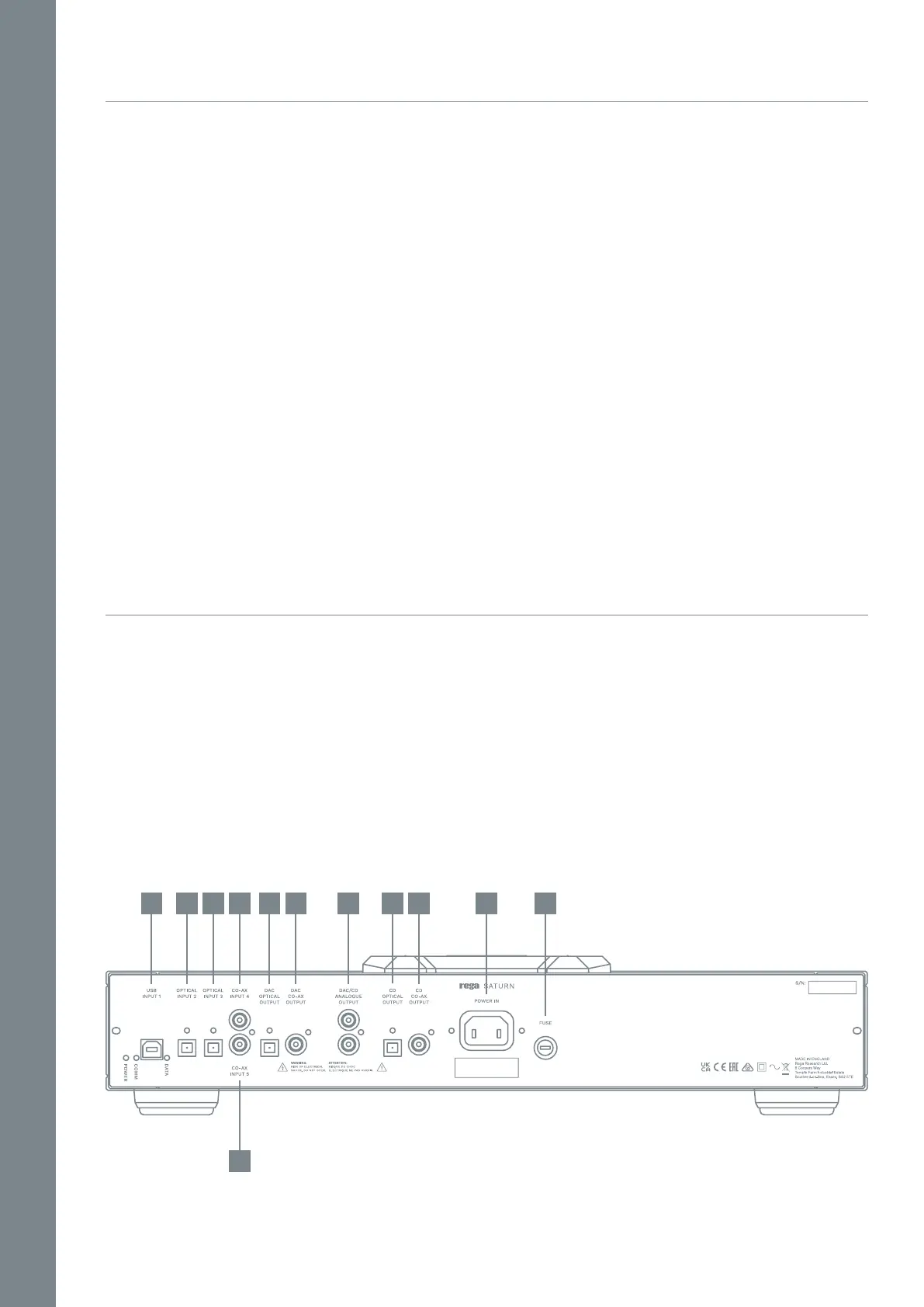
BACK PANEL CONNECTIVITY
Inputs - USB Input 1 / Optical Input 2 / Optical Input 3 / Co-
ax Input 4 / Co-ax Input 5
Outputs - DAC Optical Digital Output / DAC Co-ax Digital
Output / DAC CD Analogue Output / CD Optical Digital
Output / CD Co-ax Digital Output
IEC Mains Power Connection - Power In / Fuse access / Fuse
Ensure the operating voltage of the Saturn (stated on the
rear) is the same as your local power supply. Always place
the Saturn in a position that will allow adequate access to
the lid. If this is limited, you may risk damaging the disc
when placing on the ball chuck system.
IMPORTANT: Always turn the player o when changing
leads.
1. USB Input 1 (USB driver download required see page 5)
2. Optical Input 2
3. Optical Input 3
4. Co-ax Input 4
5. Co-ax Input 5
6. DAC Optical Digital Output
7. DAC Co-ax Digital Output
8. DAC CD Analogue Output
9. CD Optical Digital Output
10. CD Co-ax Digital Output
11. Power In
12. Fuse
1 2 3 4 6 7 8 9 10 11 12
5


 To Next Page