8
Important: Before first use, remove protective covering from the
control panel. When using the touch pad controls, be sure to press
the pad until you hear a beep.
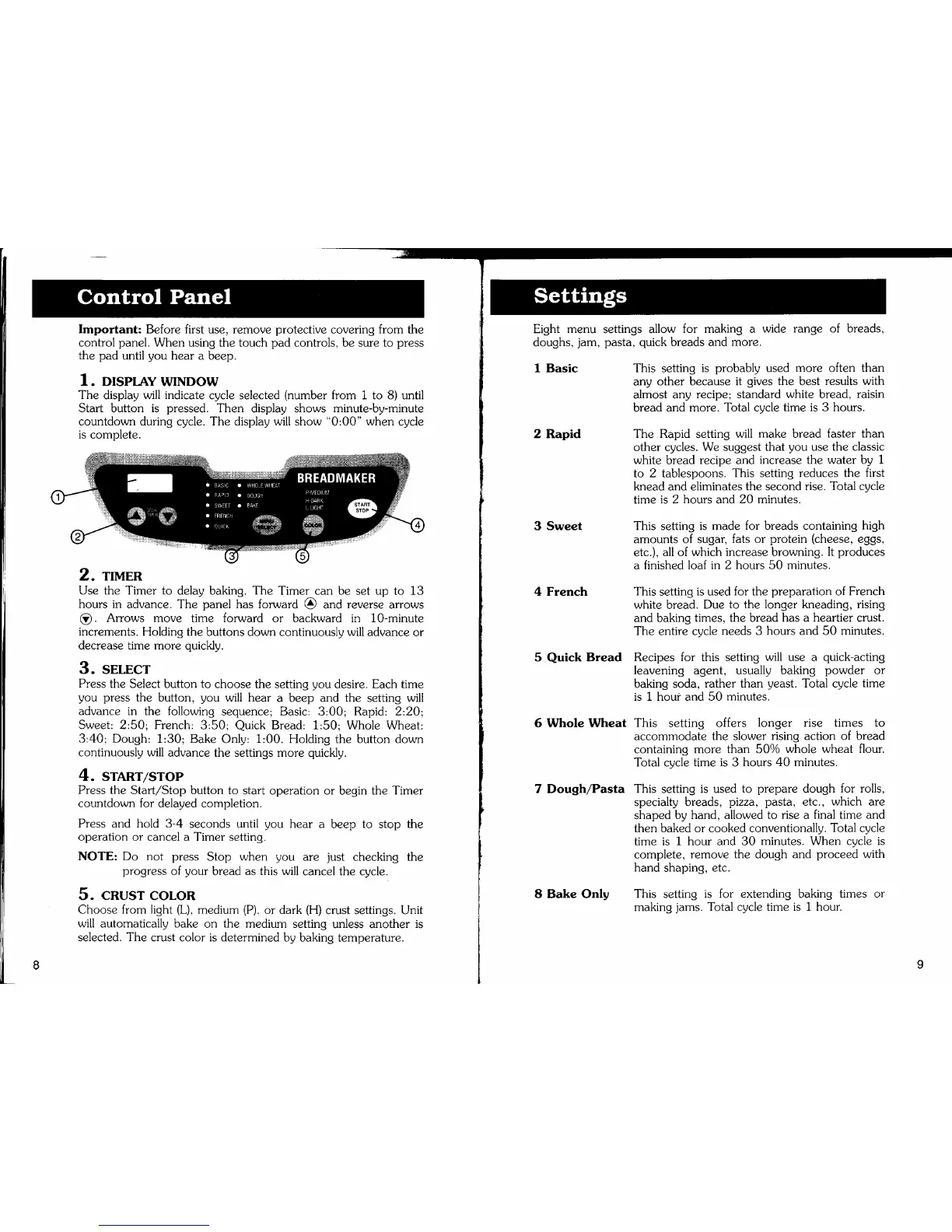
1. DISPLAY WINDOW
The display will indicate cycle selected (number from i to 8) until
Start button is pressed. Then display shows minute-by-minute
countdown during cycle. The display will show "0:00" when cycle
is complete.
2. TIMER
Use the Timer to delay baking. The Timer can be set up to 13
hours in advance. The panel has forward _ and reverse arrows
_. Arrows move time forward or backward in 10-minute
increments. Holding the buttons down continuously will advance or
decrease time more quickly.
3. SELECT
Press the Select button to choose the setting you desire. Each time
you press the button, you will hear a beep and the setting will
advance in the following sequence; Basic: 3:00; Rapid: 2:20;
Sweet: 2:50; French: 3:50; Quick Bread: 1:50; Whole Wheat:
3:40; Dough: 1:30; Bake Only: 1:00. Holding the button down
continuously will advance the settings more quickly.
4. START/STOP
Press the Start/Stop button to start operation or begin the Timer
countdown for delayed completion.
Press and hold 3-4 seconds until you hear a beep to stop the
operation or cancel a Timer setting.
NOTE: Do not press Stop when you are just checking the
progress of your bread as this will cancel the cycle.
5. CRUST COLOR
Choose from light (L), medium (P), or dark (H) crust settings. Unit
will automatically bake on the medium setting unless another is
selected. The crust color is determined by baking temperature.
Eight menu settings allow for making a wide range of breads,
doughs, jam, pasta, quick breads and more.
1 Basic
2 Rapid
3 Sweet
4 French
5 Quick Bread
6 Whole Wheat
7 Dough/Pasta
8 Bake Only
This setting is probably used more often than
any other because it gives the best results with
almost any recipe; standard white bread, raisin
bread and more. Total cycle time is 3 hours.
The Rapid setting will make bread faster than
other cycles. We suggest that you use the classic
white bread recipe and increase the water by 1
to 2 tablespoons. This setting reduces the first
knead and eliminates the second rise. Total cycle
time is 2 hours and 20 minutes.
This setting is made for breads containing high
amounts of sugar, fats or protein (cheese, eggs,
etc.), all of which increase browning. It produces
a finished loaf in 2 hours 50 minutes.
This setting is used for the preparation of French
white bread. Due to the longer kneading, rising
and baking times, the bread has a heartier crust.
The entire cycle needs 3 hours and 50 minutes.
Recipes for this setting will use a quick-acting
leavening agent, usually baking powder or
baking soda, rather than yeast. Total cycle time
is 1 hour and 50 minutes.
This setting offers longer rise times to
accommodate the slower rising action of bread
containing more than 50% whole wheat flour.
Total cycle time is 3 hours 40 minutes.
This setting is used to prepare dough for rolls,
specialty breads, pizza, pasta, etc., which are
shaped by hand, allowed to rise a final time and
then baked or cooked conventionally. Total cycle
time is 1 hour and 30 minutes. When cycle is
complete, remove the dough and proceed with
hand shaping, etc.
This setting is for extending baking times or
making jams. Total cycle time is 1 hour.


 To Next Page