55
Owner's Information
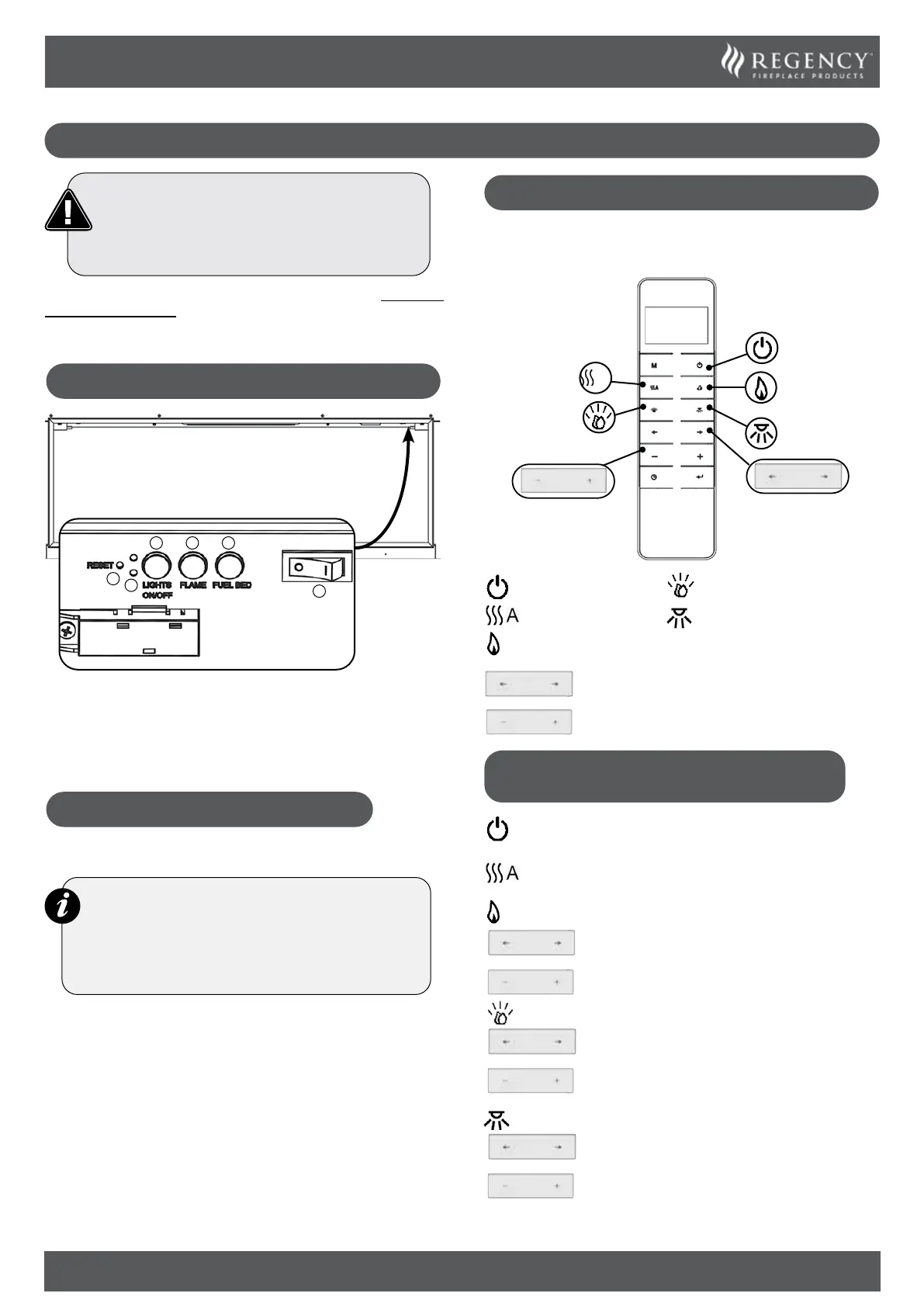
REMOTE CONTROL
The remote control should be left on a flat surface in the
room where the appliance is installed and away from any
direct flow of hot air.
A
- Fuel Bed
- Mood Lighting Strip
(Optional)
- Power On/Off
- Heater
- Flames
- Colour option
- Levels
OPERATING THE APPLIANCE
- QUICK START
Turn the Appliance On/Off
The appliance will start on the last remembered setting.
Turn the Heater On/Off.
Turn the Flame Effect On/Off.
- Change the colour option.
There are three flame colour options:
- Increase or decrease the brightness level.
Turn the Fuel Bed Effect On/Off.
- Change the colour option.
There are fourteen fuel bed colour options:
- Increase or decrease the brightness level.
Turn the Mood Lighting Strip On/Off.(Optional)
- Change the colour option.
There are fourteen colour options:
- Increase or decrease the brightness level.
OPERATING INSTRUCTIONS
WARNING! Do not operate the appliance if it is
damaged or has malfunctioned. If you suspect
the appliance is damaged or has malfunctioned
call a qualified service engineer to inspect the
appliance, and replace any part of the electrical
system if necessary, before reuse.
Do not disconnect the power at the main supply while the
appliance is running. Use the functions on the remote to turn
the fire off and ensure the main switch has been moved to the
off position before disconnecting.
MANUAL CONTROL PANEL
1
2
3 4 5
6
1. Remote Reset Button
2. Heater Running Indicators
3. All Lights On/Off
4. Flame Setting Button
5. Fuel Bed Setting Button
6. Mains Power On/Off
OPERATING THE APPLIANCE
Press 6 to Turn the Appliance On/Off.
NOTE: To use both remote and manual functions the
manual on/off switch must be in ‘ON’ position.
To prevent the product overheating, there is a 10s
delay when turning on and off the heater fan.
The manual button controls basic functions.
Use the remote hand set to carry out all functions.
Press 3 to Turn Flames and Fuel bed ON/Off at the same time.
Press 4 to select the colour of flame or return to the OFF position.
There are three flame colour options.
Press 5 to select the colour of fuel bed or return to the OFF
position.
There are fourteen fuel bed colour options.
Note: The appliance will lose the memory for the light
functions when the switch is set to the Off Position or the
remote runs out of power.



 To Next Page