P11
P12
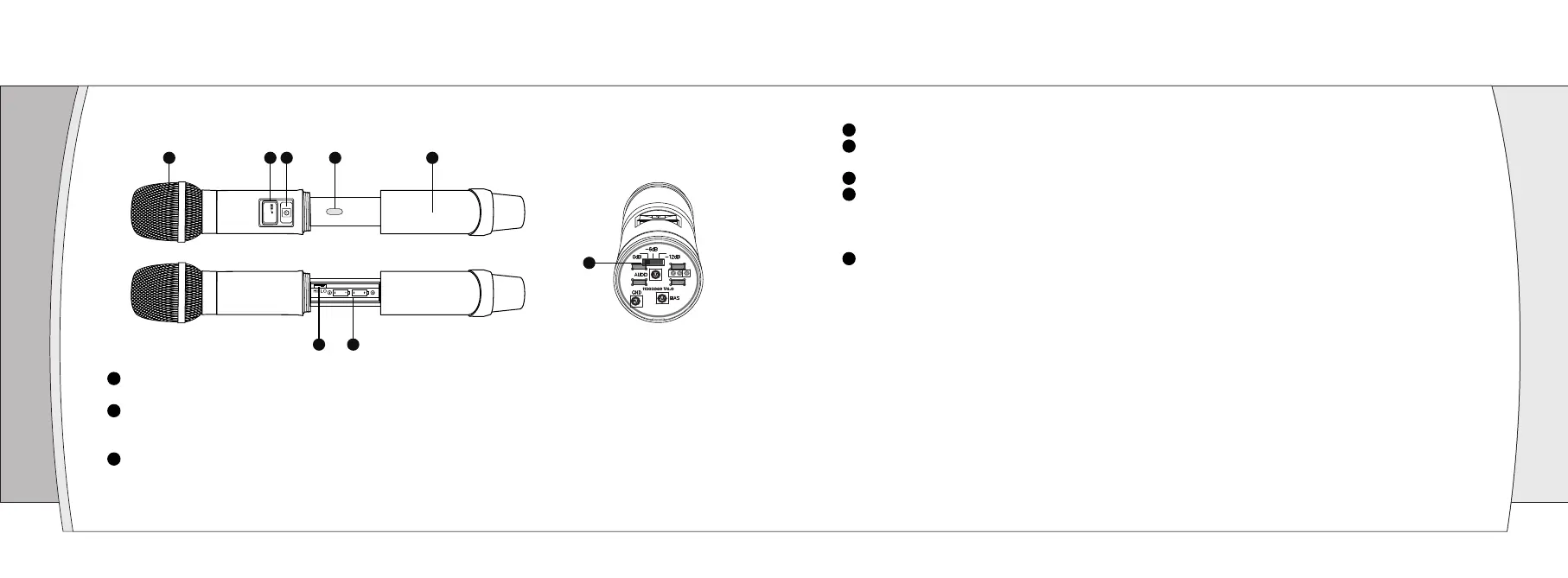
Infrared data receiving window (IR): Synchronization of transmitters via IR interface from receiver.
Battery Cover: Unscrew it can reveal the battery compartment; When installing, replacing or setting the
infrared frequency, the battery cover must be opened.
RF power switch: HI is 50 mW, LO is 30 mW.
Battery Compartment: Insert 2 fresh 1.5V AA batteries. (Alkaline type is recommended. Please remember
to replace both batteries.)
Warn: Observe correct polarity as marked inside the battery compartment to avoid damage to the internal
electric parts.
The audio gain switch: 3 optional (0dB, -6dB, -12dB), the factory default setting is 0dB (no attenuation);
when the volume is too large, can according to the actual situation adjusted the gain (-6dB or -12dB ).
Transmitter Function Introduction
07
Microphone Head: It is the important part to transfer sound into audio signal. The microphone head is
separate to change other microphone head if needed.
OLED display: display the frequency, channel, lock and battery life. Battery indicator displays a
maximum of 4 bar segments. When it leaves 1 bar segment, the batteries should be replaced
immediately.
Power Button/Mute Button: Press the power button to turn on the transmitter, press the power button
1.5 second enter the mute status, press one more time to close the mute function. Long press 3
seconds to turn off the transmitter.
6
1 2 4 53
7
8
8
5
7
4
6
3
1
2
Handheld microphone (UH-222)
888.888MHz
CH00


 To Next Page