109
SS-L Programming Example
USER GUIDE
PROGRAMMING AND CONFIGURATION EXAMPLES
SMART-SENSOR
™
2004 – 2014 Reliable Controls
®
Corporation. All rights reserved.
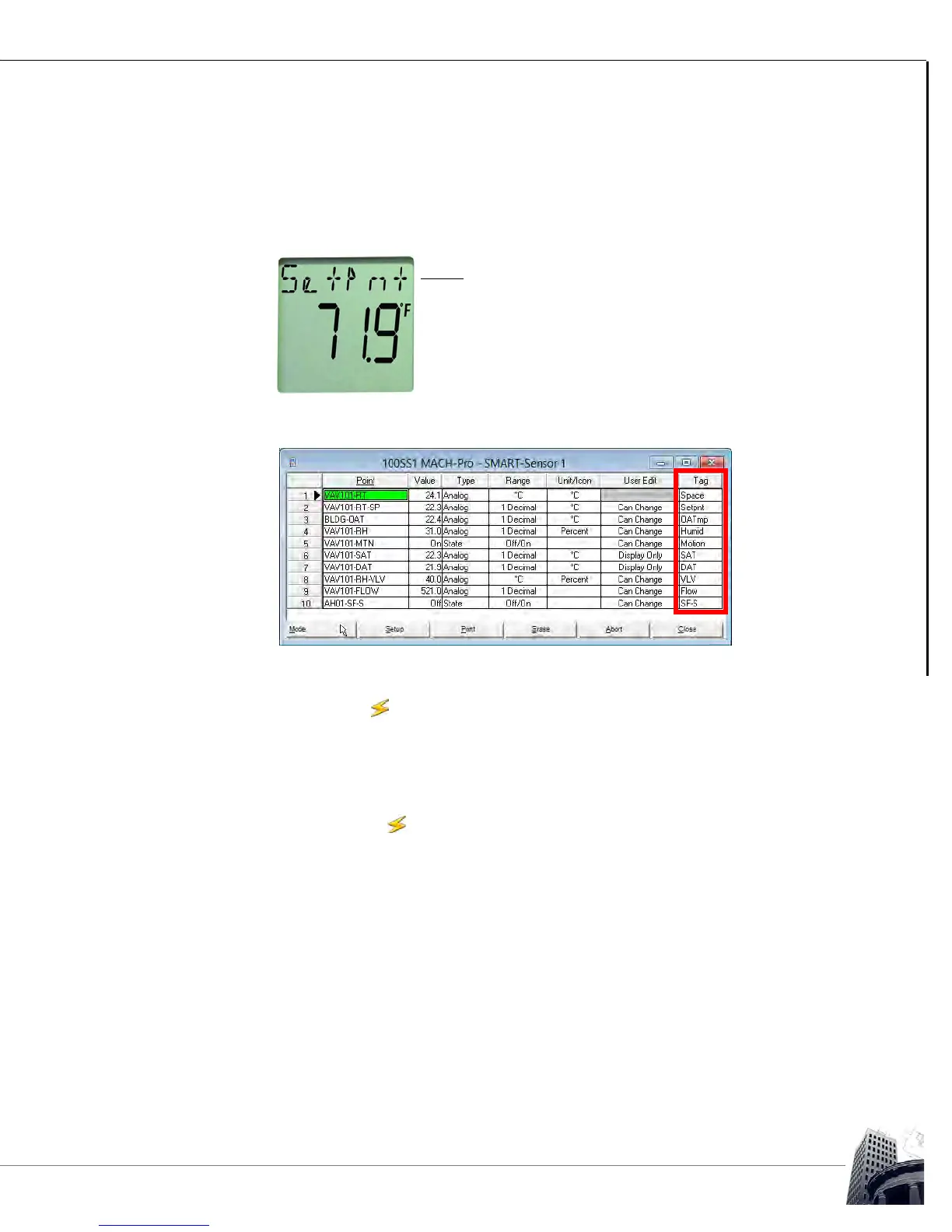
1 0 Program the Tag column with short (six-character maximum) descriptors for
each point. These descriptors, or tags, will appear in the top row of the LCD
when viewing each point.
FIGURE 103: SS-L LCD TAG
FIGURE 104: SS-L PROGRAMMING EXAMPLE - SMART-SENSOR WORKSHEET WITH TAG CONFIGURED
1 1 After the SS-L display programming is complete, remember to toggle the
worksheet to mode to save the changes and commit the programming to the
host controller of the SS-L.
1 2 Verify proper operation of the SS-L, including;
• Are all of the programmed points displaying on the SS-L as configured?
•
In the mode, do the Value columns of the SS and Variables
worksheets dynamically update with space conditions from the SS-L?
• Do display points on the SS-L LCD dynamically update consistent with
the values on the host controller worksheets?
• Can points configured as User Edit be modified, and do the values on
the appropriate host controller worksheet change? (Any points in the
host controller that are being written to by the SS-L should display SS in
the Program column for that point.)
• Do all of the onboard options function properly?
• Does the onboard temperature or humidity sensor require calibration?



 To Next Page