QUICK START GUIDE
ENGLISH
2 Version 1.0
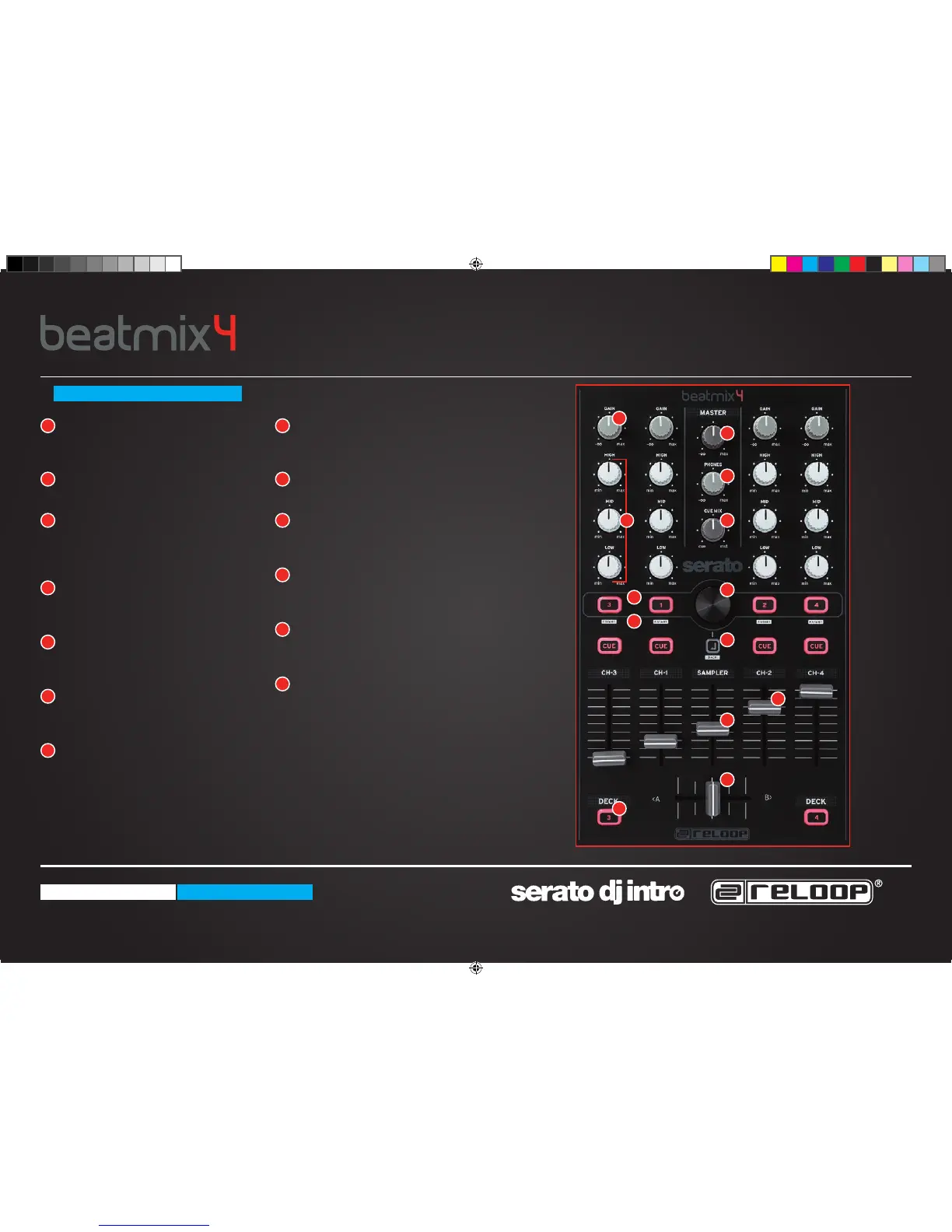
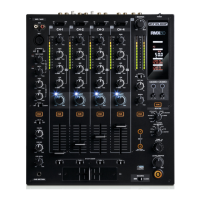
MASTER
Controls the master volume to your
main sound system.
PHONES
Controls your headphones volume.
CUE MIX
Mixes the headphones CUE signal
between your selected channel and the
master output.
TRAX SELECT
Use the trax select encoder to navigate
through your song library.
TRACK LOAD
Press 1 - 4 to load tracks on either
channel.
FADER-START
Press SHIFT + track load 1 - 4 to enable
and launch a track using your linefader.
BACK
Moves you back one step in your track
menu.
SAMPLER VOLUME
Controls the master volume of your
sampler section.
LINEFADERS
Controls your channel volume.
CROSSFADER
Enables you to fade between your
decks.
GAIN
Fine adjust the input volume for each
deck.
EQ
Tweak the high, mid or low frequencies
when mixing your track.
DECK
Press the deck button to swap between
decks 1 - 3 and 2 - 4.
MIXER SECTION
1
1
2
3
4
5
6
7
8
10
11
13
9
8
2 9
3 10
4
11
12
13
5
6
7
12
QSG_Beatmix_4.indd 2 17.12.2013 13:49:28


 To Next Page