Need help?
Do you have a question about the Reloop RMX60 DIGITAL and is the answer not in the manual?
Important safety warnings and precautions for operating the device safely.
Details on the product's compliance with regulations and intended use.
Guidance on maintenance, cleaning, and ensuring the device's safety.
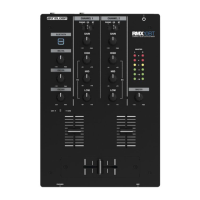
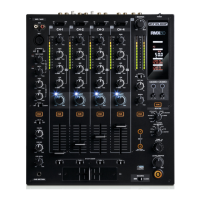
Description of the RMX-60 Digital's visual layout and user interface components.
Information on the mixer's display screen, front, and back panel layouts.
Identifies specific controls, buttons, and connectors on the device by number.
Details on various audio inputs, outputs, and power connections.
Steps to turn on the device and select input sources for channels.
How to set gain, use the equalizer, and apply the filter for each channel.
Operation and curve adjustment for linefaders and crossfader.
Using Fader-Start, Crossfader-Start, and DJ Mic talkover functions.
How to monitor audio and adjust master/booth output levels.
How to choose, assign, and activate DSP effects on desired channels.
Control of effect parameters like depth and time using encoders and buttons.
Details on Flanger, Delay, and Echo effect parameters and operation.
Explains Reverb, Pitch Shift, and Noise effect parameters and usage.
Details on Phase, Bit Crusher, and Gate effect parameters and functionality.
How to use the Cue and Channel/FX beat counters to measure track tempo.
Step-by-step guide to update the device's firmware via USB connection.
Detailed technical data for inputs, outputs, frequency range, and S/N ratio.
 General
| Type | DJ Mixer |
|---|---|
| Channels | 4 |
| Digital Effects | Yes |
| EQ | 3-band |
| EQ Range Classic Mode | ±12 dB |
| Crossfader | Yes |
| USB Interface | Yes |
| MIDI | Yes |
| Outputs | Master, Booth, Record |

 To Next Page