8
ENGLISH
SETTING UP & CONNECTIONS
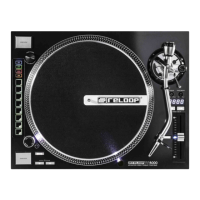
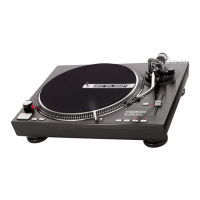
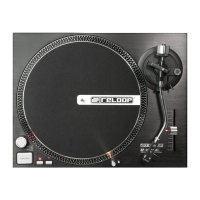
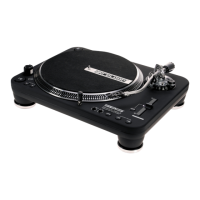
1. Attach the Turntable -1- to the motor. To do so, place the Turntable above the Hub -2-.
2. Place the supplied slipmat above the Hub -2- onto the Turntable.
3. Place the Balancing Weight -18- onto the Pick-Up arm.
NOTE! The Balancing Weight Scale -17- must face toward the DJ.
4. Screw the headshell with Pick-Up System -12- into the Pick-Up Arm -13-. The Pick-Up System is easy to exchange, if required:
a) First loosen the fastening screw on the headshell and disconnect the cable of the supplied pick-up system.
b) Remove the old pick-up system from the headshell.
c) Now connect the leads of the pick-up system and observe the assignment of wires:
d) Tighten the fastening screws to the headshell.
5. Connect the Audio Output Cable -19- to the audio input of your mixer and connect the GND Grounding Cable -20- to the grounding screw of
your mixer.
6. Connect the mains line to the Mains Connection -21- and an outlet.
OPERATION
1. Balancing Weight
Bring the Pick-Up Arm Lift -15- into the „DOWN“ position. Guide the Pick-Up Arm -13- just in front of the Turntable -1-. Adjust the Balancing Weight
-18- by turning it clockwise as such that the Pick-Up Arm does not lean up nor down, i.e. it should be balanced parallel to the record. Then return
the Pick-Up Arm to its rest -14-. Set the Balancing Scale -17- of the Balancing Weight as such that the „0“ position is above the marked line. Conti-
nue turning the Balancing Weight clockwise until the scale indicates the value which corresponds to the recommended stylus force of the pick-up
system.
2. Anti-Skating Wheel
Adjust the Anti-Skating Wheel -16- as such that the value of the stylus force corresponds to the stylus force of the pick-up system.
3. Power ON
After carrying out all connections, turn the device on via the ON/OFF Switch -4-; the turntable‘s illumination will go on.
4. Play
Place a record onto the slipmat on the Turntable -1-. Use the 33/45/78 Selectors -6- to set the correct speed. The LED of the respective selector
illuminates.
NOTE!! To activate 78 RPM, press both 33/45 Selectors simultaneously. Both LEDs will illuminate.
Activate the Reverse Switch -8- to let the turntable run counter-clockwise; the LED ashes.
NOTE! Even in reverse mode all functions of the RP-4000 MK2 remain available.
Activate the Reverse Switch again to set the turntable back to regular clockwise mode; the LED remains lit permanently.
Activate the START/STOP Button -5-. Remove the headshell with the Pick-Up System -12-. Now bring the Pick-Up Lift -15- into the “UP” position
and move the Pick-Up Arm -13- just above the desired position of the record. Then bring the Pick-Up Lift “Down”, so that the Pick-Up Arm lowers
into the vinyl groove.
NOTE! It is possible to leave the Pick-Up Lift permanently in a “Down” position and to lower the Pick-Up Arm manually onto the desired posi-
tion. When doing so, be sure not to damage the stylus of the Pick-Up System.
5. Stylus Illumination
Use Switch –7- to activate the stylus illumination, if required, to be able to see the groove of the vinyl more clearly. Deactivate the stylus illumina-
tion by pressing the lamp down until it locks into place.
6. RPM Fine-Tuning
Use the Pitch Fader -11- to steplessly adjust the speed of the record. Use the Pitch Selector -9- for a pitch range of +/- 8% (LED permanently on)
and +/-16 % (LED ashes). If you wish to play the record in original speed, bring the Pitch Fader in position „+/- 0%“. Deactivate RPM ne-tuning
by operating the Quartz Lock -10-. By pressing again, RPM ne-tuning will be reactivated: The turntable returns to the RPM set with the Pitch
Fader.
TECHNICAL SPECIFICATIONS
Model: ................................................ 3 speeds, fully manual
Drive: ................................................. quartz-controlled High Torque direct drive
RPM: .................................................. 33 1/3, 45 and 78 RPM.
Start/Stop time: .............................. < 1 sec.
Starting torque: ............................... > 1800 g/cm
Flutter: .............................................. < 0,2% WRMS
Dimensions: ...................................... 450 x 352 x 144 mm
Weight: .............................................. 9.48 kg
Note: Subject to alterations. The specied data is of approximate value.
Colour: Channel and Polarity:
White (L+) left, plus terminal
Blue (L-) left, minus terminal
Red (R+) right, plus terminal
Green (R-) right, minus terminal


 To Next Page