7
REMOVING THE RECHARGEABLE BATTERY
We strongly recommend that a professional removes the rechargeable battery. Parts of
the shaver case, and tools have sharp edges and may cause injury if not handled
correctly.
• The rechargeable battery must be removed from the appliance before it is scrapped.
• Disconnect the charging adapter before removing the battery.
1. Ensure that the battery is fully discharged. To do this, operate the trimmer until it
stops.
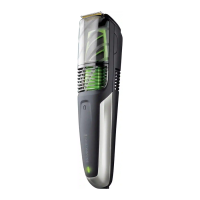
2. Remove the vacuum chamber then remove the four exposed screws.
3. Unscrew the four screws located on the outside edges of the internal frame.
4. Lift the internal frame out of the bottom housing. Remove the three screws holding
the printed circuit board to the internal frame.
5. Take out the battery and printed circuit board assembly from the battery chamber.
6. Cut the tabs on both ends of the battery and remove it from the printed circuit board
• The battery must be disposed of at an appropriate ocial recycling/collection point.
• Do not attempt to operate the trimmer once you have opened it.
ENVIRONMENTAL PROTECTION
To avoid environmental and health problems due to hazardous substances in
electrical and electronic goods, appliances marked with this symbol must not be
disposed of with unsorted municipal waste, but recovered, reused or recycled.


 To Next Page
 Loading...