GB.61
R&GO: GENERAL DESCRIPTION (1/4)
6 8
9
11
1 2
3 3
7
4
10
5
Bluetooth® connection
Check that your telephone or tablet is
paired with the audio system (see the
information on “Pairing a telephone” in
the “Pairing and unpairing a telephone”
section).
Note: Bluetooth® must be activated
and set to “visible” on your phone or dig-
ital tablet (for more information, please
see the user manual for your device).
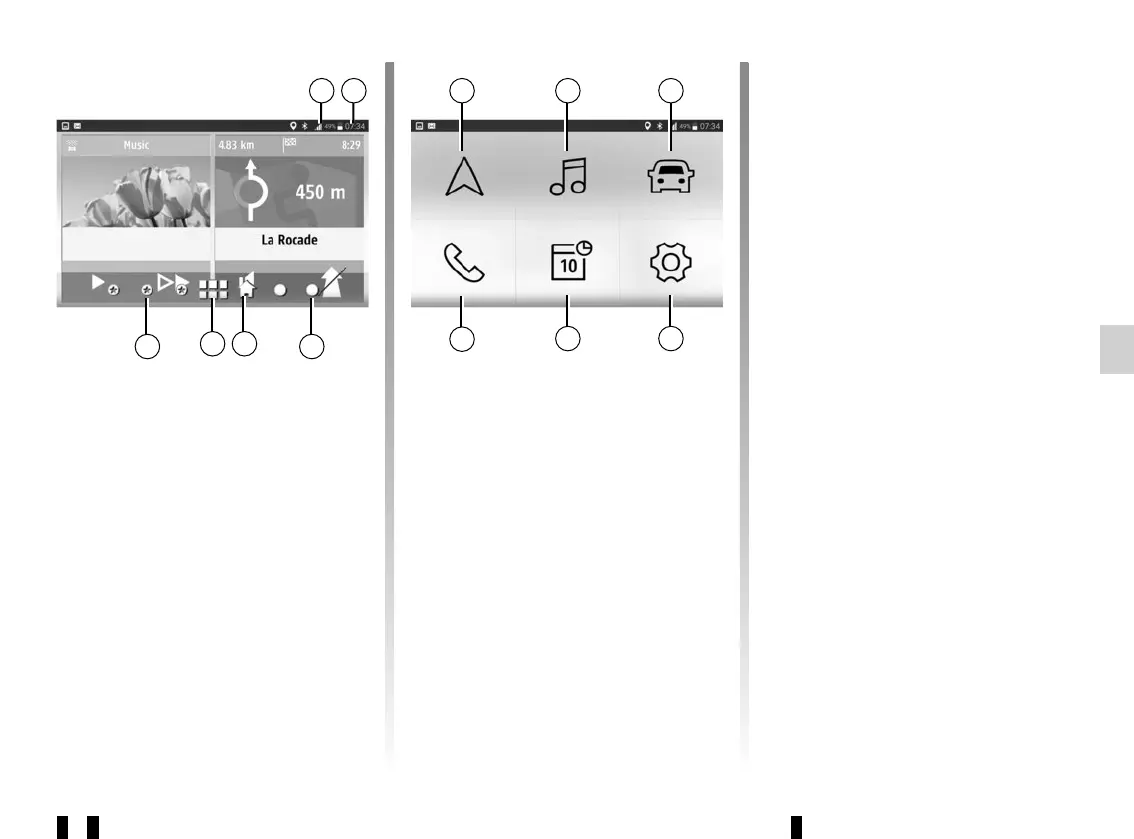
Display
Customised home page
1 Telephone/tablet information (no-
tifications, network, battery and
Bluetooth® connection).
2 Current time.
3 Page indicators.
4 Back to the customised home page.
5 Access the “R&Go” default welcome
screen.
Note: You can change the configura-
tion of the welcome screen. Refer to the
“R&Go: setting parameters” section.
“R&Go” default welcome screen
To go to the default welcome screen,
press button 5 and look for the follow-
ing headings:
6 “Navigation”: navigation manage-
ment.
7 “Multimedia”: management of multi-
media resources.
8 “Car”: management of your fuel con-
sumption, Driving Eco etc.
9 “Settings”: management of the
“R&Go” application settings.
10 “Calendar”: access to your calendar.
11 “ Phone”: management of telephone
functions.



 To Next Page