GB.62
R&GO: GENERAL DESCRIPTION (2/4)
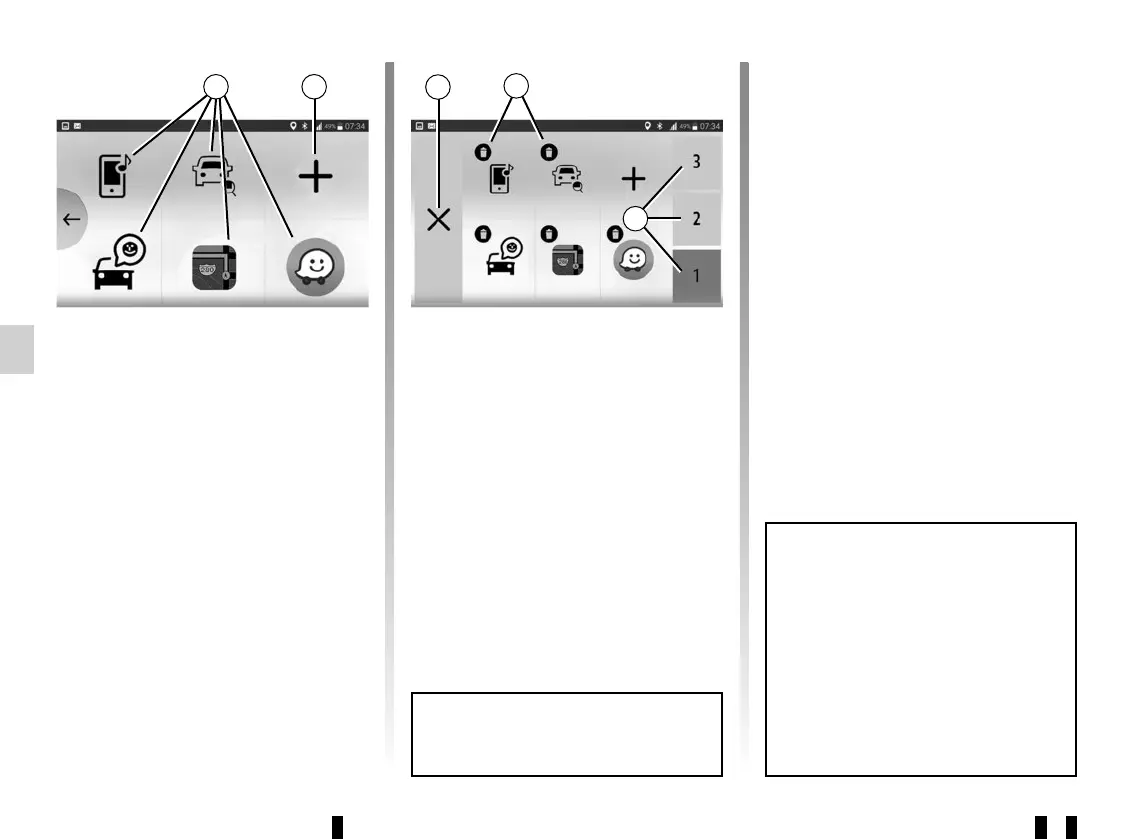
Favourites screen
Use the “R&Go” system to add short-
cuts to your favourite functions:
– applications;
– contacts;
– functions (music, navigation etc.)
– ...
12 Access to function previously desig-
nated as a favourite.
13 Access to the favourites manage-
ment screen.
Favourites management screen
To access the favourites management
screen, press the 13 button.
14 Back to the previous screen.
15 Delete the favourite.
16 Access the various favourites man-
agement pages.
12
14
15
16
13
Customising the home page
You can customise the “R&Go” home
page. To do this, press button 13 or
press and hold anywhere on the cus-
tomised home page, then slide an ap-
plication available at the bottom of the
screen to the desired location. If you
slide the application to a location that
is already in use, it will automatically be
replaced.
Your hands-free system is intended
to facilitate communication by re-
ducing risk factors, but does not
remove them completely.
You must always comply with the
laws of the country in which you are
travelling.
Regular updates of your R&Go ap-
plication are recommended.



 To Next Page