GB.63
R&GO: GENERAL DESCRIPTION (3/4)
20
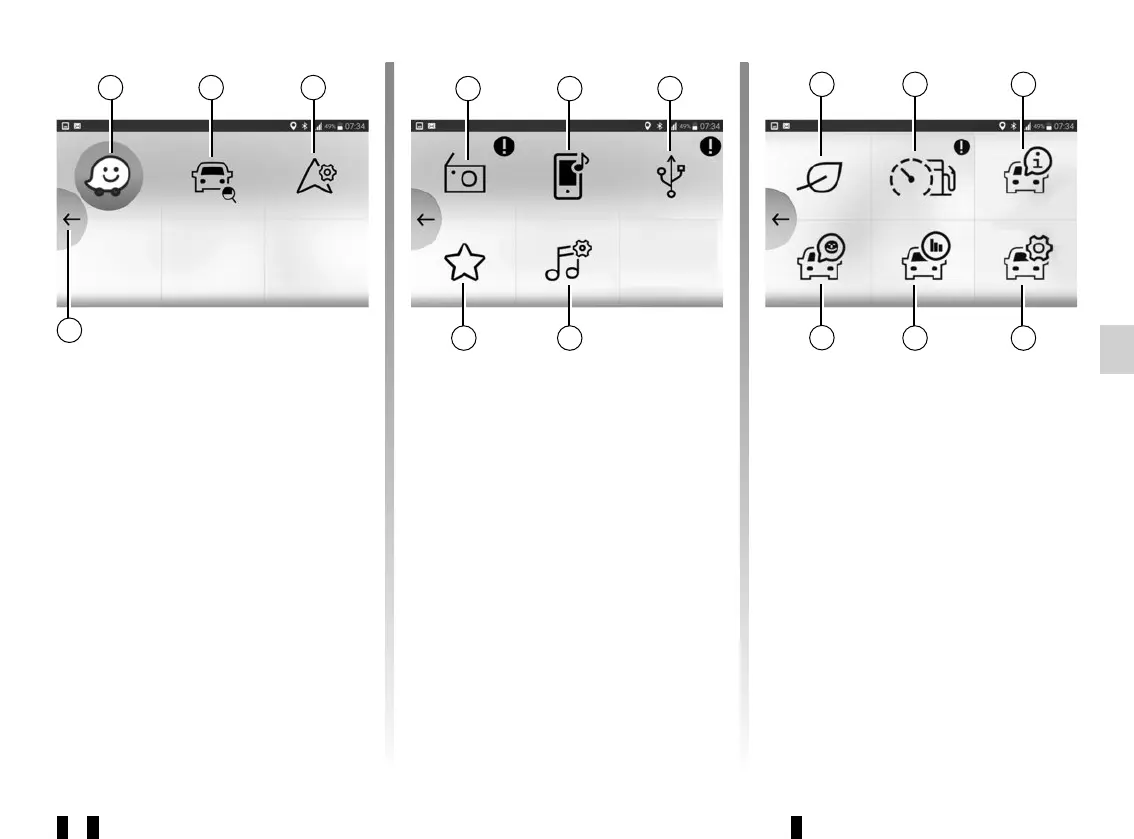
“Navigation” menu
The navigation menu includes all the
satellite navigation features, road
maps, traffic information, navigation ap-
plications and speed restriction areas.
The “Navigation” menu provides the
following functions:
17 Navigation application for planning
your journeys.
18 Application enabling you to geolo-
cate your vehicle.
19 Access the settings enabling you to
set a default navigation application.
20 Go back to the main menu.
“Multimedia” menu
The “Multimedia” menu includes all the
functions for listening to the radio and
playing audio files. The “Multimedia”
menu provides the following functions:
21 Listen to the radio.
22 Listen to music from your smart-
phone on the audio system.
23 Listen to music from an external
source (USB, MP3 player, etc.).
24 Adjust the multimedia settings.
25 Access to your personal playlist.
17 18 19
22 23
25 24
21
“Car” menu
The vehicle menu enables the man-
agement of certain equipment such as
the vehicle’s computer and Driving Eco
for example and provides the following
functions:
26 Access the Driving Eco menu (see
your eco-score etc.).
27 Rev counter (rpm x 1,000) or driving
style indicator.
28 Access your vehicle user manual.
29 Access the settings.
30 Access your “Journey record”.
31 Access your vehicle instrument
panel.
26 27 28
30 29
31



 To Next Page