operating faults ..........................................
(up to the end of the DU)
2.11
ENG_UD75665_4
Fonction Stop and Start (X82 PH2 - Renault)
Deactivating, activating the
function
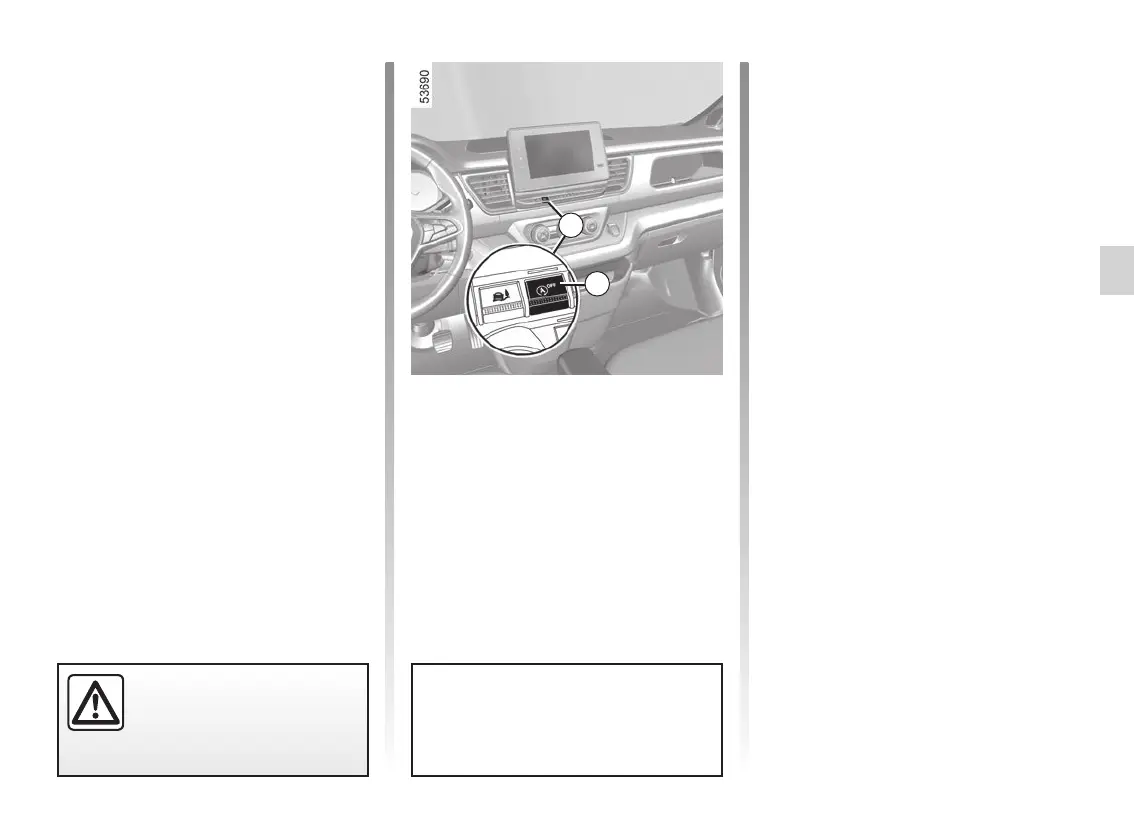
Press 1 to deactivate the function. The
message “Stop & Start deactivated” will
appear on the instrument panel and
the integrated warning light 2 on the
switch 1 will light up.
Pressing again will reactivate the
system. The message “Stop & Start
Activated” will appear on the instrument
panel and the integrated warning light 2
on switch 1 will go out.
The system is automatically reactivated
each time the vehicle is started using
the start button. ➥ 2.3.
Operating faults
When the message “Check Stop &
Start” appears on the instrument panel
and the integrated warning light 2 lights
up on the switch 1, the system is deac-
tivated.
Please consult an authorised dealer.
Special feature of the automatic
engine re-start
Under certain conditions, the engine
can restart on its own in order to guar-
antee your safety and comfort.
This can occur especially when:
– the outdoor temperature is too low or
too high;
– the “Clear view” function is activated
➥ 3.8 ;
– the battery is not sufficiently charged;
– the vehicle speed is above 3 mph
(5 km/h) (downhill slope, etc.);
– repeated pressing on the brake
pedal or braking system require-
ment;
– ...
Depending on the vehicle, the
warning light is displayed on the instru-
ment panel to notify you of automatic
engine restarting.
Depending on the vehicle, the
warning light may be accompanied by a
message on the instrument panel:
– “Battery charge optimisation” to pri-
oritise the battery charge;
– “Heating comfort priority” to prioritise
the air conditioning;
– “Engine running priority” to prioritise
engine functions.
Special note: with the engine on
standby, press switch 1 to automati-
cally restart the engine.
The engine MUST be
stopped (not put in standby)
before leaving the vehicle.
➥ 2.3.
FUNCTION STOP AND START (4/4)
1
2














 To Next Page