22
LCD Menu Screens
On the LCD home screen, press the "UP"and"DOWN" buttons to turn the page to view the solar
inverter’s real-time data.
Battery Input Voltage
PV Temperature
PV Input Voltage
Battery Input Current
Battery Input Kilowatts
AC Input Frequency
AC Input Voltage
Internal Parameters
Inverter Temperature
APP Software Version
Model PV Voltage Rating
Model Battery Voltage Rating
Load Output Voltage
PV Output Kilowatts
PV Output Current
Battery Output Current
Battery Output Kilowatts
AC Output Load Frequency
AC Output Load Current
Load Output KVA
Inverter Output Load Kilowatts
Bootloader Software Version
Model Output Current Rating
Model PV Power Rating
1
2
3
4
5
6
7
8
9
10
11
12
Fault
code
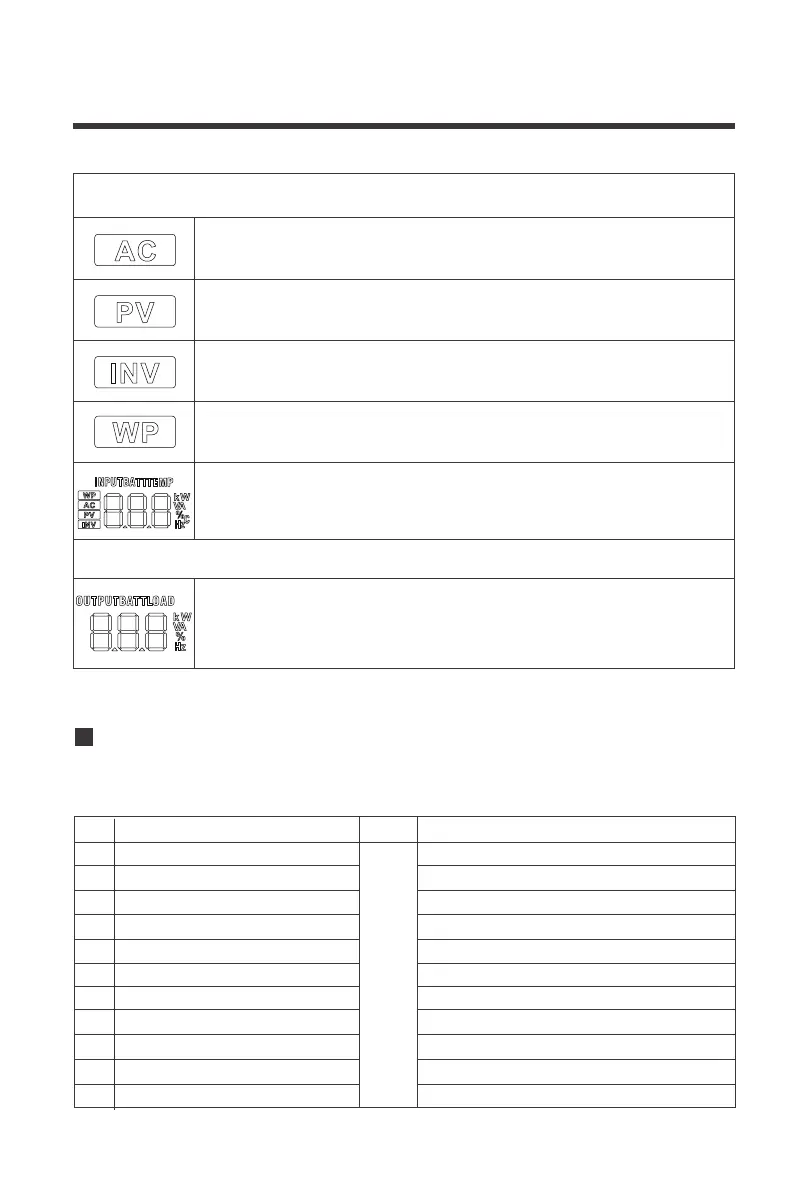
The following is on the left side of the LCD
Indicates AC input
Indicates PV input
Indicates inverter circuit
The icon appears only at startup and is irrelevant to functionality of the
solar inverter
The following is on the right side of the LCD
Shows battery voltage, total battery charge current, charge power, AC
input voltage, AC input frequency, PVInput voltage, internal heatsink
temperature, and software version
Indicates output voltage, output current, output power, output visual
power, battery discharge current, software version. In this setting
mode, the settings under the currently set parameter item code are
displayed


 To Next Page