The signal strength is indicated by a green beam,
preceded by a number between 0 and 100.
(0 = no signal, 100 = optimal signal)
‘Clear’ lights up.
By pressing ■ the signal strength will be erased.
This can be useful in order to check the signal strength.
Change the ventilation level in the main menu and then choose
‘Signal strength’ again.
The menu will now show the current strength value.
In order to leave the Installer menu hold ■ for 3 seconds or
simultaneously tap ▼ and ▲.
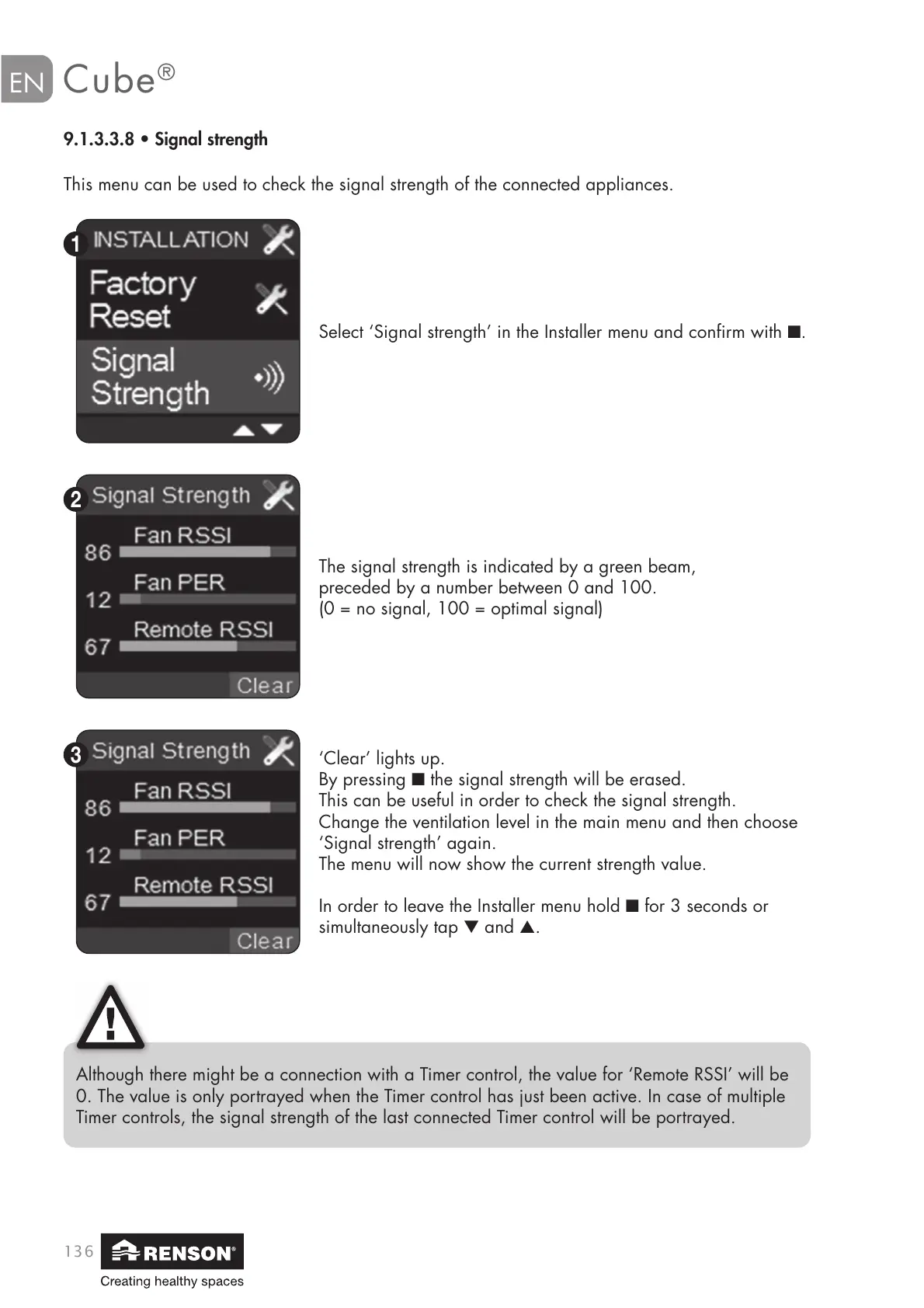
This menu can be used to check the signal strength of the connected appliances.
9.1.3.3.8 • Signal strength
Select ‘Signal strength’ in the Installer menu and confirm with ■.
Although there might be a connection with a Timer control, the value for ‘Remote RSSI’ will be
0. The value is only portrayed when the Timer control has just been active. In case of multiple
Timer controls, the signal strength of the last connected Timer control will be portrayed.


 To Next Page