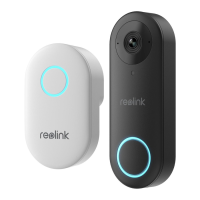
Need help?
Do you have a question about the Reolink D340P and is the answer not in the manual?
Details components and features of the PoE version doorbell, including built-in mic, lens, and ports.
Details components and features of the WiFi version doorbell, including built-in mic, lens, and ports.
Guide for setting up the doorbell using the Reolink mobile app by scanning QR codes.
Instructions for setting up the doorbell using the Reolink Client on a PC.
Installation steps specific to the PoE version, involving running Ethernet cable and connecting to a PoE device.
 General
| Image Sensor | 1/2.7" CMOS |
|---|---|
| Video Format | H.265 |
| Audio | Two-Way Audio |
| Operating Temperature | -10°C~+55°C (14°F~131°F) |
| Storage | Micro SD card |

 To Next Page