English English7 8
Mount the Camera
•Donotfacethecameratowardsanylightsources.
•Donotpointthecameratowardsaglasswindow.Or,itmayresultinpoorimage
quality
becauseofthewindowglarebyinfraredLEDs,ambientlightsorstatuslights.
•Donotplacethecamerainashadedareaandpointittowardsawell-litarea.Or,it
mayresultinpoorimagequality.Toensurebestimagequality,thelightingcondition
forboththecameraandthecaptureobjectshallbethesame.
•Toensurebetterimagequality,it’srecommendedtocleanthelenswithasoftcloth
fromtimetotime.
•Makesurethepowerportsarenotdirectlyexposedtowaterormoistureandnot
blockedbydirtorotherelements.
•Donotinstallthecameraatplaceswhererainandsnowcanhitthelensdirectly.
Installation Tips
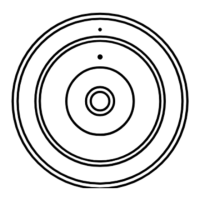
1.Beforedrillingtherequiredholes,markthedirectionofthelockprintedonthe
mountingbase.Makesurethelockisfacingup,asshowninthediagram.Thiswill
helpyoualignthemountbaseinthesameorientationwheninstalling.
2.Drillholesinaccordancewiththemountingholetemplate.Usethedrywallan-
chorsincludedinthepackageifneeded.Andusescrewstosecurethemountbase
tothewallwithitscablegroovefacingdownward.
3.Runthecableofthefisheyecamerathroughthecablegrooveonthemountbase.
Mount the Camera to the Wall
VGAHDMIUSB
AUDIO
OUT
DC 48V
ON
2 4 6 8
1 3 5 7
OFF
LAN
eSATA
You haven't added any device. Please click
the"+"button in the top right corner to add
VGAHDMIUSB
AUDIO
OUT
DC 48V
ON
2 4 6 8
1 3 5 7
OFF
LAN
eSATA
You haven't added any device. Please click
the"+"button in the top right corner to add



 To Next Page
 Loading...