EasyManua.ls Logo

ReSound Airlink 2 - User Manual

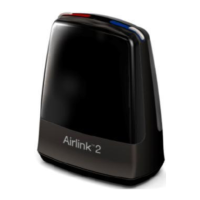
ReSound Airlink 2
14 pages
Print Icon
To Next Page IconTo Next Page
Loading...
0
USER GUIDE
Airlink 2

Questions and Answers

  • K
    Kara RichardsonAug 2, 2025
    What to do if my ReSound Hearing Aid has no connection?
    • K
      Kathleen KrauseAug 2, 2025
      If your ReSound Hearing Aid has no connection, several factors could be at play. First, ensure the Airlink 2 is correctly attached to your PC's USB port, and the fitting software is launched. Obstacles might be blocking the wireless signal; position the Airlink 2 within sight of the hearing instruments. Proximity matters, so move the Airlink 2 closer to the hearing instruments. Also, low battery power can cause connection issues. Use fresh, unexpired zinc-air batteries, remove the sticker, and allow them to breathe for 2 minutes before use.
  • M
    Michelle WongAug 11, 2025
    Why does my ReSound Airlink 2 Hearing Aid have an unstable connection?
    • C
      courtneyhenryAug 12, 2025
      If your ReSound Hearing Aid connection is unstable or lost, it could be due to several reasons. Obstacles between the Airlink 2 and the hearing instruments may be blocking the signal, so ensure a clear line of sight. The Airlink 2 might be too far from the hearing instruments; try moving it closer. Other wireless devices operating on 2.4 GHz, such as cordless telephones or WLAN access points, can interfere; minimize these or move them away. If these steps don't resolve the issue, consider using a phone that operates on a different frequency than 2.4 GHz.
  • R
    rsloanAug 22, 2025
    How to fix Airlink 2 not found error for ReSound Hearing Aid?
    • A
      Anthony ThomasAug 22, 2025
      If the Airlink 2 is not found for your ReSound Hearing Aid, first, ensure that the Airlink 2 is properly inserted into the PC's USB2 port and that the fitting software is launched. If an Airlink 1 dongle is inserted, remove it from the USB port, as it might be causing a conflict.

Summary

Welcome and Introduction

Intended Use of Airlink 2

Airlink 2's purpose is to wirelessly adjust hearing instrument settings.

Device Statement and Regulations

Product Overview and Description

Installation and Setup Guide

Wireless Fitting Best Practices

Advanced Wireless Optimization

Managing Flight Mode and Interference

Restoring wireless operation and minimizing interference from other devices.

Compatibility Information

Hearing Instrument Brand Support

Details compatibility with ReSound, Beltone, and Interton wireless hearing instruments.

Understanding LED Indicators

Connection and Data Status LEDs

Explains LED patterns for PC connection, FSW status, HI wireless connection, and data transfer.

Safety, Maintenance, and Specifications

Maintenance, Care, and Safety Warnings

Guidelines for cleaning, servicing, and general safety precautions for the device.

Troubleshooting Common Issues

Resolving Detection and Connection Problems

Steps to fix issues like "Airlink 2 Not Found" or no connection.

Addressing Unstable or Lost Connections

Tips for resolving unstable connections and interference from other devices.

ReSound Airlink 2 Specifications

General IconGeneral
BrandReSound
ModelAirlink 2
CategoryHearing Aid
LanguageEnglish

Related product manuals