EasyManua.ls Logo

ReSound Custom - User Manual

ReSound Custom
76 pages
Print Icon
To Next Page IconTo Next Page
Loading...
User guide
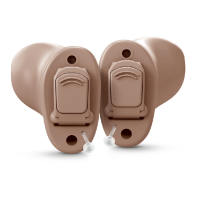
ReSound Custom hearing aids

Questions and Answers

  • D
    davisjoshuaJul 28, 2025
    Why is my ReSound Hearing Aid whistling?
    • D
      David UnderwoodJul 28, 2025
      Feedback or whistling in your ReSound Hearing Aid can occur for several reasons. First, ensure the hearing aid is correctly inserted. If the volume is too loud, try reducing it. Also, make sure nothing is too close to the hearing aid, such as a hat or telephone receiver; create more space. Finally, excessive earwax can cause feedback, so consider visiting your physician.
  • K
    Kelly MolinaAug 4, 2025
    What to do if my ReSound Custom Hearing Aid has no sound?
    • L
      larry72Aug 5, 2025
      If your ReSound Hearing Aid has no sound, check these things: * Make sure the hearing aid is switched on. * Verify that a battery is inserted correctly. * If a battery is already inserted, try replacing it with a new one to ensure it's not depleted. * If the issue persists, your ear may be full of wax, in which case you should visit your physician.
  • V
    Veronica KleinAug 12, 2025
    How to fix distorted sound on ReSound Custom Hearing Aid?
    • M
      Michelle AcostaAug 12, 2025
      If the sound from your ReSound Hearing Aid is distorted or weak, the following may help: * Replace the battery with a new one, as the current battery may be dead. * Clean the battery or replace it if it's dirty. * If your hearing aid has gotten moist, use a desiccant (drying kit).
  • A
    Adam BrownAug 20, 2025
    Why does the battery of my ReSound Hearing Aid drain so quickly?
    • R
      Richard Sanders IIAug 20, 2025
      If the battery of your ReSound Hearing Aid drains very quickly, consider these points: * Ensure you switch off your hearing aid when not in use, such as during the night. Leaving it on for extended periods can drain the battery. * Check the date on the battery pack to ensure the battery isn't old.

Summary

Your hearing aid

How to get your hearing aid ready for use

Replacing the battery

Step-by-step instructions for replacing the hearing aid battery.

Battery warnings

Safety precautions and important warnings related to handling and using hearing aid batteries.

How to place the hearing aids in your ears

Insert hearing aids

Instructions for correctly inserting CIC, ITC, and ITE hearing aids into the ear canal.

How to remove the hearing aids from your ears

Remove Completely-In-Canal hearing aids

Step-by-step instructions for removing CIC hearing aids from the ear.

Remove In-The-Canal (ITC) and In-The-Ear (ITE)

Instructions for removing ITC and ITE hearing aids from the ear.

How to use your hearing aids

Operation of the hearing aid

Explains how to use the volume control for adjusting sound levels.

Using a telephone

Phone Now warnings

Provides safety warnings and precautions for the optional Phone Now feature.

Advanced options

Wireless accessories

How to clean and maintain your hearing aids

General warnings and precautions

General warnings

Provides critical safety warnings for hearing aid usage and potential risks.

General precautions

Offers general safety precautions related to wireless function and device components.

Troubleshooting

Feedback, whistling

Troubleshooting steps for addressing feedback or whistling sounds from the hearing aid.

No sound

Solutions for issues where the hearing aid is not producing any sound.

Sound is distorted or weak?

Steps to resolve issues of distorted or weak sound output from the hearing aid.

Battery drains very quickly

Identifies causes and solutions for rapid battery depletion in the hearing aid.

Tinnitus Management

ReSound Custom Specifications

General IconGeneral
Noise ReductionYes
TechnologyDigital
MicrophoneDirectional
App CompatibilityReSound Smart 3D
Wireless ConnectivityBluetooth (select models)
Tinnitus MaskingYes
StyleITE, ITC, CIC
Remote ControlReSound Smart 3D app, Remote Control 2
CompatibilityiOS and Android

Related product manuals