16
EverGo User Manual
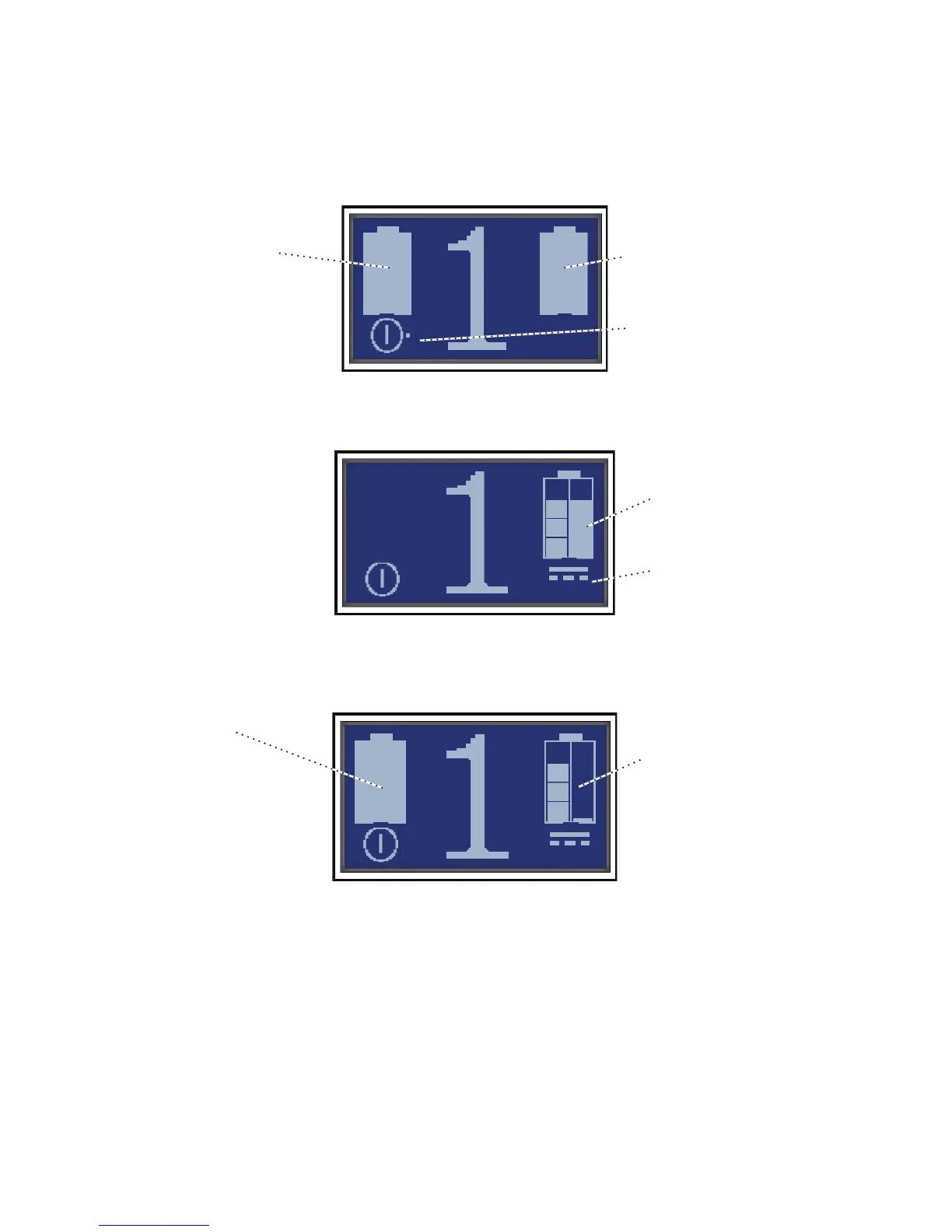
edotnexttotheon/osymbolisthepulsesymbol.Itappearswheneveryou
take a breath and the unit delivers a pulse of oxygen.
Figure 13. is screen shows a flow setting of 1. e primary battery is inserted correctly and fully
charged, and the secondary battery is inserted correctly and fully charged.
Figure 14. is typical display shows the flow setting is 1, the primary battery (which is 3/4 or 75%
charged) is inserted, and the device is connected to a power source. e secondary battery is not
inserted.
Figure 15. is display shows that two batteries are inserted. It also shows that the unit is
connected to a power source. e secondary (left) battery is fully charged. e primary (right)
battery is nearly empty and charging.
DC Power Symbol
Primary battery
iS 3/4 full
anD Charging
Primary battery
iS full
SeConDary
battery iS full
Primary battery
iS almoSt emPty
anD Charging
SeConDary battery
iS full
PulSe Symbol (Dot)



 To Next Page