13
EverGo User Manual
Getting Started
TostartyourEverGodevice,followthesesteps.(To
learn about the touch screen displays, turn to
the next section of this manual.)
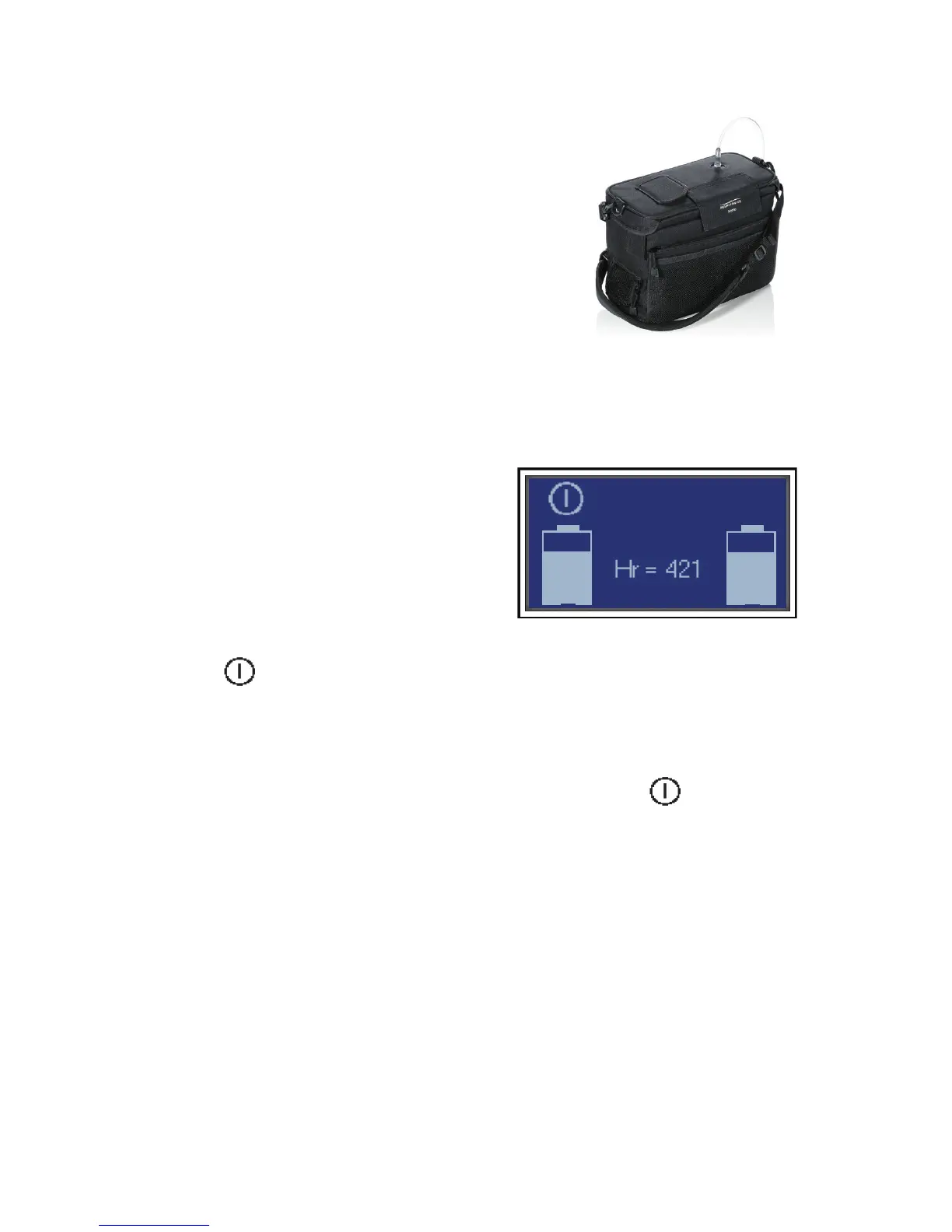
1. Connect a nasal cannula to the oxygen
outletontopofyourdevice,asshownin
Figure7.
Note: A standard single lumen nasal
cannula and tubing (not supplied) should
be used to deliver oxygen from the EverGo device. e device works with
cannula tubing up to 30 ft. (9 m).
2. Toturnonthedevice,gently
touchthescreenshownin
Figure8.isrsttouchbrings
thescreentolifeandshowsthe
on/osymbol,batterystatus,hour
readingandsoftwareversion.
3. Gentlytouchtheon/osymbol
to turn on the device.
is “double touch” feature helps
preventunwantedstartsorinadvertentchangesinoxygenow.
Youmaytouchanywhereonthescreenasyourrsttouch.
esecondtouchmustbeontheon/osymbol
within
5secondsorthescreenwillturno.
Youmaybeginbreathingfromyourunitimmediatelyafterstarting
the device.
Figure 8. Touch the on/off symbol to
start. e number on the screen (i.e. Hr
= 421) shows the number of hours this
unit has been operated.
Figure 7. e nasal cannula is
connected to the oxygen outlet port
on top.


 To Next Page