EasyManua.ls Logo

Response SL5 - User Manual

Response SL5
64 pages
Print Icon
To Next Page IconTo Next Page
Loading...
1
45
6
7
ENTER
ESC
POWER ALARM
STATUS
ALARM MEM/
MESSAGE
LINE
STATUS
!
9
2 3
8
?
0
36 Zone
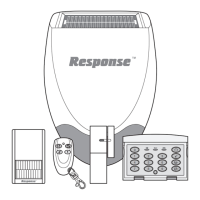
Wireless Security System
SL5
Installation & Operating Manual

Table of Contents

Question and Answer IconNeed help?

Do you have a question about the Response SL5 and is the answer not in the manual?

Summary

Foreword and System Overview

General Safety Precautions

Provides essential safety advice for installation and operation of the alarm system.

Factory Settings

Remote Control Unit Overview

Configuring the Remote Control

Installing the Control Panel

Linking Remote Controls and Keypads to the Control Panel

Testing the Control Panel and Remote Controls

Passive Infra-Red (PIR) Movement Detectors

Positioning PIR Detectors for Optimal Performance

Guidance on selecting the best locations for PIR detectors to ensure effective detection.

PIR Detector Installation and Testing

Installing and Configuring PIR Detectors

Step-by-step instructions for mounting and setting up PIR detectors.

Independent PIR Detector Testing

Procedure to test PIR detectors individually before linking to the system.

Linking PIR Detectors to the Control Panel

Magnetic Door;Window Detectors

Testing PIR Detectors with the Control Panel

Magnetic Detector Installation and Linking

Installing and Configuring Magnetic Detectors

Step-by-step instructions for mounting and setting up magnetic detectors.

Linking Magnetic Detectors to the Control Panel

Procedure for pairing magnetic detectors with the control panel.

Testing Magnetic Detectors with the Control Panel

External Solar Siren

Solar Siren Installation and Power-Up

Step-by-step instructions for installing and initially powering the solar siren.

Solar Siren Operation and Mounting

Mounting the Solar Siren on the Wall

Detailed instructions for physically mounting the solar siren to a wall.

Dummy Siren Installation

External Connections (Optional)

Testing the System

Detector Test Procedures

Alarm Testing

Siren Alarm Tests

Instructions for testing wireless, internal, and wired sirens.

Siren Service Modes

Remote Manager Test (Optional)

Remote Manager and Voice Dialer Tests

Factory Settings

Resetting System to Factory Defaults

Procedure for restoring the system to its original factory settings.

Programming Instructions

User Setup Menu Configuration

Master User Access Code Configuration

Details on setting and changing the Master User Access Code.

Other User Access Codes Configuration

Instructions for setting access codes for users 1-6 and the duress code.

System Setup

Learning Remote Controls and Keypads

Procedure for pairing wireless remote controls and keypads with the system.

System Setup Parameters

System Configuration

Zone Setup Configuration

Zone Setup Procedures

Learning Detector Codes for Zones

Procedure for teaching the control panel the ID codes of wireless detectors.

Monitoring Setup

Voice Dialer Setup

Alarm Message Recording and Replay

Recording and replaying custom alarm messages for the voice dialler.

Latch Key Setup

Spectra Plus Lighting Setup

Operating Instructions

Arming the System

Steps for setting the alarm system to Full Arm mode.

Part-Arming the System (Part-Arm 1 & 2)

Instructions for activating Part-Arm 1 and Part-Arm 2 modes.

Disarming the System

Procedure for disarming the alarm system.

Advanced Operating Modes

Quick Set and Personal Attack Alarm

Using quick set for arming and triggering a personal attack alarm.

Siren and Battery Management

Troubleshooting

Control Unit Issues

Troubleshooting power, low battery, and access code issues for the control unit.

Alarm and Siren Issues

Diagnosing problems with zone triggers, siren operation, and panel alarms.

False Alarm Diagnosis

Solutions for the system triggering false alarms without intrusion.

Troubleshooting: Detectors and Remotes

PIR Detector Issues

Solutions for PIR detectors falsely alarming or failing to detect movement.

Door;Window Detector Issues

Troubleshooting non-working or false-alarming door/window detectors.

System Communication Troubleshooting

Control Unit and Dialer Communication Issues

Troubleshooting communication failures with Remote Manager and Voice Dialer.

Latch Key and Customer Helpline Information

Troubleshooting Latch Key issues and providing customer helpline contact details.

Response SL5 Specifications

General IconGeneral
BrandResponse
ModelSL5
CategorySecurity System
LanguageEnglish

Related product manuals