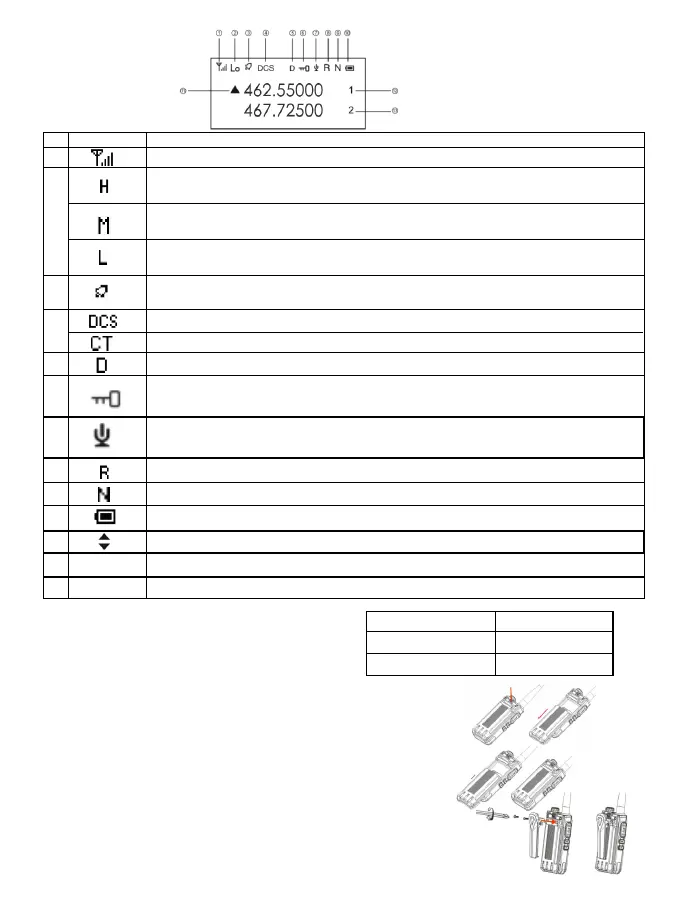
Status Indicator
Status Icon
LED Indicator
The LED indicators of this radio can let you easily grasp the
current operating status.
Preparation
Battery Installation
1.Align the battery with the battery mount on the back of the radio
2.Press the battery forcefully into the walkie-talkie, and slide the battery up
until the lock plate is locked to the correct position
If you need to remove the battery, turn off the radio. Press the battery lock to
the unlocked position and hold it down, then slide the battery down and
away from the battery mount.
Belt Clip Installation
Align the two screw holes of the belt clip with the screw holes above the
battery, install and tighten the screws.
If you need to remove the belt clip, loosen and remove the screws from
the belt clip
Install an external headset/microphone (optional purchase separately)
Indicator status Radio Status
Red light long bright Transmitting
Green light long bright Receiving
The current transmitting power is medium power (more power saving, relatively moderate
communication distance)
The current transmitting power is low power (the most power saving, relatively close
distance)
The current transmitting power is high power (the longest communication distance, the
highest power consumption)
Channel strength indicator, the more the number, the stronger the signal
This symbol indicates that the current status is DCS
This symbol indicates that the current status is CT
This symbol indicates that dual frequency waiting is on and it is in a dual-waiting status.
This symbol appears whne the buttonboard is locked, press 【#】button to unlock and it
disappears
This symbol indicates that the VOX function is activated, and the emission will start when
the sound pressure level of the microphone reaches the set value
Receiving and transmitting frequency inversion in frequency mode/channel mode
It appears whne the channel is working in a narrowband mode
Display the current remaining power of battery
A/B band pointer, indicating the current working frequency or working channel
Band A current channel number in channel mode
Band B current channel number in channel mode
This symbol appears when the side tone switch is set to button side tone/button+identity
code/identity code
NO.
Icon Product Status
2
1
4
5
6
7
8
9
10
11
12
13
3
Aranbic No.
Aranbic No.
2



 To Next Page