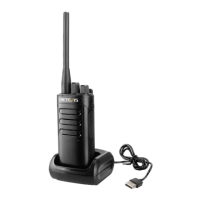
Charging the Battery
1.The battery is not charged in the factory, please charge the battery
under the environmental temperature 5—40℃ before using.
2.After purchasing or long-term storage(more than two months),charging
the battery for the first time can not reach its saturation capacity,repeat
charge/discharge for twice or three times to make battery capacity
achieve the best state.
3.Before charging,please power off the transceiver,using the transceiver
during charging may affect correct charging.
4.If the battery has been charged fully,please do not charge it
again,otherwise the service life of the battery may be shorten or may be
damaged.
5.If the service time is significantly reduced even after completely correct
charging,the battery can not be used any more,please replace a new
battery.
BASIC OPERATION:
·Power/Volume Button
Rotate the power button, you can turn on/off the radio.
When radio is turn on, Rotate it again, you can adjust the radio’s Volume
·Channel Selection
Short press【UP/DOWN】keys to adjust the channels.
·PTT
Press this button you can talk to others.
·Monitoring
When“Side Key 2” in the software is programmed to the monitoring
function,long press 【DOWN】 key for two seconds to enter into the
monitor mode, release it to exit.
1


 To Next Page