EasyManua.ls Logo

Revolabs Executive Elite 01-ELITEEXEC8 - Page 72

Revolabs Executive Elite 01-ELITEEXEC8
104 pages
Print Icon
To Next Page IconTo Next Page
To Previous Page IconTo Previous Page
Loading...
72
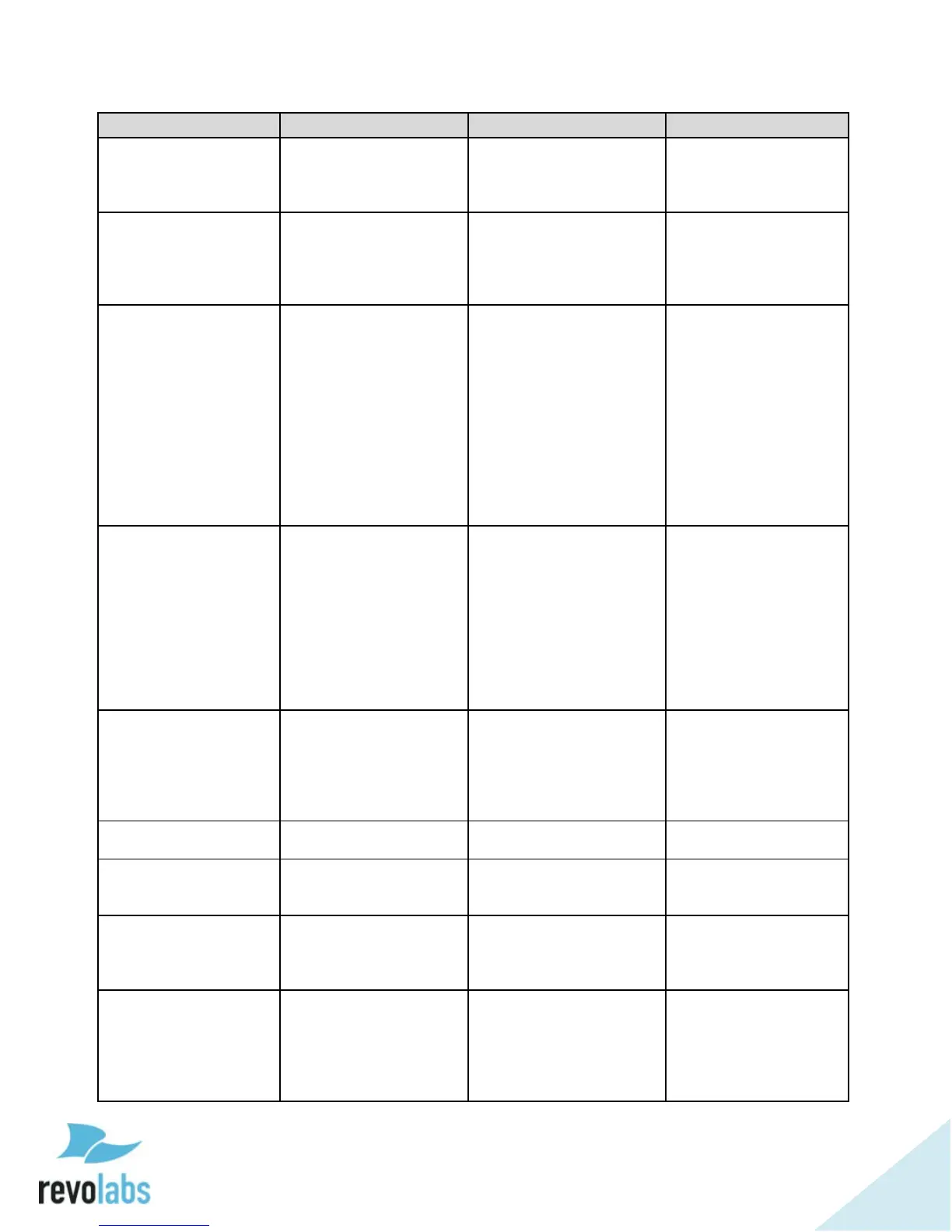
Property/Action
Command Format
Description
Response
micstandbymode
get micstandbymode
ch <channel number>
Retrieve mic standby
status,
channel number 1-8 or
A
val micstandbymode
ch <channel
number> <0/1>
micstandbymode
set micstandbymode
ch <channel number>
<0/1/2>
Set mic into standby
mode,
1 - Enter standby,
0 - leave standby,
2 - toggle.
val micstandbymode
ch <channel
number> <0/1>
micstatus
get micstatus ch
<channel number>
Retrieve the given
microphone's current
status,
0 - off,
1 - on,
2 - standby,
3 - charging,
4 - out of range,
5 - not paired,
6 - pairing,
7 - unpairing,
8 updating
val micstatus ch
<channel number>
<status>
mictype
get mictype ch
<channel number>
Retrieve the given's
microphone's type.
0 - Wearable,
1 - Omni,
2 - Directional,
3 - XLR,
4 - Mini XLR,
5 - Gooseneck,
10 - Handheld,
11 - unknown
val mictype ch
<channel number>
<type>
mutestatus
get mutestatus ch
<channel number>
Retrieve the mic mute
status, value is a
comma delimited
string:
<mute>,<mute
type>,<mute lock>
val mutestatus ch
<channel number>
<mute>,<mute
type>,<mute lock>
regnotify
Regnotify
Register to listen to
system notifications.
regnotify
outputgain
get outputgain ch
<channel number>
Retrieve the given
channel's output gain.
val outputgain ch
<channel number>
<output gain>
outputgain
set outputgain ch
<channel number>
<output gain>
Configure the given
channel's output gain,
output gain range -20
to 5 dB
val outputgain ch
<channel number>
<output gain>
outputlevel
get outputlevel ch
<channel number>
Retrieve the channel
output level,
channel number
1/2/../8/A,
0 - mic level,
1 - line level.
val outputlevel ch
<channel number>
<0/1>

Table of Contents

Related product manuals