EasyManua.ls Logo

Revox A77 - 3 Dismantling; Removal of Housing; Removal of Cover Panel; Removal of Front Panel

Revox A77
92 pages
Print Icon
To Next Page IconTo Next Page
To Previous Page IconTo Previous Page
Loading...
3.
DISMANTLING
3.2.
Removal
of
Cover
Panel
Table
of
Wire
Colors
red
org
yel
gmn
blu
vio
brn
gry
blk
wht
•
red
rouge
•
orange
orange
•
yellow
jaune
•
green
vert
•
blue
bleu
•
violet violet
•
brown
brun
gray
gris
•
black
noir
•
white
blanc
Rot
Orange
Gelb
Grün
Blau
Violett
Braun
Grau
Schwarz
Weiss
3.1.
Removal
of
Housing
Set
instrument
face
down
on
soft
basis.
Remove
remote
control
dummy
plug.
Remove
housing
fasteners.
Pull
housing
carefully
upward.
Disconnect
loudspeaker
connectors
on
regulator
card
(
fig.
3.9 —
13
1
in
the
carrying
case.
Reinsert
remote
control
plug.
Bridge
power
disconnect
jack (
2-
pole
protective
dis
-
connector )
with
two
insulated
banana
plugs.
blu
C 2
wht
C 4
red
C 1
blk
C 3
Fig.
3.4-5 (
View
from
below
I
6
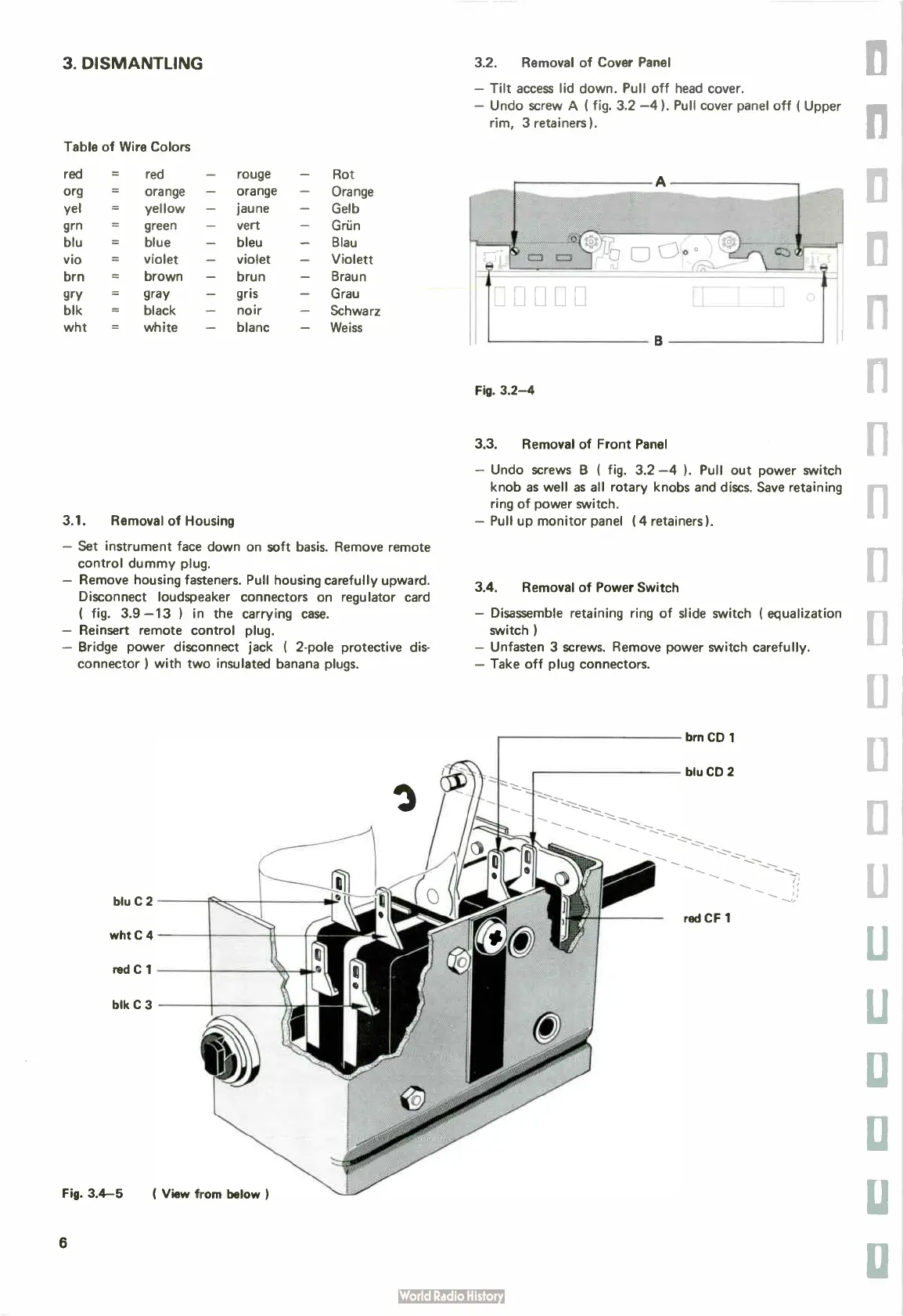
Tilt
access
lid
down.
Pull
off
head
cover.
—
Undo
screw
A (
fig.
3.2 —
4).
Pull
cover
panel
off (
Upper
rim,
3
retainers).
Fig.
3.2-4
3.3.
Removal
of
Front
Panel
—
Undo
screws
13 (
fig.
3.2 —
4 ). Pull
out
power
switch
knob
as
well
as
all
rotary
knobs
and
discs.
Save
retaining
ring
of
power
switch.
—
Pull
up
monitor
panel (
4
retainers ).
3.4.
Removal
of
Power
Switch
—
Disassemble
retaining
ring
of
slide
switch ( equalization
switch )
—
Unfasten
3
screws.
Remove
power
switch
carefully.
—
Take
off
plug
connectors.
brn
CD
1
blu
CD
2
red
CF
1