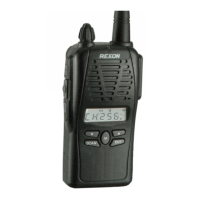
Front View
(L) Screen
This LCD displays the current frequency, last frequency, and other
information to the operator.
(M) Numeric Keypad
These keys are used whenever the PJ2+ COM requires a numeric
input such as setting the frequency.
(N) 2 Key 121.5 Emergency
This key is used to select 121.5 emergency frequency. Hold down the
2 key for 3 seconds to automatically go to 121.5.
(O) 4 Key Night Vision Mode (while on the LED contrast page)
This key is used to place the PJ2+ COM in night vision mode.
Automatic noise limiting (ANL) can be turned on and off by holding
the Clear key and pressing 4.
(P) 5 Key Normal Vision Mode (while on the LED contrast page)
This key is used to place the PJ2+ COM in normal vision mode.
(Q) 7 Key Low Back Light
This key is used to adjust the low back light function. This is accessed
by holding the Clear key and pressing the 7 key.
(R) 8 Key High Back Light
This key is used to adjust the high back light function. This is
accessed by holding the Clear key and pressing the 8 key.
(S) Down Key/Key Lock
This key is used to select the next lower frequency or to initiate
search and scan functions. This key is also used in combination with
the Clear Key to lock out all inputs to the keyboard.
(T) Memory Clear Key
This key is used to delete a selected memory channel after putting
the PJ2+ COM in Memory Clear Mode (CLR+MEM).
(U) Internal Speaker
(V) Internal Microphone
(W) Clear Key/ALL CLR
This key is used to clear erroneous key entries and to exit functions
such as search, scan, and memory storage and recall. This key is
used in combination with the Down key to lock out all inputs to the
keyboard. It is used in combination with the Light Button to enable/
disable the backlight feature. It is used in combination with the UP
key to enable/disable the BEEP function. This key is also used in
combination with the ON/ OFF Volume Control to clear all
memory channels.
(X) Weather Key
This key is used to recall the NOAA weather frequencies.
(Y) Memory Key
This key is used while storing frequencies in one of the 20
memory channels.
(Z) 9 Key LED Contrast
This key is used to adjust the LCD contrast and night mode function.
Manual_final.indd 12 7/13/22 1:51 PM



 To Next Page