EasyManua.ls Logo

Rheem Comfort Control 2 System - User Manual

Rheem Comfort Control 2 System
10 pages
Print Icon
To Next Page IconTo Next Page
Loading...
RECORD OF THERMOSTAT OPTIONS SELECTED
OVERVIEWQUICK STARTUSAGE GUIDESETUPPROGRAMMINGDIAGNOSTICS
MANUAL 37-6940A
0830
For your quick reference, below are the options selected by your installing dealer
to optimize your equipment settings and your personal home comfort preferences.
(Contractor to fill in value or check box. N/A = Not Applicable for your equipment or application.)
Factory
Thermostat Options Configuration Menu Setting
On-Demand Dehumidification: Set RH ________% (Relative Humidity) OFF
Continuous Fan Speed: High Medium Low (Fan-On Setting) Medium
Program Days Per Week: 7 Program Days

0/Non-Programmable 7
Continuous Backlight: On Off On
Energy Management Recovery: On Off On
Temperature Offset: _____ (0, 1, 2, 3, 4, 5°) Hi (+) Lo (-)
Temperature Display: °F °C (Fahrenheit/Celsius) °F
Beeper: On Off (Touch Key Input Confirmation) On
Air Filter Maintenance: _____ Hours (System Runtime) Off
UV Lamp Maintenance: _____ Days Off
Humidifier Pad Maintenance: _____ Hours (Continuous Clock) Off
If you need help adjusting the programmed time or temperatures
in your thermostat, please call Homeowner Help Line at 800-284-2925
For All Other Service, Please Call:
Rheem Installing Dealer: ______________________________________________
Phone: ______________________________________________
Date Installed: ______________________________________________
Question and Answer IconNeed help?

Do you have a question about the Rheem Comfort Control 2 System and is the answer not in the manual?

Summary

DIAGNOSTICS

Diagnostics (Fault) Screen

Monitors system performance and displays fault information, prompting service calls when issues arise.

Reset Operation

Provides instructions to reset the thermostat due to power interruptions or erratic operation, restoring factory defaults.

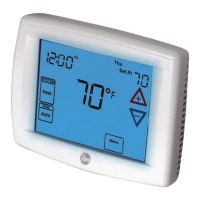
TOUCHSCREEN THERMOSTAT DISPLAY OVERVIEW

Home Screen Display

Details the main display elements including time, temperature, system mode, and setpoint.

Touch Keys for Programming and Configuration Items

Explains the various touch keys used for navigating menus and accessing configuration options.

Worksheet for Re-Programming 7 Day Program

Provides blank tables for users to plan and record their custom heating and cooling schedules.

PROGRAMMING YOUR THERMOSTAT

Planning Your Program

Guides users on setting up a 7-day programmable schedule for comfort and energy savings.

Programming Tip: Copy Program

Offers a tip on efficiently copying programmed schedules from one day to another.

QUICK START GUIDE

Set Current Time and Day

Step-by-step instructions for setting the thermostat's current time and day accurately.

SETTING UP YOUR THERMOSTAT OPTIONS

System Operation

Explains how to select thermostat operating modes like Cool, Heat, Em, and Auto for optimal comfort.

Auxiliary Heating

Describes the automatic activation of auxiliary heating when the heat pump cannot efficiently heat the home.

Emergency Heating

Details how to manually activate emergency heating in case of heat pump malfunction.

Temporary Program Override

Allows temporary adjustment of temperature settings, overriding the program until the next scheduled period.

Overview

This document describes the Rheem Comfort Control² System, a sophisticated touchscreen thermostat designed for optimal home comfort, energy efficiency, and reliability through serial communication technology. The system constantly communicates with indoor and outdoor heating and cooling components, ensuring precise temperature control and proactive maintenance alerts.

Function Description

The Rheem Comfort Control² System functions as a central control unit for your home's heating, cooling, and ventilation. It utilizes serial communicating technology to link your indoor furnace or air handler, outdoor air conditioning condensing unit or heat pump, and the touchscreen thermostat. This network allows for auto-configuration, information sharing across components, and superior temperature management.

The thermostat offers various system modes:

  • Cool: Controls only the cooling system.
  • Off: Turns off both heating and cooling systems.
  • Heat: Controls only the heating system.
  • Em (Emergency Heat): Activates emergency heating only, typically for heat pump systems when auxiliary heating is needed or in case of a heat pump malfunction.
  • Auto: Allows the thermostat to automatically switch between heating and cooling based on indoor temperature and selected setpoints. This mode prevents conflicting heating and cooling setpoints.

The system also features On-Demand Dehumidification, which improves comfort by reducing indoor humidity. When selected, the thermostat displays the current humidity and, if it's above the setpoint, will initiate a dehumidification request by slowing the system fan speed and lengthening run time.

Usage Features

The touchscreen interface provides an intuitive way to manage your home's climate.

Time and Day Setting:

  • From the Home Screen, touch the "Menu" key.
  • Touch "Set Time" to display the hour and AM/PM. Adjust using the up/down keys.
  • Touch "Set Time" again to display minutes. Adjust using the left/right keys.
  • Touch "Set Time" once more to display the day of the week. Adjust using the left/right keys.
  • Touch "Run Schedule" to save and return to the Home Screen.

System Mode Selection:

  • Touch the "SYSTEM" key to cycle through available operating modes (Cool, Off, Heat, Em, Auto).
  • When the system is calling for the first stage, "Low" will display. For the second stage, "High" will display.
  • Temperature setpoints can be adjusted using the up/down keys.

Auxiliary and Emergency Heating:

  • Auxiliary Heating activates automatically when the outdoor temperature is too low for the heat pump to efficiently heat the home, indicated by "Auxiliary Heat" on the display.
  • Emergency Heat can be manually activated by touching the "SYSTEM" key to "Em," starting the electric or fossil fuel system and displaying "Auxiliary Heat."

Programmable Fan:

  • The indoor fan/blower can be set to run automatically with the system's cycle ("FAN Auto") or continuously ("FAN Prog").
  • In "FAN Prog" mode, the fan runs throughout the programmed period, indicated by "FAN On Prog." This can be overridden to "Auto" or "On."
  • Continuous fan speed can be set to High, Medium, or Low, affecting air circulation and cleaning.

Programming Your Thermostat:

  • The thermostat supports 7-day programming with four time/temperature periods per day (Morning, Day, Evening, Night).
  • To enter the programming menu, touch "Menu," then "Set Schedule."
  • Select the desired day and period (e.g., "MORNING").
  • Adjust the start time and temperature for each period using the up/down and left/right keys.
  • Select "FAN Auto" or "Prog" for each period.
  • Use the "Copy Key" to duplicate programs to other days or "Advance Day" to move to the next day.
  • Once programming is complete, touch "Run Schedule" to activate your schedule.

Temporary Program Override:

  • Adjust the temperature using the up/down keys. "Temporary Hold At" will display.
  • This override remains active until the next program period begins.
  • To cancel, touch "Run Schedule."

Permanent Temperature Hold:

  • Adjust the temperature using the up/down keys.
  • Touch the "Hold" key to maintain the new setpoint indefinitely. "Hold At" will display.
  • To cancel, touch "Run Schedule."

Non-Programmable Mode:

  • If "Program days per week" is set to 0 days in the Thermostat Options Configuration Menu, the thermostat will not follow any programs. Time and day will not display.
  • Adjust temperature manually using the "SYSTEM" key to select Heat or Cool and the up/down keys.

Thermostat Options Configuration Menu:

  • Access by touching and holding the "Installer Config" key for 3 seconds.
  • Navigate using the up/down keys.
  • Options include:
    • On-Demand Dehumidification: Set RH between 40-94% (default OFF).
    • Continuous Fan Speed: High, Medium, or Low (default Medium).
    • Program Days Per Week: 7 Program Days or 0/Non-Programmable (default 7).
    • Continuous Backlight: On or Off (default On).
    • Energy Management Recovery: On or Off (default On). When On, the thermostat starts heating/cooling early to reach the setpoint by the program start time.
    • Temperature Offset: Adjusts the displayed temperature from -5° to +5° (default 0°).
    • Temperature Display: °F or °C (default °F).
    • Beeper: On or Off (default On) for touch key input confirmation.

Maintenance Features

The Rheem Comfort Control² System includes several maintenance reminders to ensure optimal performance and longevity of your equipment. These reminders appear in the scrolling message area on the display.

Air Filter Maintenance:

  • The thermostat tracks system runtime.
  • When the selected runtime (e.g., 225 hours for 3 months, adjustable in 25-hour increments from 25 to 1975 hours) is reached, "CHANGE FILTER" will display.
  • To clear the reminder and reset the timer, touch the "Clean Display" key.

Humidifier Pad Maintenance:

  • Based on a reminder setting (adjustable in 25-hour increments from 25 to 1975 hours, with 100 hours typically being 6 months of runtime), "CHANGE HUMIDIFIER PAD" will display.
  • Clear by touching the "Clean Display" key.

UV Lamp Maintenance:

  • Based on a reminder setting (adjustable in 25-day increments from 25 to 1975 days, with 350 days being an annual reminder), "CHANGE UV LAMP" will display.
  • Clear by touching the "Clean Display" key.

Diagnostics (Fault) Screen:

  • The system continuously monitors itself.
  • If a fault is detected, the Home Screen will display "Call for Service" and a scrolling message like "CHECK AIR CONDITIONER," "CHECK AIR HANDLER," "CHECK FURNACE," or "CHECK HEAT PUMP" to identify the issue.
  • If a serious fault occurs, the system may shut down and indicate "Call for Service" as a safeguard.
  • Fault messages clear automatically once the issue is resolved.

Battery Location and Replacement:

  • The thermostat uses two "AA" alkaline batteries to maintain time during power outages and enable armchair programming.
  • When batteries are low, "LOW BATTERY" will display.
  • To replace, set the "SYSTEM" key to "Off," remove the thermostat from the wall by grasping the top and bottom and pulling straight out. Install new batteries in the rear along the top, then reposition the thermostat over the base plate until it snaps into place.

System Power Loss:

  • If the thermostat loses 24 Volt AC power, "Power Fail" will display in the scrolling message area.

Reset Operation:

  • In case of a voltage spike, static discharge, or erratic operation, the thermostat can be reset.
  • To reset, touch the up, down, and "SYSTEM" keys simultaneously. The display will go blank, then all segments will momentarily display.
  • Note: A reset will revert all Thermostat Options Configuration Menu settings, time, and programming schedules to factory defaults. Refer to the "Record of Thermostat Options Selected" on the back cover of the manual to restore customized settings.

Rheem Comfort Control 2 System Specifications

General IconGeneral
DisplayColor Touchscreen
Warranty5-Year Limited Warranty
ConnectivityWi-Fi
Mobile AppYes, Rheem EcoNet app
Voice ControlAmazon Alexa, Google Assistant
Programmability7-day programmable
Temperature Range40°F to 90°F (4°C to 32°C)

Related product manuals