Revison 0.8.6 Document No. 01424 Page 15
7.3 Recording a cardiac event
The medical technician or physician should instruct the patient with an explanation of
what should be m
arked as a cardiac event. The patient should be instructed to press
the Record Button to start a recording when he or she experiences symptoms for
which RhythmStar was prescribed. It is recommended that this feature be used by
patients who can comprehend the instructions provided by the medical technician or
physician and are capable of pressing the necessary buttons. RhythmStar will also
be automatically recording and transmitting asymptomatic cardiac events as they
occur without the patient needing to press the Record Button or interface with
RhythmStar in any way.
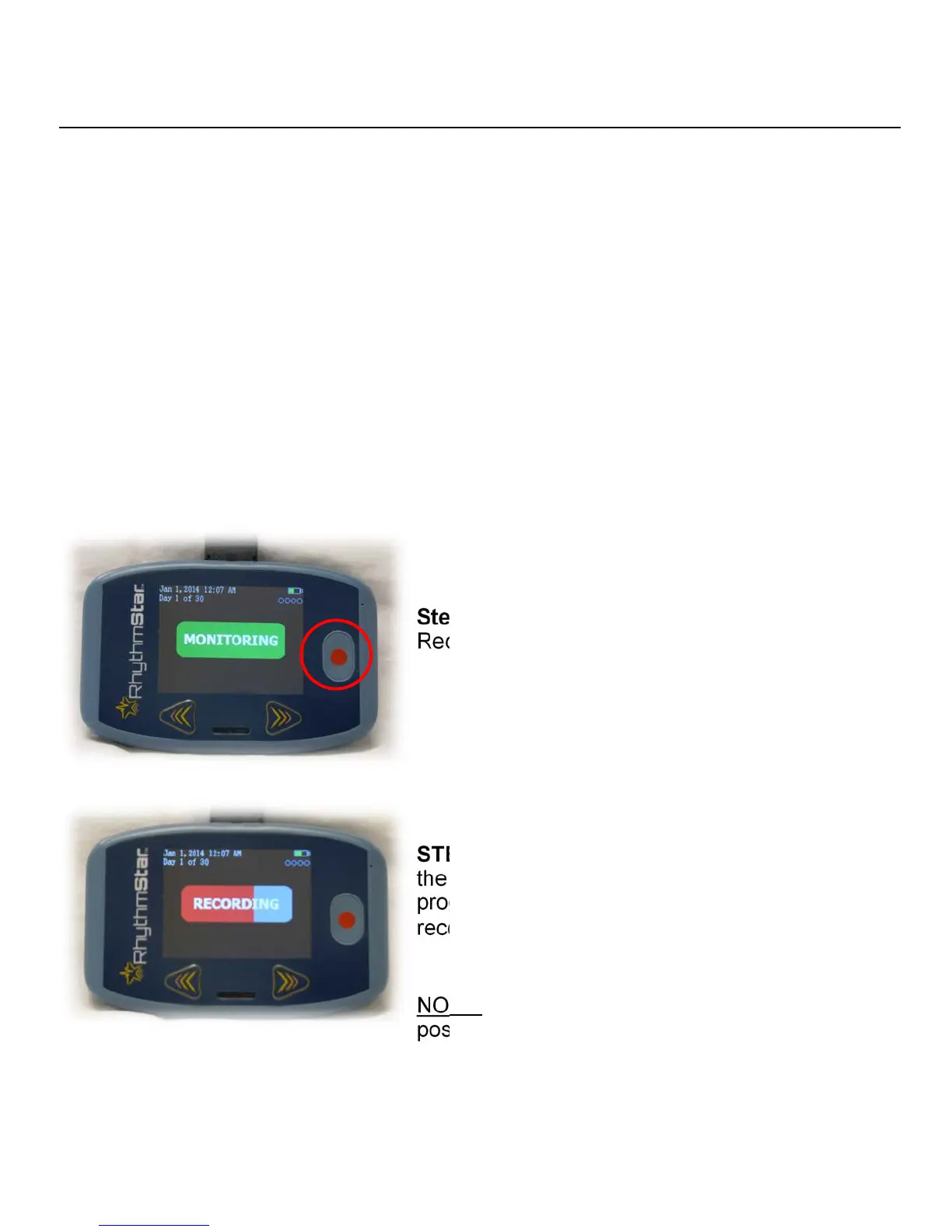
Follow the below instructions to record a cardiac event:
Step 1: In
struct the patient to press the
Record Button.
STEP 2: U
pon pressing the Record Button,
the screen will change to “RECORDING”. A red
progress bar will begin and last until the
recording is complete.
NOTE: Instruct patients to remain as still as
possible for the duration of the recording.


 To Next Page