19 -
6.3 File transfer
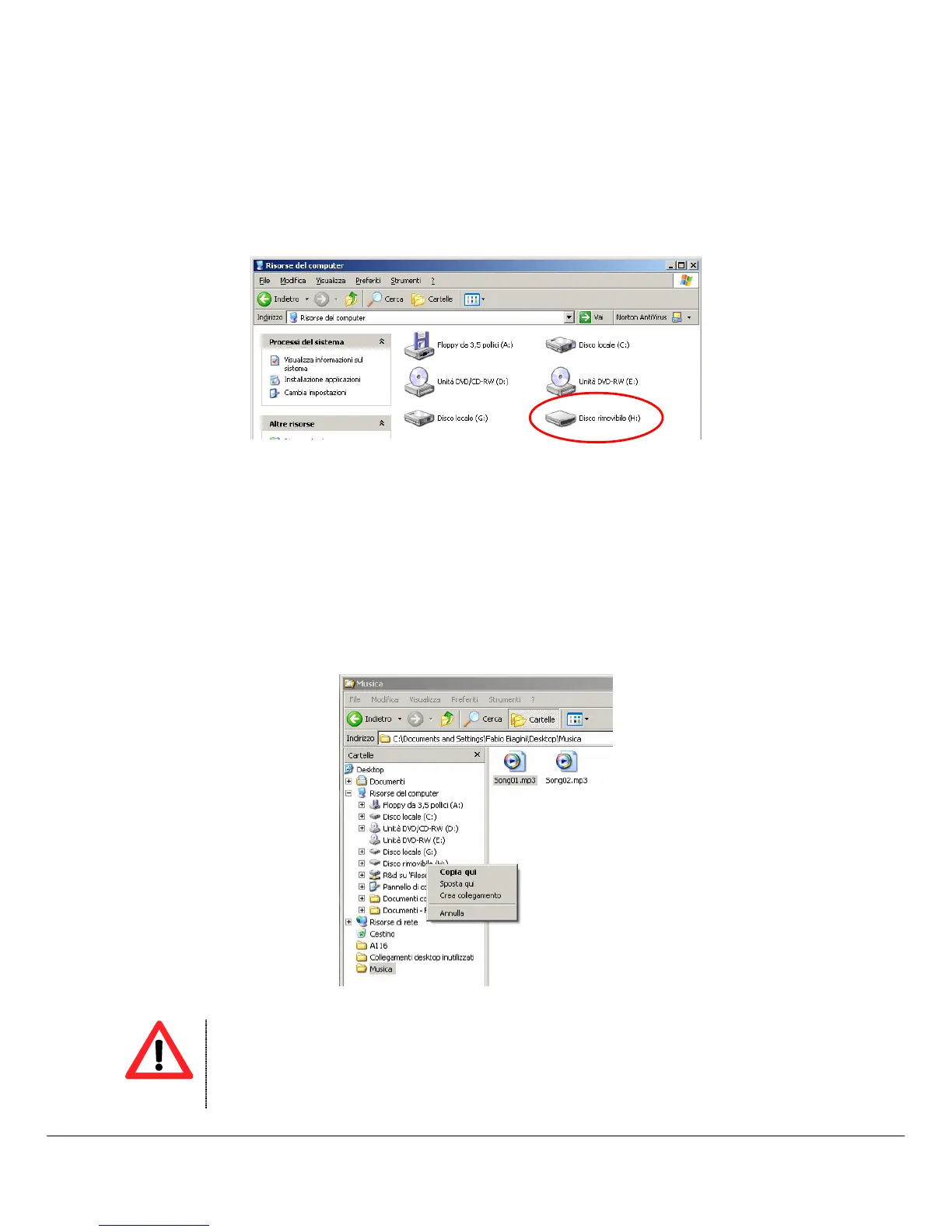
When the MP4 Player is connected to the computer, “My Computer” has a new “Removable Disc”. This
removable disc is the MP4 player. The operating system assigns automatically a drive letter to removable
device (the picture below shows an MP4 Player where the operating system has assigned the H: letter).
Windows® XP – My Computer
To transfer song files to MP4 Player please follow here below instruction:
1. Run “Windows Explorer”.
2. Select the hard disk folder where there are the song files.
3. Select the song file with right mouse button and drag the file to the MP4 Player drive letter.
4. Release the right button and from pop-up menu select “Copy here…”. Now the song file is copied in
the MP4 Player memory.
5. Repeat the steps nr.3 and nr.4 for each song file that you want to copy in the MP4 player memory.
Windows® XP – Windows Explorer



 To Next Page