25
RICKARD 2019
MLM INTEGRATION WITH BMS
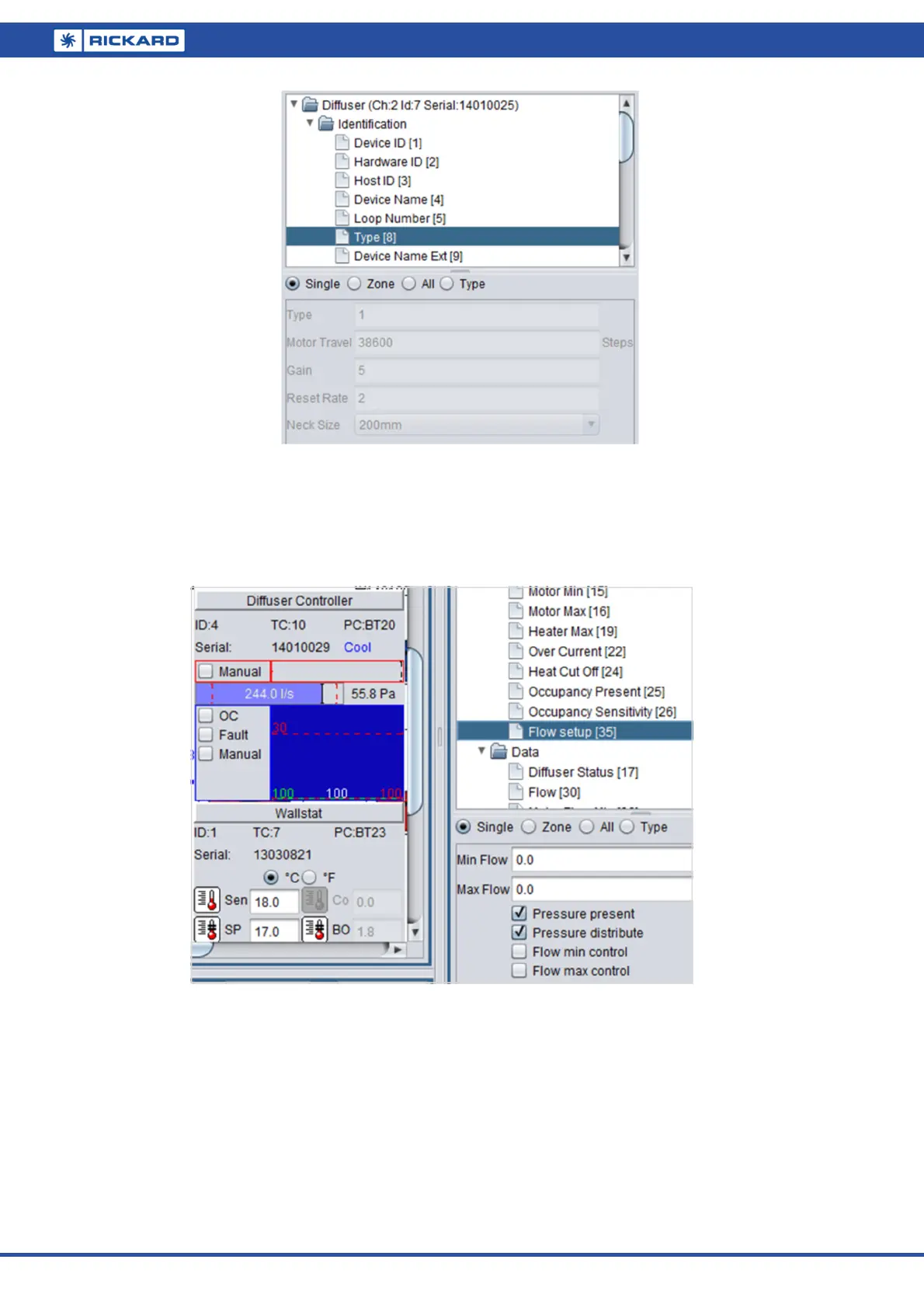
The airflow data can also be monitored under the Data/Flow tab on the Diffuser controller.
Valid – indicates the MCU had all the necessary information to do a valid airflow calculation.
Distribute – if a single airflow sensor is installed per control zone, the ‘distribute’ function should be acti-
vated in Flow setup. The measured pressure is then distributed to all the other diffusers in that zone for a
total zone airflow calculation. Should each diffuser in the zone have airflow sensors fitted, this function
should not be selected. Note if more than one, but not all diffusers in a zone are fitted with airflow sen-
sors, the distribute function for the zone will only work off one pressure sensor.
No constants found – update the MCU Flow coefficients or check the diffuser type.
Once this check list is confirmed, the user must select Pressure present under the ‘Flow setup’ tab on the Diffus-
er controller node.
If the air handling unit is in operation, the flow and pressure values will now be displayed on the Diffuser con-
troller icon on a horizontal bar just below the heater demand output.


 To Next Page