8
❖ PS Menu (optional)
❖ PDF Menu (optional)
This menu can be selected only when the optional PostScript 3 unit and the
optional hard disk are installed.
Note
❒ Some options do not appear depending optional units or selected printer lan-
guages.
❒ The PCL printer language is optional depending on the options installed on
the machine, but is required if the PCL unit is installed.
❒ Some options cannot be set depending on security settings.
❒ If you are using the machine that does not have the optional hard disk in-
stalled, some options are not displayed.
Reference
For details, see “Printer Features”, General Settings Guide.
For more information about copier features and system settings, see Copy
Reference and General Settings Guide.
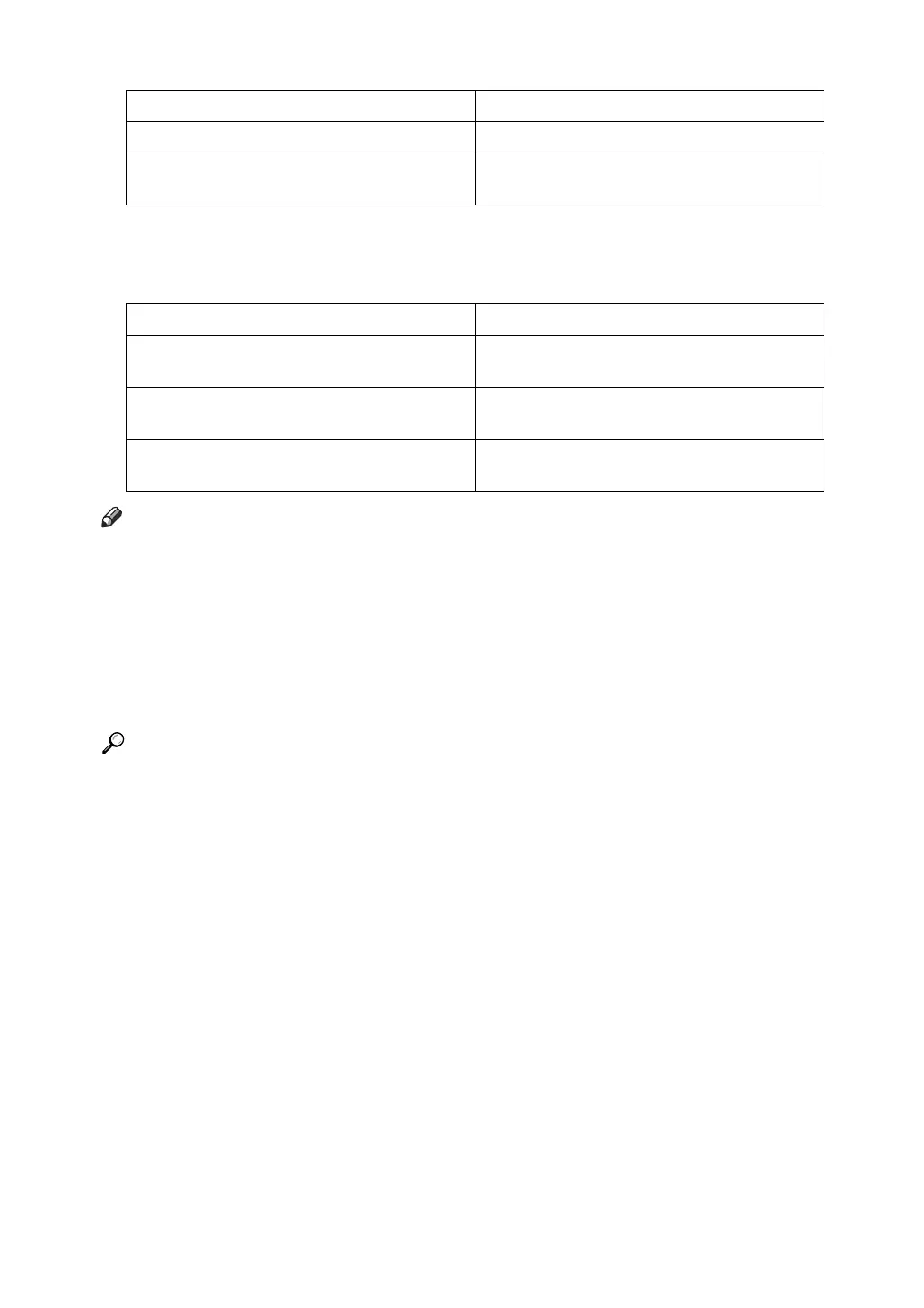
Menu Description
Data Format You can select a data format.
Resolution You can set the print resolution in dots per
inch.
Menu Description
Change PDF Password You can set the password for the PDF file ex-
ecuting PDF Direct Print.
PDF Group Password You can set the group password already
specified with DeskTopBinder Lite.
Resolution You can set the print resolution in dots per
inch.





 To Next Page