EasyManua.ls Logo

Ricoh Aficio SP 3410DN - User Manual

Ricoh Aficio SP 3410DN
2 pages
Print Icon
To Next Page IconTo Next Page
Loading...
Ricoh Aficio SP 3400N/SP 3410DN
B/W Laser Printer
A Remarkably Robust and Economical
Desktop Printing Solution
network
compact
simple

Other manuals for Ricoh Aficio SP 3410DN

Questions and Answers

  • A
    Austin YangSep 12, 2025
    What does 'Paper Size Mismatch Paper of the selected paper size is not supported for the [Duplex] feature' mean on Ricoh Aficio SP 3410DN Printer?
    • C
      Chris ClarkSep 12, 2025
      If your Ricoh Printer displays 'Paper Size Mismatch Paper of the selected paper size is not supported for the [Duplex] feature', it means 2-sided printing could not be performed because the tray does not contain the valid size paper, which are A4, Letter or Legal. Specify the tray containing the A4, Letter or Legal size paper in the printer driver setting.
  • N
    nmartinAug 22, 2025
    What does 'Unit Not Detected' mean on my Ricoh Aficio SP 3410DN?
    • M
      mschaeferAug 22, 2025
      If your Ricoh Printer displays 'Unit Not Detected', it means the print cartridge is not set correctly, or not set.
  • J
    James RamirezAug 25, 2025
    What to do if my Ricoh Aficio SP 3410DN is printing slowly due to memory overflow?
    • R
      Richard WoodsAug 25, 2025
      If printing on your Ricoh Printer is interrupted due to memory overflow, it means the data is too large or complex to print. If using the PCL 6 printer driver, set [Resolution] in [Print Quality] to [600 x 600 dpi]. If using the PostScript 3 printer driver, set [Print Quality] in [Printer Features] to [600 x 600 dpi].
  • A
    adam36Aug 26, 2025
    What to do if the Ricoh Printer says 'No Toner'?
    • J
      jessicafischerAug 26, 2025
      If your Ricoh Printer indicates 'No Toner', it means the printer is out of toner. The solution is to replace the print cartridge.
  • D
    davidsandersAug 29, 2025
    What to do if Ricoh Aficio SP 3410DN says 'Cover Open'?
    • L
      lindsay11Aug 29, 2025
      If your Ricoh Printer displays a 'Cover Open' message, it means the front or rear cover is open. To resolve this, open and then close the front cover or rear cover as indicated.
  • D
    David PowellAug 31, 2025
    What to do if my Ricoh Aficio SP 3410DN displays 'Paper Size Mismatch'?
    • M
      Matthew HendersonAug 31, 2025
      If your Ricoh Printer shows a 'Paper Size Mismatch' error, it means the paper size setting in the tray differs from the actual paper size in the tray. To fix this, load paper of the selected size in the tray, and then change the paper size setting with printer driver or Smart Organizing Monitor.
  • L
    lisabakerNov 26, 2025
    How to fix paper misfeed on Ricoh Printer?
    • S
      Spencer CollinsNov 26, 2025
      If your Ricoh Printer is experiencing a paper misfeed, the solution is to remove the misfed paper. If the message indicates [Rear Cover], and if there is no paper, open the Front Cover and pull out the Print Cartridge to remove any misfed paper. If the message indicates [Bypass Tray], pull out the loaded paper and remove any misfed paper. If the message indicates [Tray 1], pull out the indicated unit, and push the Duplex Path Release Lever away to remove any misfed paper. If the message indicates [Tray 2], pull out the indicated unit and remove any misfed paper; if there is no paper, open the Front Cover and pull out the Print Cartridge to remove any misfed paper. If the message indicates [Front Cover], pull out Print Cartridge, then remove any misfed paper. If no paper, pull out Tray 1, t...
  • B
    Bryan CuevasSep 13, 2025
    What does 'Paper Type Mismatch Paper of the selected paper type is not supported for the [Duplex] feature' mean on Ricoh Aficio SP 3410DN?
    • J
      jennifer99Sep 13, 2025
      If your Ricoh Printer displays 'Paper Type Mismatch Paper of the selected paper type is not supported for the [Duplex] feature', it means you cannot select duplex printing if the paper type is set to [Thick Paper 2], [Bond paper], [Cardstock], [Labels], [OHP], or [Envelope]. Select a paper type that allows duplex printing.
  • B
    Brandon ThomasSep 10, 2025
    What does 'Independent-supplier toner has been set' mean on Ricoh Aficio SP 3410DN Printer?
    • M
      Michael WilliamsSep 10, 2025
      If your Ricoh Printer displays 'Independent-supplier toner has been set', it means a non-supported print cartridge is installed. Remove it and replace it with a print cartridge specified by an authorized dealer.
  • C
    Charles FranklinSep 6, 2025
    What does 'Print Cartridge is near empty' mean on Ricoh Aficio SP 3410DN?
    • K
      Kara PerezSep 6, 2025
      If your Ricoh Printer displays 'Print Cartridge is near empty', it means the print cartridge is almost empty. It is recommended to prepare a new print cartridge.

Summary

Designed for Your Desktop and Your Budget

Maximum Productivity, Minimal Effort

Versatile, Expandable Media Support

Affordable and Virtually Maintenance Free

Overview

The Ricoh Aficio SP 3400N/SP 3410DN is a series of compact black and white laser printers designed to provide robust and economical desktop printing solutions for home offices and small businesses. These printers aim to deliver professional printing capabilities with maximum productivity and minimal effort, while also focusing on affordability and ease of maintenance.

Function Description

The primary function of the Ricoh Aficio SP 3400N/SP 3410DN series is to produce high-quality black and white laser prints. Both models are designed for network printing, allowing multiple users within a small office or home environment to share the device. The SP 3410DN model further enhances functionality with standard automatic duplexing, enabling efficient two-sided printing, which is beneficial for saving paper and reducing mailing and filing costs. The printers are built to handle demanding workloads and support a variety of media requirements, making them versatile tools for everyday office tasks. They are capable of processing incoming data streams quickly, ensuring that print jobs are completed efficiently. The inclusion of standard Ethernet networking and a USB 2.0 interface provides flexible connectivity options, allowing the units to be driven through a network or a single Windows PC or Mac.

Usage Features

The Ricoh Aficio SP 3400N/SP 3410DN printers are designed for ease of use and efficient operation. They offer fast output speeds of 30 pages-per-minute (Letter), ensuring that jobs are finished quickly. The laser-sharp 1200 x 600 dpi maximum resolution ensures that every page looks professional and crisp. With a fast warm-up time of 20 seconds and a first print speed of just 8 seconds, users can save time and energy, getting their print jobs started almost immediately.

The printers are equipped with a 295MHz CPU and standard 64 MB RAM, which allows them to process files with ease, handling popular PCL 6 or PostScript 3 emulation to keep pages flowing smoothly. This robust processing power contributes to a seamless printing experience, even with complex documents.

Media handling is a key feature, with user-adjustable, front-loading paper trays that enhance system flexibility. The standard paper supply includes a 250-sheet tray and a 50-sheet bypass tray, allowing for various media types and sizes. The bypass tray is particularly useful for speed envelope printing, which is ideal for in-house customer invoicing and mailing applications. The printers can accommodate a wide range of media sizes, up to 8.5" x 14", and paper weights up to 90 lb. Index. For users with higher volume needs, the paper capacity can be expanded up to 550 sheets with an optional 250-Sheet Paper Feed Unit, which installs beneath the standard tray to maintain a compact footprint while reducing interruptions for longer jobs.

The SP 3410DN's automatic duplexing feature is a significant advantage for users looking to conserve resources. It allows for productive two-sided printing, which not only saves paper but also contributes to lower mailing and filing costs. The compact design of both models ensures they fit comfortably on a desktop, making them suitable for environments where space is a premium.

Maintenance Features

The Ricoh Aficio SP 3400N/SP 3410DN series is designed to be virtually maintenance-free, contributing to a low total cost of ownership. A key aspect of this is the use of an All-In-One (AIO) print cartridge, which simplifies consumable replacement. Users can choose between a Standard Yield AIO print cartridge (2,500 pages) to minimize out-of-pocket supply expenses or a High Yield AIO (5,000 pages) to further reduce cost-per-page factors.

Replacing the print cartridge is a quick and mess-free process, as it involves exchanging the front-loading AIO print cartridge in seconds. This design minimizes downtime and makes routine maintenance straightforward for any user. The robust feature set and high duty cycle of these printers also contribute to their superior value and longevity, reducing the need for frequent repairs or replacements.

The printers are built with an emphasis on reliability, ensuring consistent performance over time. The design focuses on minimizing user intervention for maintenance tasks, allowing users to concentrate on their work rather than printer upkeep. The economical nature of the consumables, combined with the ease of replacement, makes these printers an attractive option for businesses looking to control printing costs effectively. The overall design prioritizes a hassle-free experience, from initial setup to ongoing operation and maintenance.

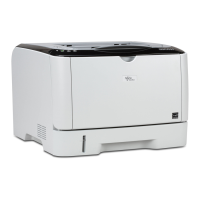
Ricoh Aficio SP 3410DN Specifications

General IconGeneral
Print TechnologyLaser
Paper Capacity250 sheets
ConnectivityUSB 2.0, Ethernet
Memory128 MB
First Print Out Time8 seconds
Maximum Paper SizeA4
Resolution1200 x 600 dpi
Duplex PrintingYes
Paper Input250-sheet tray, 50-sheet bypass tray
Supported Paper SizesA4, A5, A6, B5, Letter, Legal
Dimensions370 x 392 x 262 mm
Operating System CompatibilityWindows, Mac, Linux

Related product manuals