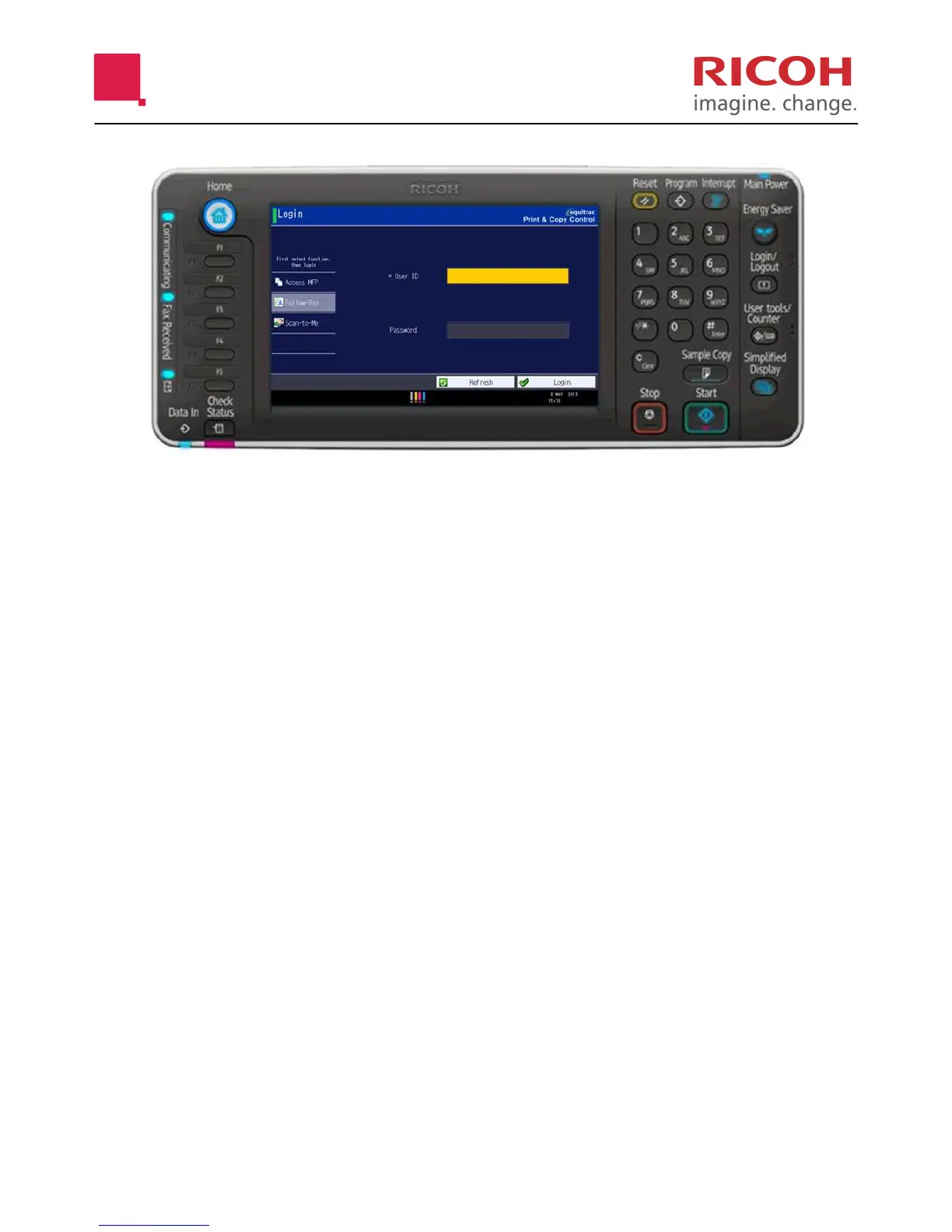
CONTROL PANEL
RESET Clears all settings (Defaults).
PROGRAM Store frequently used copy settings
in the machine memory and recall
them for future use.
INTERRUPT Not in use.
ENERGY SAVER Turn the machine ON/OFF (from
standby)
LOGOUT Logout hard key.
USER TOOLS/COUNTER Access System menus. Take coun-
ter readings.
C/CLEAR Delete quantity.
STOP Stop copying/scanning/faxing when
on that function.
SIMPLIFIED DISPLAY Toggles between normal and sim-
plified screen mode.
SAMPLE COPY Use this key instead of the green
button to produce a sample set. *
Can only be used when [Sort] is
selected.
START Begin copying/scanning/faxing
when on that function.
STOP Cancel/stop Copier job.
CHECK STATUS Overview of function status.
F1 Access the Copier function.
F2 Access the Printer function.
F3 Not in use.
F4 Not in use.
F5 Not in use.








 To Next Page