RICOH Ri 1000
User Maintenance Precautions
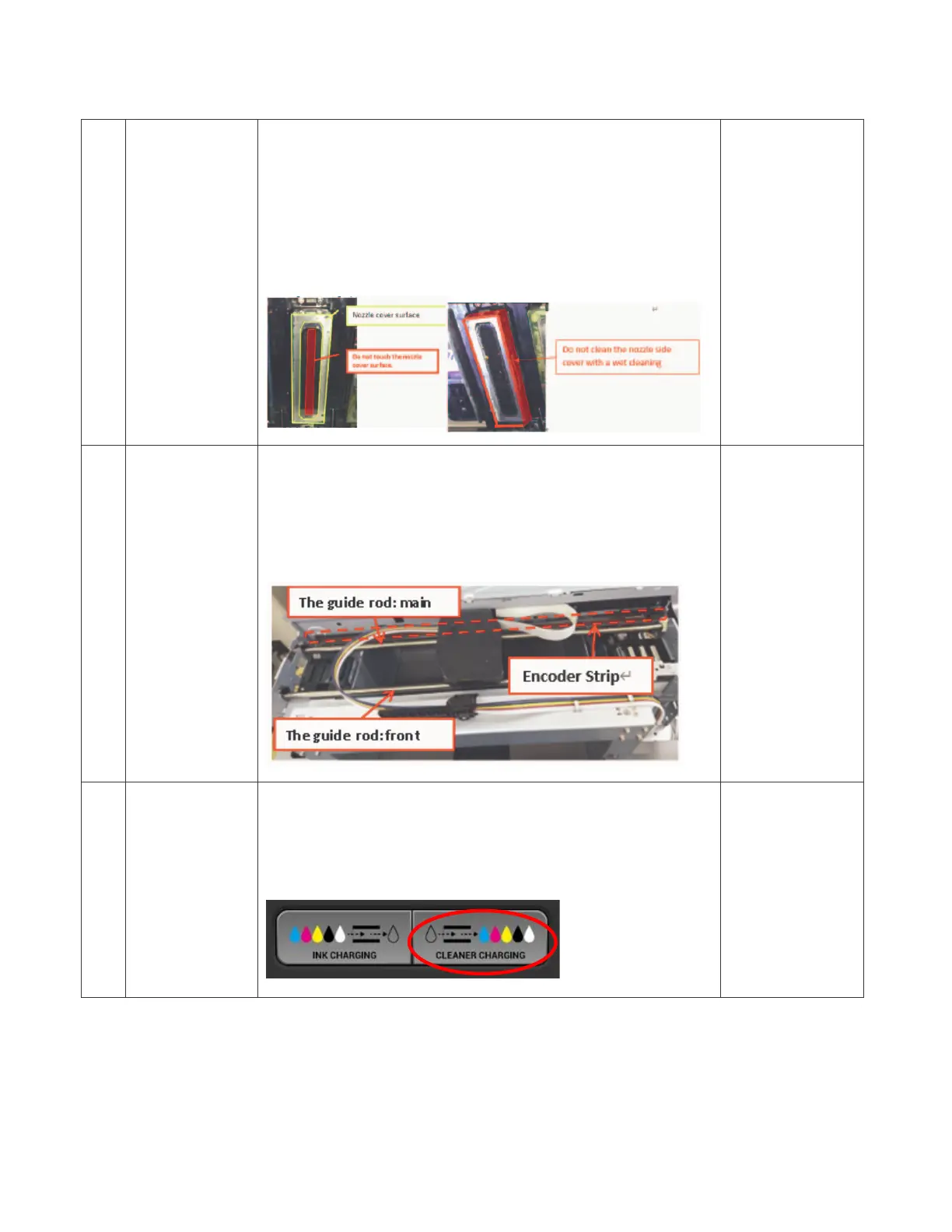
3 Cleaning Head
Nozzle Cover
(Weekly)
Remove and clean the ink adhered to the head nozzle
cover every week.
If the maintenance is not performed regularly, it may cause
head ejection failure or head nozzle clogging.
Do not clean the nozzle holes and the sides of the nozzle
cover.
It may cause printer failure such as head ejection failure or
printer board damage.
8.2 Maintenance
Schedule
(Weekly)
How to Clean
the Cover of
Head Nozzle
Plate (the
Nozzle Cover)
4
Cleaning
Guide Rod
and Encoder
Strip
(Weekly)
Clean and remove ink mist on the guide rod and encoder
sheet every week.
If the maintenance is not performed regularly, the carriage
will not operate normally, which may cause abnormal
noise, poor carriage scanning, poor head ejection, and
head nozzle clogging.
8.2 Maintenance
Schedule
(Weekly)
How to Clean
the Guide Rod
and the Encoder
Strip
5 Long-term
Storage or
shipping
For long-term storage (power off for 12 hours or more) or
shipping, replace the ink with cleaning solution.
If the printer is stored or transported while it is filled with
ink, the ink inside may stick and cause ink leakage or head
nozzle clogging.
8.3 Preparing
Your Printer for
Storage/
Shipping



 To Previous Page
 Loading...