EasyManua.ls Logo

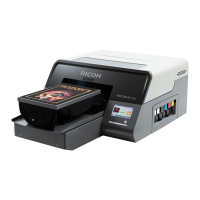
Ricoh Ri 2000 - User Manual

Ricoh Ri 2000
257 pages
Print Icon
To Next Page IconTo Next Page
Loading...
Original instructions
For safe and correct use, be sure to read the Safety Information in Safety Information and Quick Installation Guide
before using the machine.
User Manual

Table of Contents

Other manuals for Ricoh Ri 2000

Questions and Answers

  • K
    Kelly GarzaSep 9, 2025
    Why is there a blot of ink on the shirt from Ricoh Ri 2000 Printer?
    • S
      staylorSep 9, 2025
      A blot of ink on the shirt could be due to: * The frame blotting with ink. Clean the frame. * The print head rubbing against the media during printing. Change the [HEIGHT SETTING], and then perform HEIGHT ADJUST again.
  • T
    Tina AdamsAug 23, 2025
    Why do dark shirt prints look dull with my Ricoh Ri 2000 Printer?
    • J
      Jonathan GarnerAug 23, 2025
      If your Ricoh Printer's dark shirt prints look dull, ensure the white nozzles are near 100% and that you're pretreating the shirt adequately by increasing the amount of pretreat being sprayed.
  • S
    smithelizabethAug 25, 2025
    Why does my Ricoh Printer make light shirts look dull?
    • T
      tylerdeanAug 25, 2025
      If your Ricoh Printer light shirt prints look too dull and the nozzle is 100%, the wrong output profile may be selected. If printing in 600 X 600 DPI and using a profile meant for 1200 X 1200 DPI, change the profile.
  • J
    Jamie BradfordAug 26, 2025
    How to fix multiple missing nozzles on my Ricoh Ri 2000?
    • E
      Eric CampbellAug 27, 2025
      If several nozzles are out on your Ricoh Printer and head cleaning doesn't improve it, let the printer sit overnight to allow any air introduced during ink fill or cleaning to settle.
  • B
    Brandon MorganAug 27, 2025
    Why does my Ricoh Printer cartridge read 0%?
    • T
      Taylor SullivanAug 28, 2025
      A temporary communication loss may have caused the cartridge reading error. Remove the cartridge that reads 0%. The status should change to NC, and a message indicating cartridges are not loaded will appear. Reinsert the cartridge; the percentage reading should return to normal. If it still reads 0%, turn the printer off and then on again.
  • P
    Paul GonzalesAug 29, 2025
    How to fix fuzzy blurry prints on Ricoh Ri 2000 Printer?
    • H
      hernandezreneeAug 29, 2025
      Fuzzy or blurry prints can occur due to several reasons. Check the following: * The table height might be too low. Set the garment correctly on the platen, and then perform HEIGHT ADJUST again. * Too much ink (oversaturation) may cause bleeding. Check the settings in ColorGATE Productionserver, ensuring the rendering intent is set to perceptual and that profile selections haven't been altered. * Nozzle deflection. Perform normal or strong nozzle cleaning, then recheck the nozzles. * Poor pretreat on dark shirts with a white underbase. Check the dilution ratio of the pretreatment and the coating/drying method again. * Head alignment may be off. Perform the head alignment procedure.
  • J
    John WellsSep 18, 2025
    What causes blurry prints due to oversaturation on my Ricoh Ri 2000?
    • L
      lisa96Sep 18, 2025
      If your Ricoh Printer produces fuzzy, blurry prints, and you suspect too much ink is causing bleeding, check the settings in ColorGATE Productionserver, especially the rendering intent. Ensure you haven't changed profile selections.
  • F
    frostscottSep 18, 2025
    Why is my Ricoh Printer leaving ink blots on the shirt?
    • K
      Kristie DyerSep 19, 2025
      If your Ricoh Printer is leaving blots of ink on the shirt because the frame is blotting with ink, clean the frame.
  • M
    marissakingSep 7, 2025
    What to do if Ricoh Ri 2000 print looks too dull?
    • J
      jamierichardsSep 7, 2025
      If your print looks too dull, and the nozzle is at 100%, the wrong output profile might be selected. If printing in 600 X 600 dpi and using a profile meant for 1200 X 1200 dpi, change the profile.
  • E
    Elizabeth GibsonSep 4, 2025
    What causes Ricoh Ri 2000 color print to appear shifted from white Underbase print?
    • T
      Taylor DavenportSep 5, 2025
      A shifted color print from the white underbase can be caused by: * Table height being too low. Set the garment correctly on the platen, and then perform HEIGHT ADJUST again. * Head alignment being off. Perform the head alignment procedure. * Misalignment of print positions for white and color. Adjust the print position for white and color. * The material of the shirt and the amount of ink ejected. Input the amount of “Choke” with ColorGATE Productionserver.

Summary

How to Read the Manuals

Manual Reading Guidelines

Provides guidance on how to interpret the manual, disclaimers, and important notes.

Safety Symbols for This Machine

1. Before You Begin

Product Contents Check

Lists all items included with the RICOH Ri 2000 printer.

Printer Component Identification

Identifies and labels the printer's key parts and features.

Essential Printer Operation Tips

Provides crucial advice for optimal printer performance and longevity.

Machine Installation and Initial Setup

Covers unpacking, connecting, and initial setup procedures for the printer.

Control Panel Interface Overview

Explains the various tabs and functions available on the printer's touch screen interface.

Network Configuration and IP Address Setting

Details how to configure the printer's IP address for network connectivity.

ColorGATE Productionserver Usage

Outlines system requirements and usage guidelines for the ColorGATE software.

2. Printing

Cotton Garment Printing Workflow

Step-by-step guide for printing on cotton-based garments.

Cotton Garment Printing Preparation

Lists necessary items and checks before printing on cotton garments.

Garment Placement on Platen

Instructions on how to properly place and secure garments on the printer's platen.

Platen Height Adjustment Procedure

Explains the automatic and manual procedures for setting the correct platen height.

Sending Print Images to Printer

Describes methods for transferring image files for printing via Productionserver or USB.

Initiating and Managing Print Jobs

Guides the user through the process of starting and managing print jobs.

Cotton Garment Heat Treatment

Details the heat treatment process to ensure ink durability on cotton garments.

White Polyester Printing Workflow

Step-by-step guide for printing on white polyester garments.

White Polyester Printing Preparation

Lists necessary items and checks before printing on white polyester.

White Polyester Garment Placement

Instructions for placing white polyester garments on the platen.

White Polyester Heat Treatment

Details the heat treatment process for white polyester garments.

3. Maintenance

Printer Maintenance Schedule

Outlines daily, weekly, and monthly maintenance tasks and frequencies.

Nozzle Check and Verification

Explains how to perform a nozzle check to verify print head status.

Automatic Head Cleaning Process

Details the process for automatic print head cleaning to resolve nozzle issues.

Jig-Assisted Head Cleaning

Step-by-step guide for cleaning print heads using the specialized jig.

Routine Printer Component Cleaning

Overview of routine cleaning tasks for the printer's components.

Guide Rod Cleaning Instructions

Instructions for cleaning the printer's guide rods to ensure smooth movement.

Cleaning Maintenance Unit and Flushing Box

Guides on cleaning essential maintenance components of the printer.

White Head Cleaning Frequency Adjustment

Allows adjustment of how often automatic white head cleaning occurs.

Proper Agitation of White Ink Cartridges

Instructions on properly shaking white ink cartridges before use.

White Ink Circulation System

Explains the white ink circulation system to prevent settling.

Waste Ink Bottle Draining and Reset

Procedures for safely draining and resetting the waste ink bottle.

4. Adjustments

Print Head Alignment Adjustment

Corrects misalignment issues for clearer and sharper print results.

Printer Table Alignment Procedure

Fine-tunes the table's printing index for accurate print placement.

Print Position Calibration

Allows precise adjustment of the starting position for printing.

5. Replacing Service Parts

Service Part Status Monitoring

Explains the status indicators for replaceable printer components.

Mist Fan Filter Replacement Guide

Step-by-step guide for replacing the mist fan filter.

6. Printer Preparation for Storage and Shipping

7. Using the Printer in 4-color Mode (CMYK Only)

Switching to 4-Color CMYK Mode

Guides on switching the printer from 6-color to 4-color mode.

Switching to 6-Color Mode

Guides on switching the printer from 4-color to 6-color mode.

8. Ink Path Guide

9. Troubleshooting Guide

Common Printing Result Issues

Addresses common printing problems like fuzzy prints, banding, and color shifts.

White Ink and Nozzle Problems

Covers problems related to white ink, such as white spots and nozzle missing.

Head Protection Cover Installation and Handling

Detailed instructions for installing and removing the head protection cover.

Nozzle Strong Maintenance Procedures

Advanced maintenance steps for persistent nozzle clogging issues.

10. Appendix

Printer Specifications Overview

Technical details and operating parameters of the RICOH Ri 2000 printer.

Open Source Software License Information

Information regarding the ZLib open-source software license used.

Support and Inquiry Information

Details on where to inquire for support or further information.

Manual Revision History

Lists the changes and updates made in different versions of the manual.

Product Trademarks

Lists registered trademarks and product names mentioned in the manual.

Ricoh Ri 2000 Specifications

General IconGeneral
Print TechnologyInkjet
Ink TypePigment Ink
ConnectivityUSB, Ethernet
Operating System CompatibilityWindows
Weight250 lbs
PrintheadRicoh
Print Resolution1200 x 1200 dpi
Substrate CompatibilityCotton, Polyester, Blends
Power RequirementsAC 100-240V, 50/60 Hz

Related product manuals