15
ENGLISH
1.10 Faults and solutions
The boiler does not switch on.
Check that:
− there is an electrical power supply
− the power supply plug of the appliance, if
present, is correctly inserted
− the main switch is in the "on" position, and
that the green signal is on and ashing
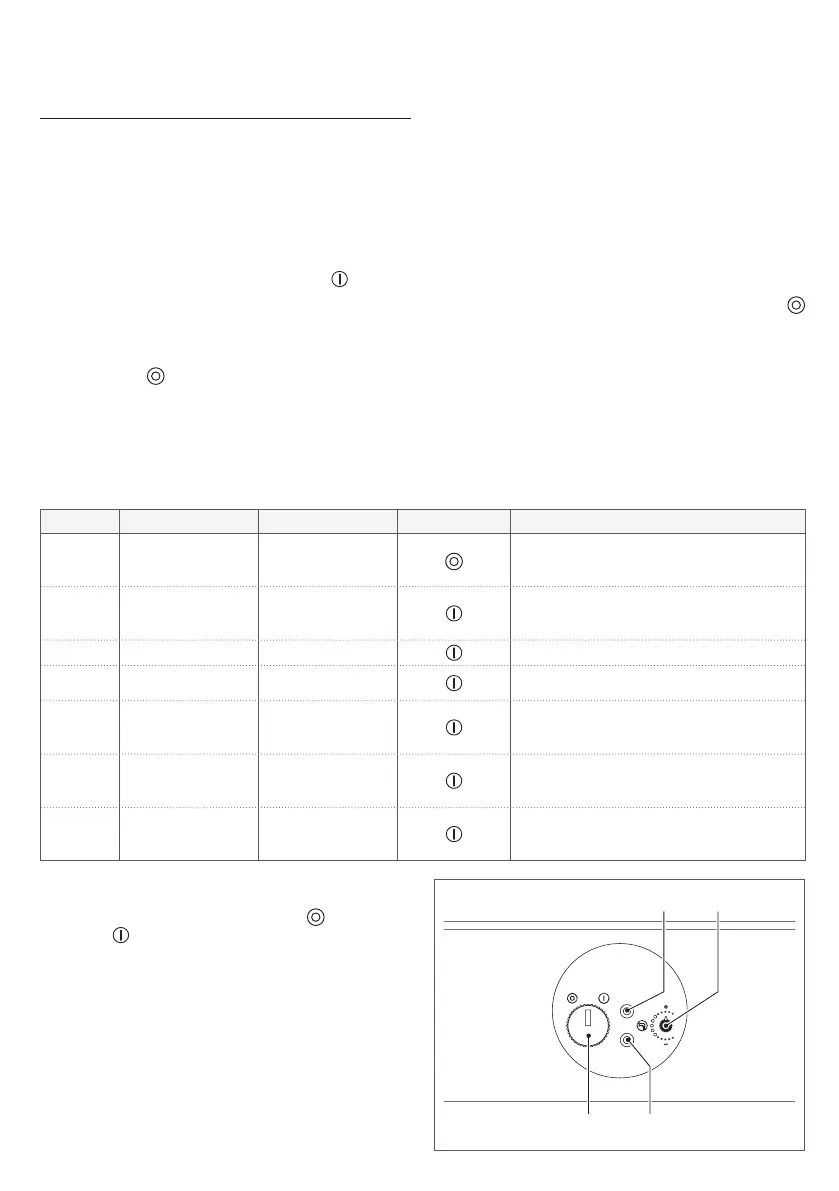
− the main switch (A) is in position “ ”
− the fuel tap is open
− the green signal is not ashing rapidly, which
indicates the intervention of the ue gases
pressure switch (to test it turn the main
switch to " " and compare the ashes), in
this case contact the Technical Assistance
Centre
− both the green (C) and red (D) signals are
not ashing, this indicates a fault with the
probes, in this case contact the Technical
Assistance Centre
− the boiler is not in “LOCKOUT” (red signal
(D) on).
The burner does not switch off when the hot
water tap is turned off
Close the gas tap, turn the main switch to "
" and then contact the Technical Assistance
Centre.
To better understand the LED warning lights, please refer to the following table:
STATUS GREEN LED RED LED HOT WATER OPERATING STATUS
Off
Flashing
ON 1 SEC
OFF 5 SECS
Off
Appliance off:
the water cannot be heated
On
Flashing
ON 1 SEC
OFF 5 SECS
Off
Appliance on:
waiting for a request
On Remains on Off The appliance is heating water
On Off On
Appliance blocked:
ame lockout
On Off
Flashing
ON 0.5 SEC
OFF 0.5 SECS
Appliance blocked:
limit thermostat tripped
On
Flashing
ON 0.5 SEC
OFF 0.5 SECS
Off
Appliance blocked:
ue gas pressure switch
not commutating
On
Flashing
ON 0.5 SEC
OFF 0.5 SECS
Flashing
ON 0.5 SEC
OFF 0.5 SECS
Appliance blocked:
temperature probe anomaly
To restore the operation of the appliance, manu-
ally turn the dial (A) to position " " and then
position " ".
9
If the boiler is often in lockout or if you are
unable to resume operation with the reset
procedure, contact the Technical Assis-
tance Centre.
C
DA
B




 To Next Page