Need help?
Do you have a question about the ring Pathlight and is the answer not in the manual?
Instructions for downloading the Ring app from app stores or website.
Connects Ring Smart Lights to the Ring app and other Ring devices.
Guide on inserting four D Cell batteries into the Pathlight's battery compartment.
Steps to set up the Pathlight within the Ring application using 'Set Up a Device'.
Instructions for driving the stake into the ground, noting sensor direction.
Guide on lowering and twisting the Pathlight onto the stake to lock it securely.
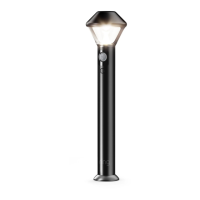
The Ring Pathlight is a smart lighting device designed to illuminate pathways and outdoor areas while integrating with the Ring smart home ecosystem. This device offers intelligent lighting solutions, enhancing both the aesthetic appeal and security of your property through its motion-sensing capabilities and connectivity with other Ring devices.
The primary function of the Ring Pathlight is to provide smart illumination for outdoor pathways. It is equipped with a motion sensor that detects movement in its vicinity, triggering the light to turn on. This feature is particularly useful for enhancing security, as it can deter potential intruders by illuminating dark areas, and for convenience, by lighting your way as you approach or walk along a path. The Pathlight is part of the Ring Smart Lighting family, which means it can be linked to a Ring Bridge to connect with the Ring app and other Ring devices. This integration allows for advanced control and customization of its lighting behavior. For instance, you can set schedules for when the light should be active, adjust its brightness, and configure it to work in conjunction with other Ring devices, such as Ring cameras or doorbells. When motion is detected by the Pathlight, it can trigger other connected Ring devices to begin recording or send alerts to your smartphone, creating a comprehensive security network. The Pathlight operates on batteries, offering flexibility in placement without the need for electrical wiring. Its design is intended for outdoor use, providing durable and reliable performance in various weather conditions.
Setting up and using the Ring Pathlight involves a few straightforward steps, beginning with downloading the Ring app and setting up a Ring Bridge. The Ring app serves as the central control hub for your Pathlight and other Ring devices. Once the app is installed on your smartphone or tablet, you'll be guided through the process of adding your Pathlight. The Ring Bridge is essential for connecting your Pathlight to the Ring app and enabling its smart features. It acts as a communication hub, allowing your battery-powered Pathlight to communicate with your home Wi-Fi network and other Ring devices.
To prepare the Pathlight for use, you'll need to insert four D Cell batteries (not included). This is done by pushing a lock button on the front of the Pathlight and sliding off the battery cover. The batteries should be inserted flat end first into the battery compartment. After inserting the batteries, you can proceed with setting up the device in the Ring app. In the app, you'll tap "Set Up a Device," select "Smart Lights," and follow the on-screen instructions to pair your Pathlight with your Ring Bridge and account. Once the setup is complete, the battery cover should be slid back onto the Pathlight.
Installation of the Pathlight involves placing a stake into the ground at your desired location. It's important to ensure that the "Sensor Direction" arrow on the stake is pointing toward the area you wish to monitor for motion. If you are installing multiple Pathlights, it is recommended to space them 5-7 feet apart to optimize motion sensing performance. After the stake is in place, the Pathlight is lowered onto the stake and twisted clockwise until it clicks, locking it securely into position. This modular design allows for easy installation and repositioning if needed.
Through the Ring app, users can customize various aspects of the Pathlight's operation. This includes adjusting motion sensitivity, setting up light schedules, and linking the Pathlight with other Ring devices. For example, you can configure the Pathlight to turn on when a Ring doorbell detects motion, or to activate a Ring camera to record footage. The app also provides notifications when motion is detected, keeping you informed about activity around your home. The battery-powered nature of the Pathlight means it can be placed in locations where running electrical wires would be difficult or impossible, offering significant flexibility in outdoor lighting design.
Maintaining the Ring Pathlight is relatively simple, primarily focusing on battery replacement and ensuring proper sensor functionality. Since the Pathlight is battery-operated, periodic battery replacement is the main maintenance task. The Ring app will typically notify you when the battery levels are low, prompting you to replace the four D Cell batteries. The process for replacing batteries is the same as the initial insertion: push the lock button, slide off the cover, replace the batteries, and then slide the cover back on. Using high-quality D Cell batteries can help extend the time between replacements.
To ensure optimal performance of the motion sensor, it's advisable to keep the sensor area clean and free from obstructions. Dust, dirt, spiderwebs, or overgrown foliage can interfere with the sensor's ability to accurately detect motion. Periodically wiping down the Pathlight, especially the sensor lens, with a soft, damp cloth can help maintain its effectiveness. Avoid using harsh chemicals or abrasive materials that could damage the device's finish or sensor.
The Pathlight is designed for outdoor use and is built to withstand various weather conditions. However, extreme weather events or prolonged exposure to harsh elements might warrant occasional inspection for any signs of wear or damage. While the device is durable, ensuring it remains securely attached to its stake and that the stake itself is firm in the ground can prevent accidental dislodgement.
Software updates for the Ring Pathlight are managed through the Ring app and Ring Bridge. Keeping the Ring app updated to the latest version and ensuring your Ring Bridge has the most recent firmware will provide access to new features, performance improvements, and security enhancements. These updates are usually applied automatically or with a simple prompt within the app.
Should you encounter any issues with your Pathlight, the Ring app often provides troubleshooting tips and diagnostic information. Additionally, Ring's customer support resources, including online help articles and phone support, are available for more complex problems. Regular checks of the device's status within the Ring app can help identify and address potential issues proactively, ensuring your Pathlight continues to function reliably as part of your smart home lighting and security system.
 General
| Brand | Ring |
|---|---|
| Model | Pathlight |
| Category | Outdoor Light |
| Power Source | Battery |
| Brightness | 80 lumens |
| Weather Resistance | Weather Resistant |
| Light Type | LED |
| Motion Sensor | Yes |
| Installation | Stake into ground |
| Connectivity | Ring Bridge required |
| Battery Life | Up to 1 year (depending on usage) |

 To Next Page