This document describes the Brivis by Rinnai 1F83C-11PRBR Single Stage Thermostat, a programmable controller designed for managing heating and cooling systems. The thermostat is suitable for various applications, including conventional gas, oil, electric (mV and 24V) systems, heat-only, cool-only, or heat/cool systems, as well as heat pumps (air source or geothermal) without auxiliary heat. It is designed for single-stage heat/cool operations.
Function Description
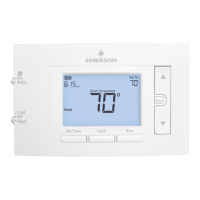
The Brivis 1F83C-11PRBR thermostat serves as a central control unit for your HVAC system, allowing users to set and maintain desired temperatures based on a programmed schedule or manual overrides. It features a clear digital display that shows the current time, room temperature, setpoint temperature, system status (e.g., "Heat On," "Cool On"), and various indicators such as battery status and keypad lock.
The thermostat supports different schedule types, including 7-Day, 5-1-1 Day, or Non-Programmable modes, offering flexibility to match diverse user needs and lifestyles. The "Early Start" feature allows the thermostat to begin heating or cooling early to ensure the programmed temperature is reached by the scheduled time.
For system protection, it includes a compressor lockout feature that prevents short cycling, ensuring the longevity of the compressor. The thermostat also provides reminders for changing the air filter, promoting regular maintenance and efficient system operation.
Usage Features
The thermostat is designed for user-friendly operation with a combination of buttons and switches.
- Fan Switch: Controls the blower operation, with "On" for continuous fan operation and "Auto" for the fan to run only when heating or cooling is active.
- System Switch: Allows users to select the operating mode: "Heat," "Cool," or "Off."
- Backlight Button: Illuminates the display for better visibility in low-light conditions.
- Set Correct Time: Used to set the current hour, minutes, and day of the week.
- Temperature Adjustment Buttons (▲/▼): Used to raise or lower the temperature setpoint.
- Menu Button: Accesses the thermostat's menu options, including the Installer Menu and User Menu.
- Next/Back Buttons: Navigate through menu items and schedule programming.
- Hold Button: Initiates a permanent temperature hold, bypassing the programmed schedule.
- Run Button: Cancels a permanent hold and returns the thermostat to its programmed schedule.
- Program Override (Temporary Hold): Allows users to temporarily adjust the temperature setpoint, overriding the schedule for a minimum of 2 hours before automatically reverting to the program.
The display provides real-time feedback on the system's status. For instance, "Starting Soon" indicates that the compressor lockout feature is active, causing a delay before the compressor turns on. "Replace" or battery icons signal when new AA alkaline batteries are needed.
Installer Menu: This menu provides access to advanced configuration options that affect system performance. It includes settings for:
- Heat Cycle Rate: Adjusts how often the heating system turns on (Slow, Medium, Fast).
- Cool Cycle Rate: Adjusts how often the cooling system turns on (Slow, Medium, Fast).
- Compressor Lockout: Enables or disables the compressor protection feature.
- Maximum Heat Limit: Sets the highest allowable temperature setpoint in heat mode.
- Minimum Cool Limit: Sets the lowest allowable temperature setpoint in cool mode.
- Schedule Type: Configures the thermostat for 7-Day, 5-1-1 Day, or Non-Programmable scheduling.
- Early Start: Activates or deactivates the feature that starts heating/cooling early to reach the setpoint by the programmed time.
- Fahrenheit or Celsius: Selects the temperature unit display.
- Temperature Display Adjustment: Allows fine-tuning of the displayed room temperature.
- Continuous Display Light: Keeps the backlight on continuously (requires a "C" wire connection).
- Change Air Filter Reminder: Sets a monthly reminder for filter replacement.
- Keypad Lock: Prevents unwanted changes by disabling the buttons.
User Menu: This menu provides access to settings that do not affect system performance, allowing users to customize basic thermostat features. It includes options for:
- Schedule Type
- Early Start
- Fahrenheit or Celsius display
- Temperature Display Adjustment
- Continuous Display Light
- Change Air Filter reminder
Programming the Schedule: The thermostat comes with an energy-saving factory schedule. Users can modify both heating and cooling schedules by setting specific times and temperatures for different periods (P1/Wake, P2/Leave, P3/Return, P4/Sleep) for each day of the week.
Maintenance Features
The Brivis 1F83C-11PRBR thermostat incorporates several features to aid in maintenance and troubleshooting:
- Battery Status Indicator: The display shows a battery icon ("Replace" or "I") when the batteries are low, prompting the user to install new premium brand AA alkaline batteries. This is crucial for maintaining clock and program settings, especially if a C-wire is not available.
- Change Air Filter Reminder: Users can set a monthly reminder (1 to 12 months) to change the air filter, ensuring optimal system performance and air quality. This reminder can be turned off if not desired.
- Keypad Lockout: This feature allows users to disable the thermostat buttons, preventing accidental or unauthorized changes to settings. It is activated and deactivated by pressing and holding specific buttons.
- Troubleshooting Guide: The manual provides a comprehensive troubleshooting section that lists common symptoms (e.g., "No Heat," "No Cool," "Fan Runs Constantly," "Call for Service" icon), possible causes, and corrective actions. This helps users diagnose and resolve minor issues without professional assistance.
- Resetting the Thermostat:
- Hard Reset: If the thermostat has a blank display or is unresponsive, removing the batteries for 2 minutes will perform a hard reset without altering menu settings or programs.
- Factory Defaults Reset: To reset only the schedule and user settings to factory defaults, users can press and hold the Menu and Backlight buttons simultaneously until the display goes blank and resets.
- "Call for Service" Icon: If the heating or cooling system fails to reach the setpoint within 10 degrees within 2 hours, or if the room temperature display shows "--", a "Call for Service" icon appears, indicating a potential system issue or the need for thermostat replacement.
The thermostat's design emphasizes ease of installation and configuration, with clear wiring instructions and an installer menu for proper system setup. Precautions are highlighted to ensure safe installation and operation, warning against exceeding voltage ratings, improper wiring, and operating the cooling system below 50°F outdoor temperature.


 To Next Page
 General