3.2 HOW TO USE THE BOAT WITH APP
3.2.1 DOWNLOAD THE APP
Please search “Rippton Boat” in the APP Store for your iOS equipment, or in
Google Play or Samsung Galaxy Store or Huawei Store for your Android
equipment, or scan the QR code below to download the app, for controlling the
boat in a much easier way. Installing the app requires Android System 8.0 or
above and iOS 9.0 or above
3.2.2 MAP PRELOAD IN ADVANCE
Before connecting the boat to your mobile device (which will temporarily restrict your device's access
to the internet), it's essential to first access the operation interface of the "Rippton Boat" app while
connected to the internet. This step is crucial to preload the map of your fishing destination for a
seamless experience.
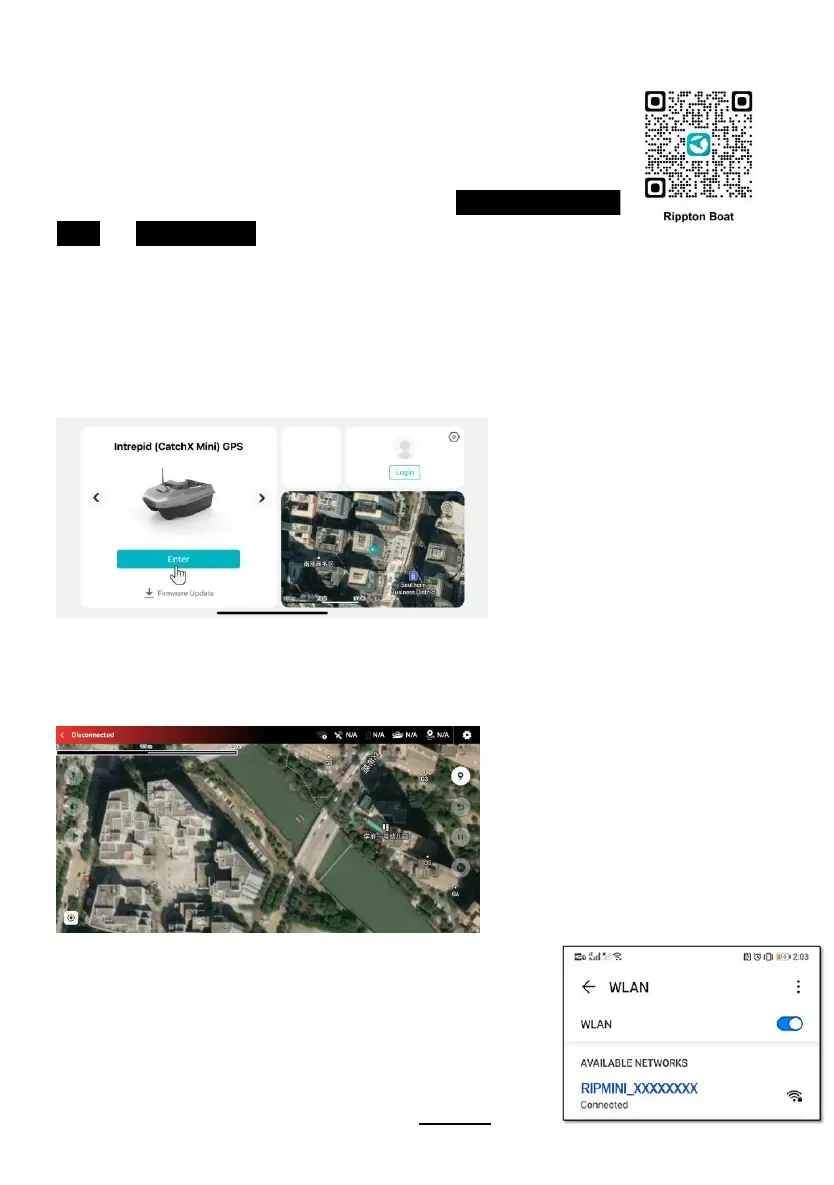
The map for your current location will be pre-loaded automatically after entering the operation interface.
When you see the map loaded and displayed like below, it means the map preload has been
successful.
Note: Without preloading the map, it will cause the connection failure
between the boat and your mobile device.
3.2.3 CONNECTION WITH APP
a. After switching on the remote and the boat, search for the
boat’s Wi-Fi signal in the settings of your mobile device. Find
the boat’s Wi-Fi name (in the format of RIPMINI_XXXXXXXX)
and make a connection with the password of 12345678.


 To Next Page