USAGE
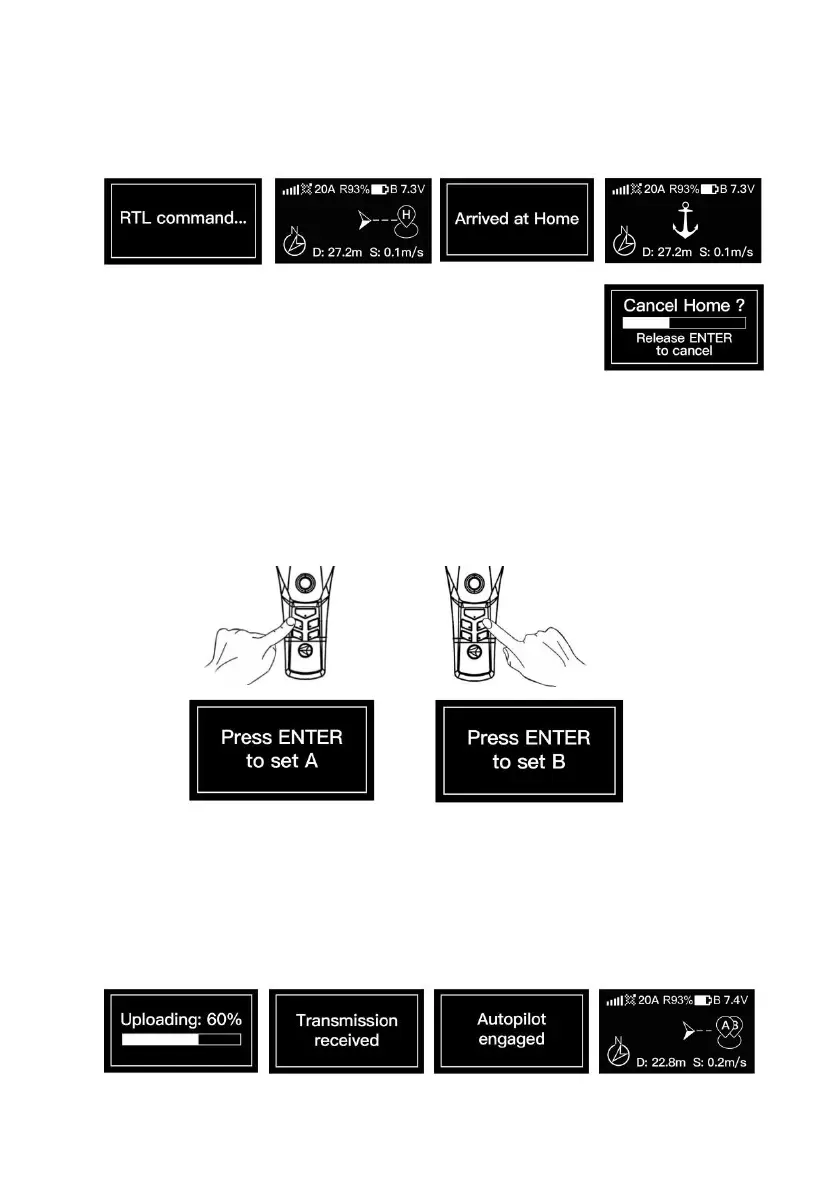
d. Long press down the joystick to activate the Return to Home.
Upon reaching the home point, an “Anchor" symbol will appear on the screen, accompanied by a
gentle vibration every 3 seconds as a prompt.
If you want to cancel the Return to Home in the middle way, just
press and hold the “Enter/ESC” button till canceled.
3.1.5.2 TASK POINT SET AND USAGE
SET
a. After the home point determined, drive the boat to the position proposed for dropping
baits/berleys. This mini boat allows you to set 2 task points: Point A and Point B;
b. Short press either the Point A button or the Point B button, a prompt box will pop up on the
screen as follows:
c. Short press the “Enter/ESC” button, the screen will display “Set success” or “Set fail”.
d. After one point is set, another point can be set subsequently.
USAGE
e. Long press the button for Point A/B you set to perform the task:


 To Next Page