RDS (Radio Data System)
RDS service availability varies with areas.
Please understand if RDS service is not
available in you area, the following service is
not available.
RDS Basics
AF
(Alternative Frequency): When the radio
signal strength is poor, enabling the AF
function will allow the unit to automatically
search another station with the same PI
(program identication) as the current station
but with stronger signal strength.
PS
(Program Service name): The name of
station will be display instead of frequency.
Traffic Announcements
Some RDS FM stations periodically provide
trafc information.
TP
(Trafc Program Identication)
Broadcasting of trafc information
TA
(Trafc Announcements Identication)
Radio announcements on trafc conditions
EON (Enhanced Other Networks)
When EON dat a i s re ceiv ed, the EON
indicator lights and the TA and AF functions
are enhanced.
TA: Traffic information can be received from
the current station or stations in other network.
AF: The frequency list of preset RDS stations
is updated by EON data. EON enables the
radio to make fuller use of RDS information.
It constantly updates the AF list of preset
stations, including the one that currently tuned
into. If you preset a station around the area at
your home, you will later be able to receive the
same station at an alternative frequency, or
any other station serving the same program,
EON also keeps track of locally available TP
stations for quick reception.
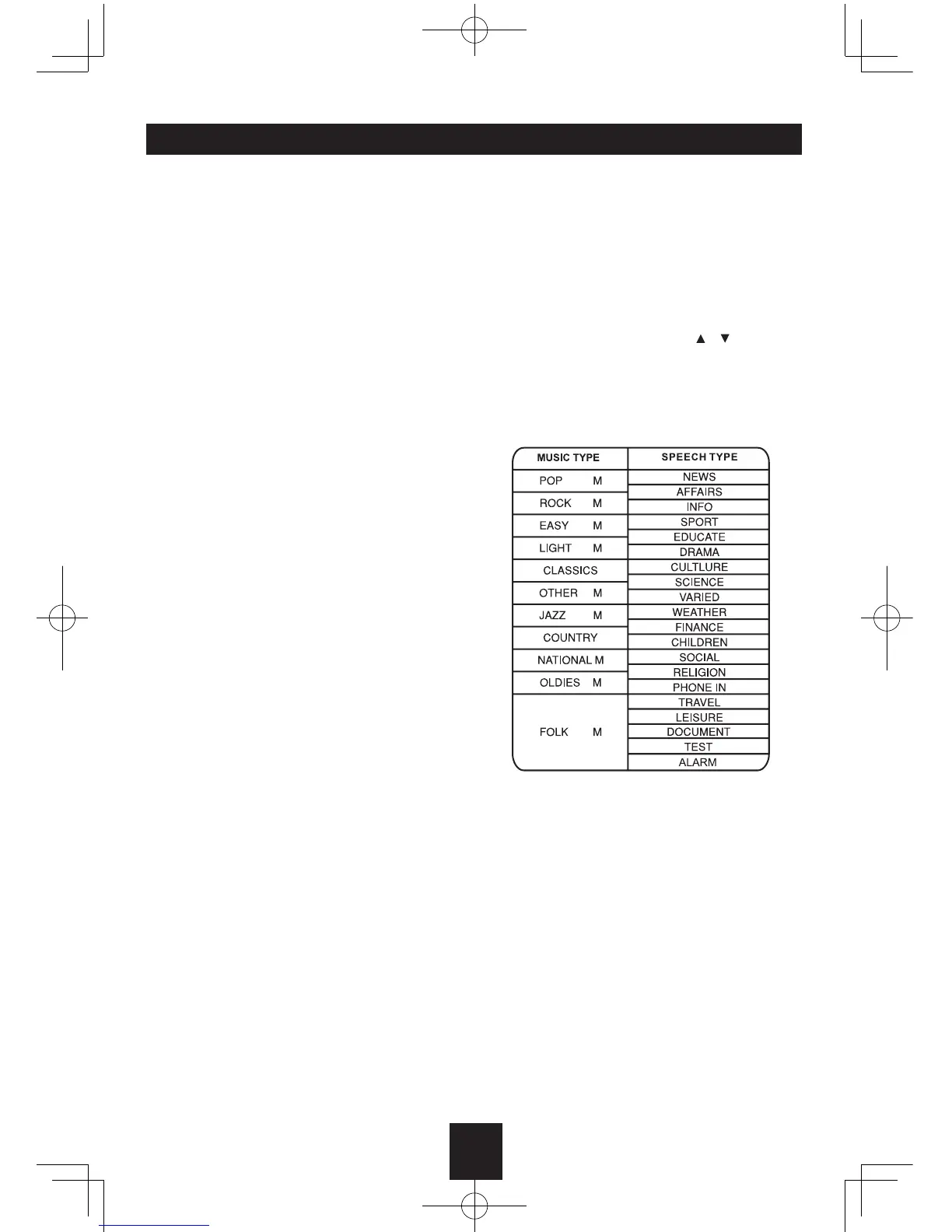
PTY Reception (Program Type)
RDS FM stations provide a program type
identication signal.
Example: news, rock, info, sport, etc.
PTY Mode:
Press BAND
more than 2 seconds
to turn
on the Program Type reception, the previous
PTY type is shown
, then use / to select
the desired program type. The selected PTY
type is shown and searching starts if no other
function is selected for 2 seconds. If there is
no corresponding program type, NO PTY is
shown and the unit will return to normal mode.


 To Next Page