Remote Controls
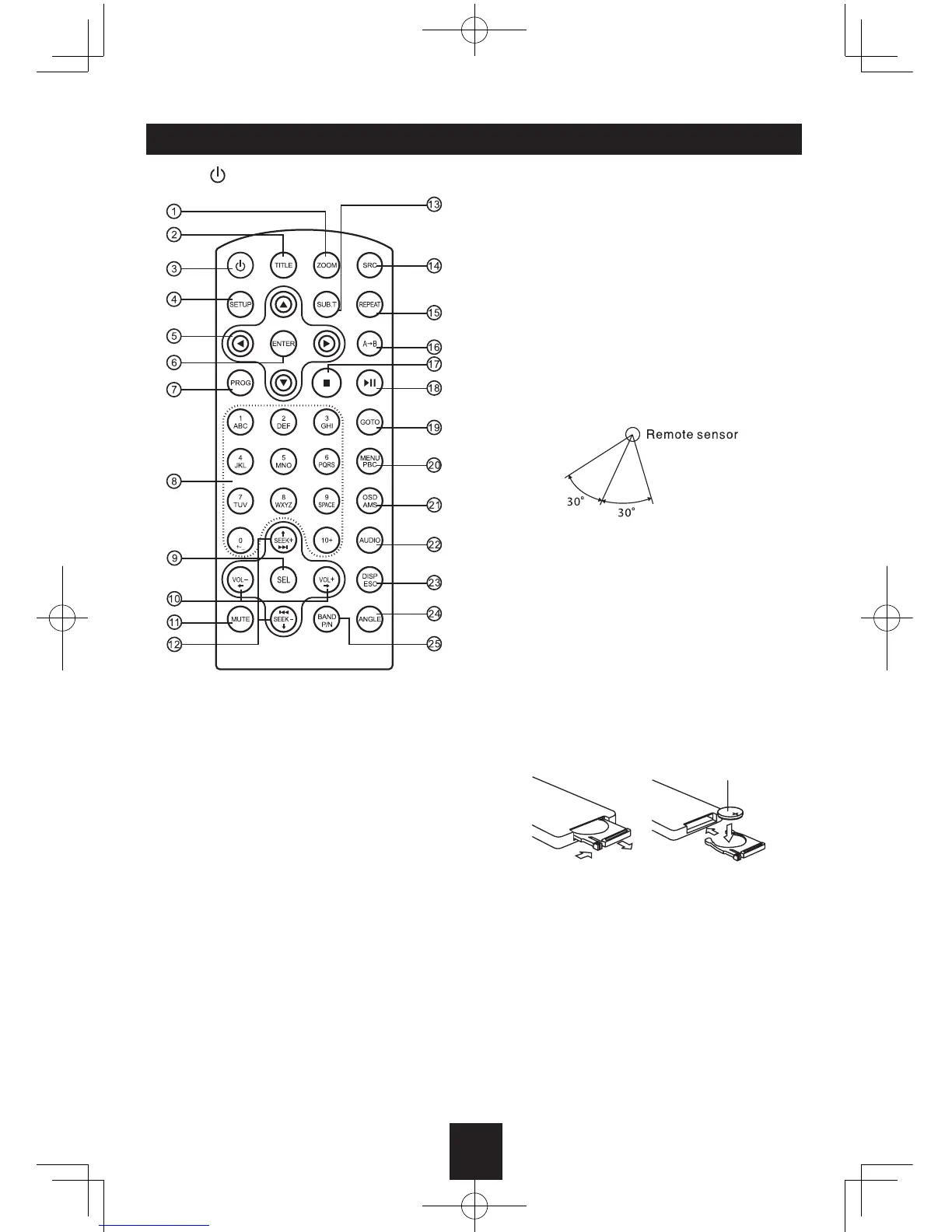
Press to turn on/off the unit.
Replacing the lithium battery
When the range of operation of the card
remote control becomes short or no function,
replace the lithium battery with a new one.
Make sure the battery polarity replacement is
correct.
1. Pull out the battery holder while pressing
the stopper.
2. Insert the button-type lithium battery with
the (+) mark facing upward. Insert the battery
holder into the remote control.
Remote Control Operating Range
The remote control can operate within a
distance of 3~5m.
Warning
• Store the battery where children cannot
reach. If a child accidentally swallows the
battery, consult a doctor immediately.
• Do not recharge, short, disassemble or heat
the battery or dispose it in a fire.
• Do not leave the battery with other metallic
materials. Otherwise, the battery may start
to give off heat, crack or catch fire.
• When throwing away or saving the battery,
wrap it in tape and insulate.
1. Zoom (DVD/VCD only)
2. Title (DVD only)
3. Power on/off
4. Setup
5. Menu cursor
6. Enter
7. Program
8. Digit area
9. Select Audio/Video Setting, then rotate the
knob to adjust level.
10. Volume
11. Mute
12. - Radio tune
- Track skip/seek
13. Subtitle (DVD only)
14. Source switch
15. Repeat
16. Repeat A-B
17. Stop/Return
18. Play/Pause
19. Goto search
20. - DVD menu
- PBC (for VCD 2.0 or up)
21. - OSD: On screen display
- AMS: Search and store stations
automatically
22. - DVD audio
- VCD audio L/R/ST
23. - DISP: Display time/clock (Video mode)
- ESC: Return to previous menu
24. Angle (DVD only)
25. - Video system PAL/NTSC/AUTO
- Radio band (in Radio mode)


 To Next Page