Temporary image adjustment method (manual adjustment) Item 21-1
[ B2B image adjustment ]
This function is available on “HC5500 firmware Ver2.02” or later.
In addition, controller veision is required the following version or later.
HC3R-5000; Ver1.30 PS7R-9000; Ver3.30
[ B2B image adjustment ]
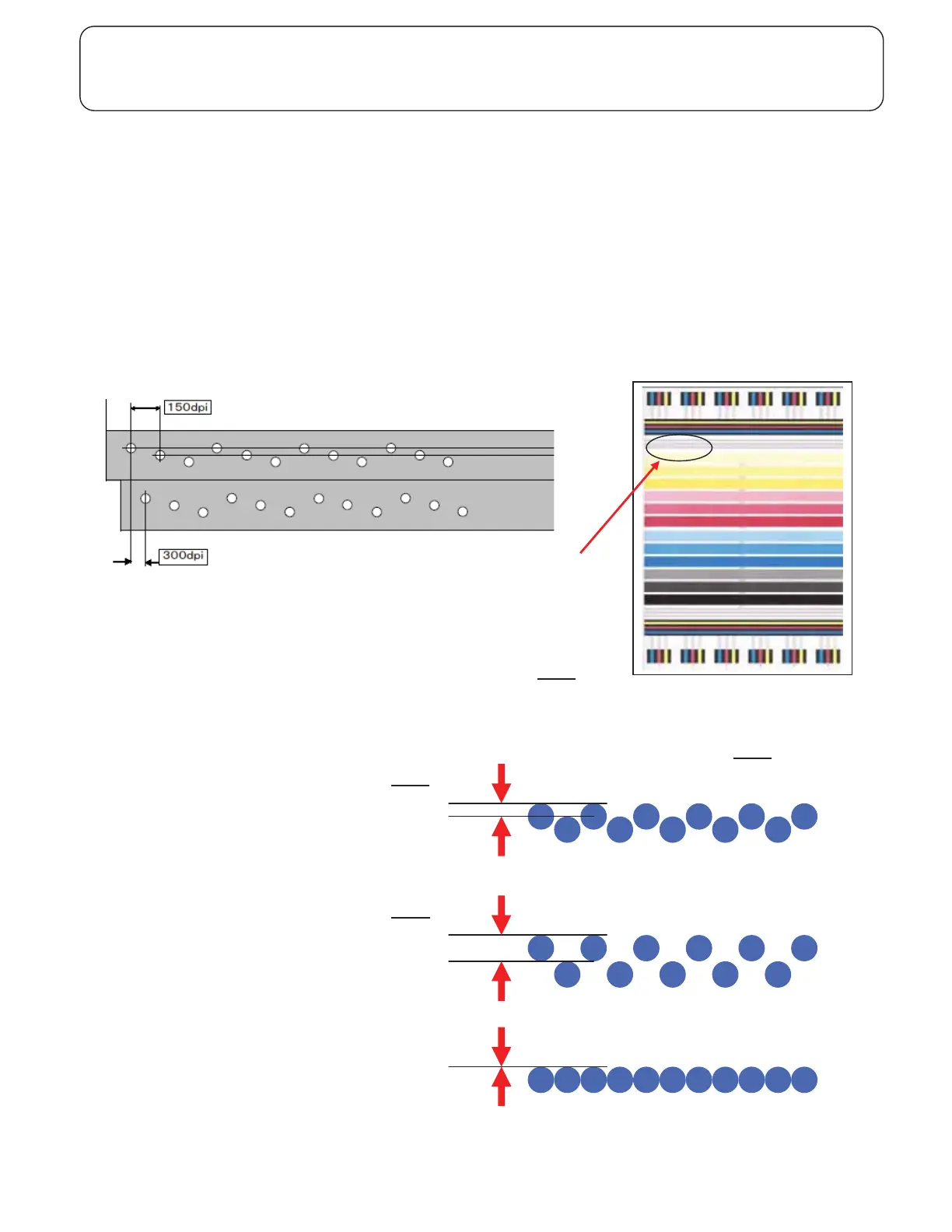
- Two 150 dpi Print Head compose a 300 dpi Print Head.
- Since there is an actual distance between these two parts, in order to print in the same position, it is necessary to drive
two parts with a suitable time lag.
- If the time lag is not suitable, the image will become like a wavy line and it needs adjustment.
- Perform SE mode 5.6.9 and get the print.
- Measure the distance between the lines of dots and decide the value
to add to the parameter by SE mode 8.5.1.7.x (x: Head position) (Ref A
)
(The diameter of a dot is equivalent to 16 points.)
- Add that value to the parameter on try.
- If the image shifts opposite to assumed direction, it has had to be subtracted from the parameter. (Ref B
)
[ Horizontal image adjustment ]
- You can not adjust it on the machine .
Ref A
Ref B
Collect condition
SE mode 5.6.9 Size A3
Check here



 To Next Page