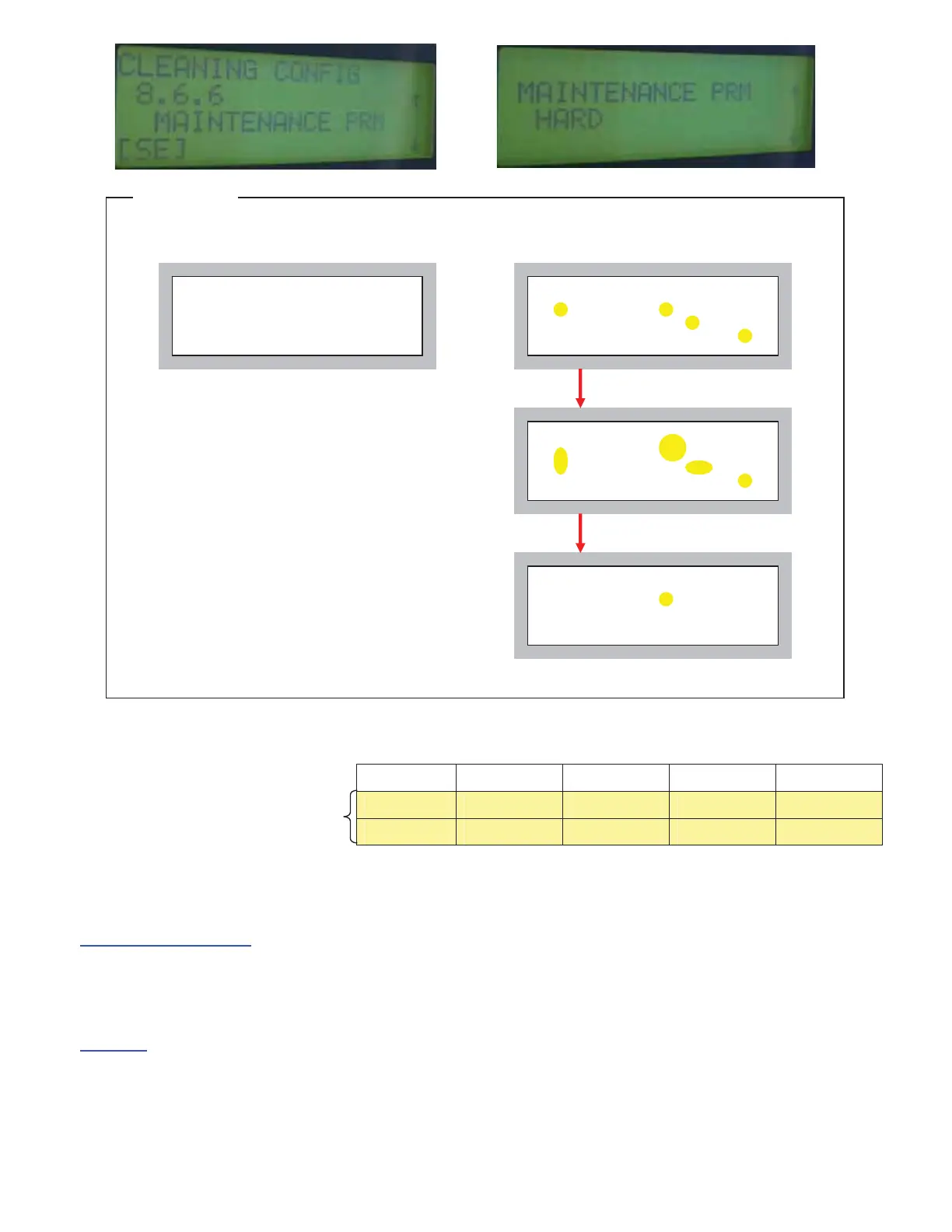
Print Head condition after cleaning
- If you adjust the parameter with HC5000, please refer to a following chart.
8-6-6
OFF(default) WEAK NORMAL HARD
8-6-6-5
50ms 150ms 250ms 350ms
8-6-6-9
50ms 50ms 100ms 100ms
Cause of the problem (3)
There is a problem in the Reservoir.
- Solenoid valve of Reservoir cannot work properly and cannot release compressed air in the Reservoir during Print Head
cleaning operation, it causes ink spilling out from Print Head.
Solutions
- Replace the Ink Reservoir.
HC5500 Ver2.00 or later
HC5000 Ver2.05 or later
Clear
There are some ink drips; they
becoming bigger.
30sec later
Print Head Print Head
No problem Adjustment is required
After adjusting the parameter
If there are many ink drips on the Print Head even if
change parameter to “HARD”, it is necessary to replace
ink reservoir or to clean up the Print Head again.
Reference



 To Next Page