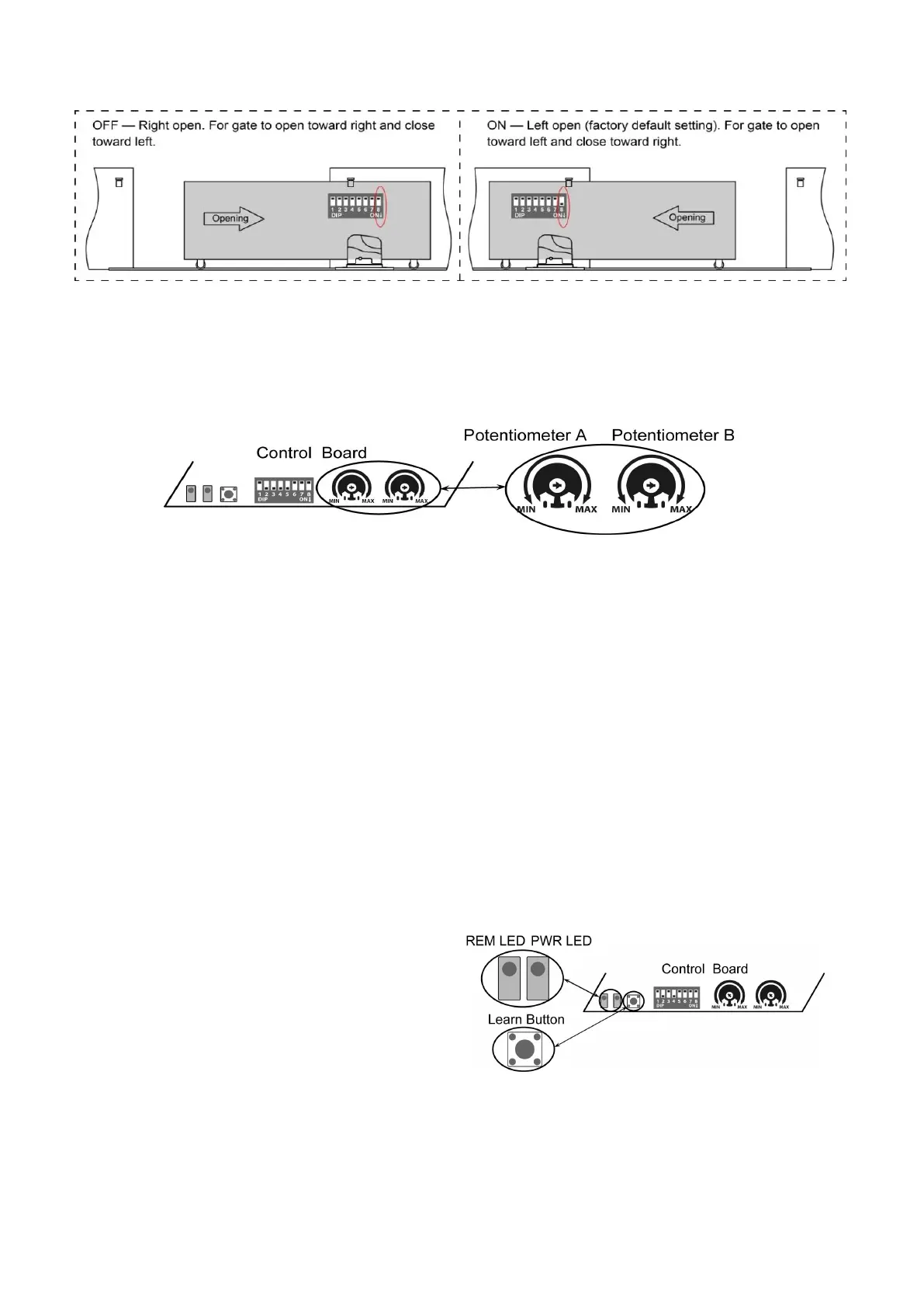
DIP Switch #8: Left/Right open
2. Potentiometers
Potentiometer A is used to adjust the close stall force the gate operator. Turn clockwise to increase the stall
force, and turn it counter-clockwise to decrease the stall force.
Potentiometer B is used to adjust the open stall force the gate operator. Turn clockwise to increase the stall
force, and turn it counter-clockwise to decrease the stall force.
Test the reversing sensitivity
For the sake of safety, it is very important to test the reversing sensitivity as soon as the control board set is
finished.
The reversing sensitivity adjustment is inverse correlation with stall force adjustment in potentiometer A and
B. In other word, the stall force level is higher; the reversing sensitivity level is lower.
Put an immobile object along the gate path, and then operate the gate to strike it during the close cycles.
The gate must reverse as soon as object is struck with it. If the gate doesn’t reverse, please increase the
reversing sensitivity by turning the potentiometer in counter-clockwise direction. (Turning the stall force
potentiometer toward to MIN position to increase the reversing sensitivity)
Note 1: If the sensitivity setting is too higher, the gate will stop or reverses very easy by itself while
there is little obstruction or resistance such as strong wind or heavy snow sometimes.
Note 2: Always check the gate reversing function every each time of control board set or restart after
power off.
How to learn or erase the remote
Learn the remote
Press and release the learn button, the REM LED
light will be on, then press the key in the remote twice
in 2 seconds, the REM LED light will flash for 4
seconds. Now the remote has been learnt successfully.
Erase all the remote codes
Press and hold the learn button until the REM LED light is off. Now all remote codes have been erased.


 To Next Page