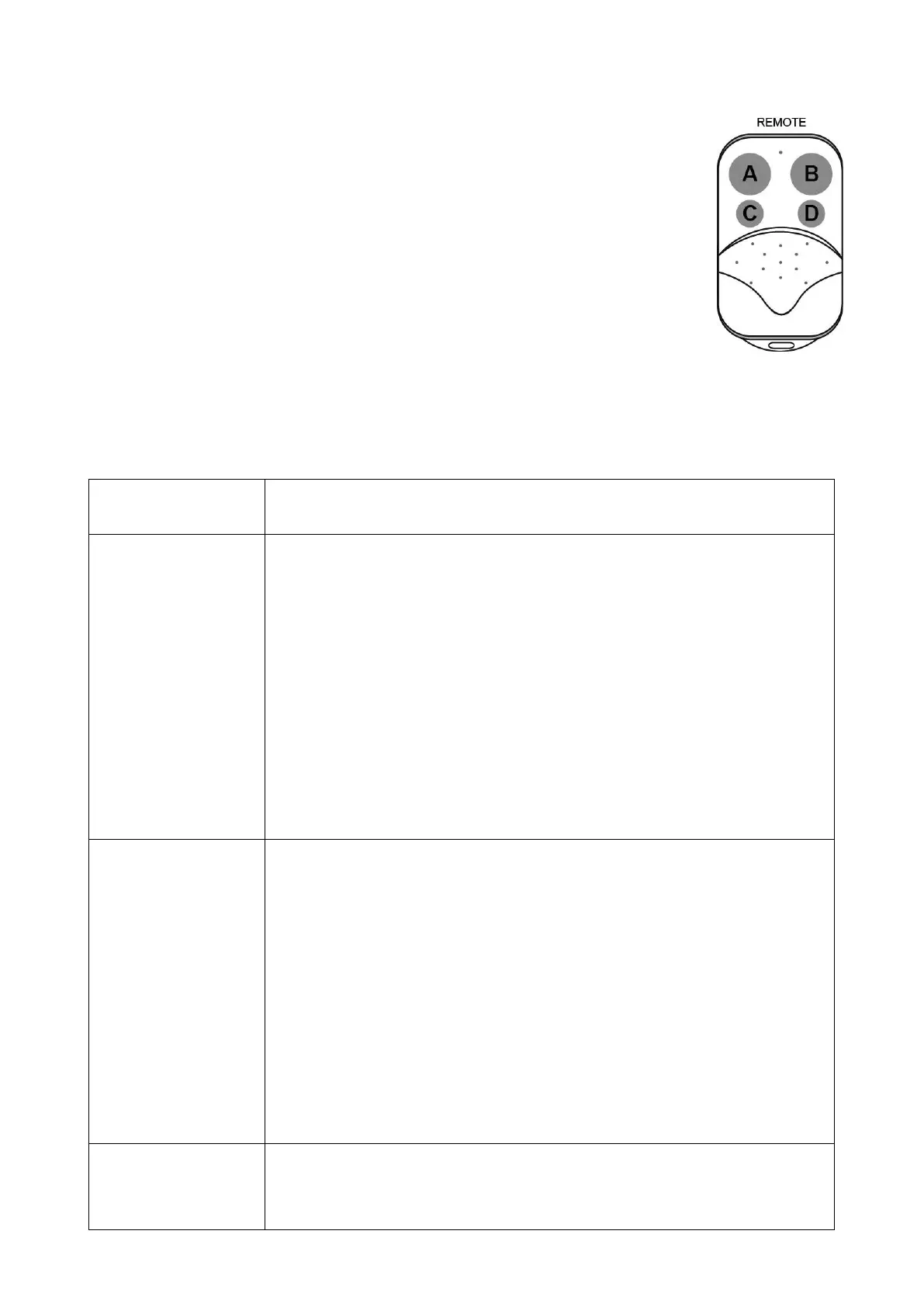
How to use the remote to control the opener
Key A is used to operate the opener to work alternately (open-stop-close-stop-open).
When the Pedestrian Mode function is enabled, Key B is used to achieve the
Pedestrian Mode function (open the gate for the pre-setting time). When the
Pedestrian Mode function is disabled, the opener works alternately (open-stop-close-
stop-open) by pressing Key B.
The Key C and Key D are reserved for garage door opener, swing gate opener in our
brand. While if you want to use Key C and or Key D to control a second sliding gate
opener, an external receiver (optional) is necessary.
Troubleshooting
Have a multi-meter to check voltage and continuity. Use caution when checking high voltage terminals.
The opener does not
run. Power LED is
OFF.
1. Make sure that the power cord is properly plugged into the mains outlet.
2. Check if the output voltage of the transformer is 24VAC. If the voltage
measures 0, the transformer may be overheated or damaged. Turn power off
and allow board to cool for several minutes then reset. Replace the
transformer if the symptom still exists.
3. Check the fuse in the control board. Replace the fuse if it was burnt out.
4. Check the status of the over-discharged LED on the solar controller, the
voltage of the batteries is too low to power the gate opener if the LED is ON.
Please wait the batteries are charged to full.
5. The solar controller could be faulty if the over-discharged LED is ON when
the voltage of the batteries is normal (>24VDC).
6. Check the control board. Replace the control board if necessary.
The opener does not
run. Power LED is
ON.
1. Check to be sure the beam is not blocked if a photocell is used as a
secondary entrapment prevention device. If a photocell is not used, photocell
terminal of the control board should be shorted by a jumper wire.
2. Check the motor. Release the clutch then disconnect the wires of the
motor from terminal 1 and 2. Connect the wires to 24V battery directly, the
motor should run, and then exchange the wires, the motor should run in the
opposite direction. If the motor runs in both directions, please check the other
parts listed below.
3. Check the limit switch. Use a jumper wire to short terminal 4 with terminal
3 and 5, and then use a keying device to operate the opener, replace the limit
switch if the motor could run in both directions.
4. Check the control board. Replace the control board if necessary.
Remote control does
not work.
1. The indicator light of remote control is not on. Check the battery in your
remote control. Replace the battery if necessary.
2. The distance you use the remote is too far away from the opener. Try it


 To Next Page