FS Pag. 54 Rev 00 02/12
UK
Code Level Descr.
Range Unit MBP LBP HBP
dro 1
°C or °F selection
0 = °C
1 = °F
This selection only affects temperature measurements. The values of the
parameters concerning temperature maintain their current values and
therefore, they must be varied manually to adapt them to the Fahrenheit
scale.
0,1 flag 0 0 0
List of -CnF configuration parameters
LOC
(**)
1
Keyboard lock
0 = keyboards disabled
1 = main terminal keyboard enabled
2 = secondary terminal keyboard enabled
3 = keyboards enabled (the first to request a service has precedence
until completion)
0 … 3 1 1 1
rEL 1
Software release
A read-only value that identifies the software version
0.0 … 99.9 - - -
List of -Lan(***) network parameters
dEA 1
Supervision network address (for Master only)
The address to be set on each master must take into account the number
of slaves present in the LAN network preceding it: “dEA”=”dEA[previous
master]”+”L01[previous master]”+1
The Supervision network address for a Slave is “dEA[master]”+”L00”)
1 … 199 1 1 1
*ATTENTION: (*) ATTENTION: In order to unlock the keyboard, press "SET" and "ON/OFF" at the same time for
at least 5 seconds.
**ATTENTION: the "LAn" network parameters is only used with MASTER/SLAVE and TELEMANAGEMENT operation.
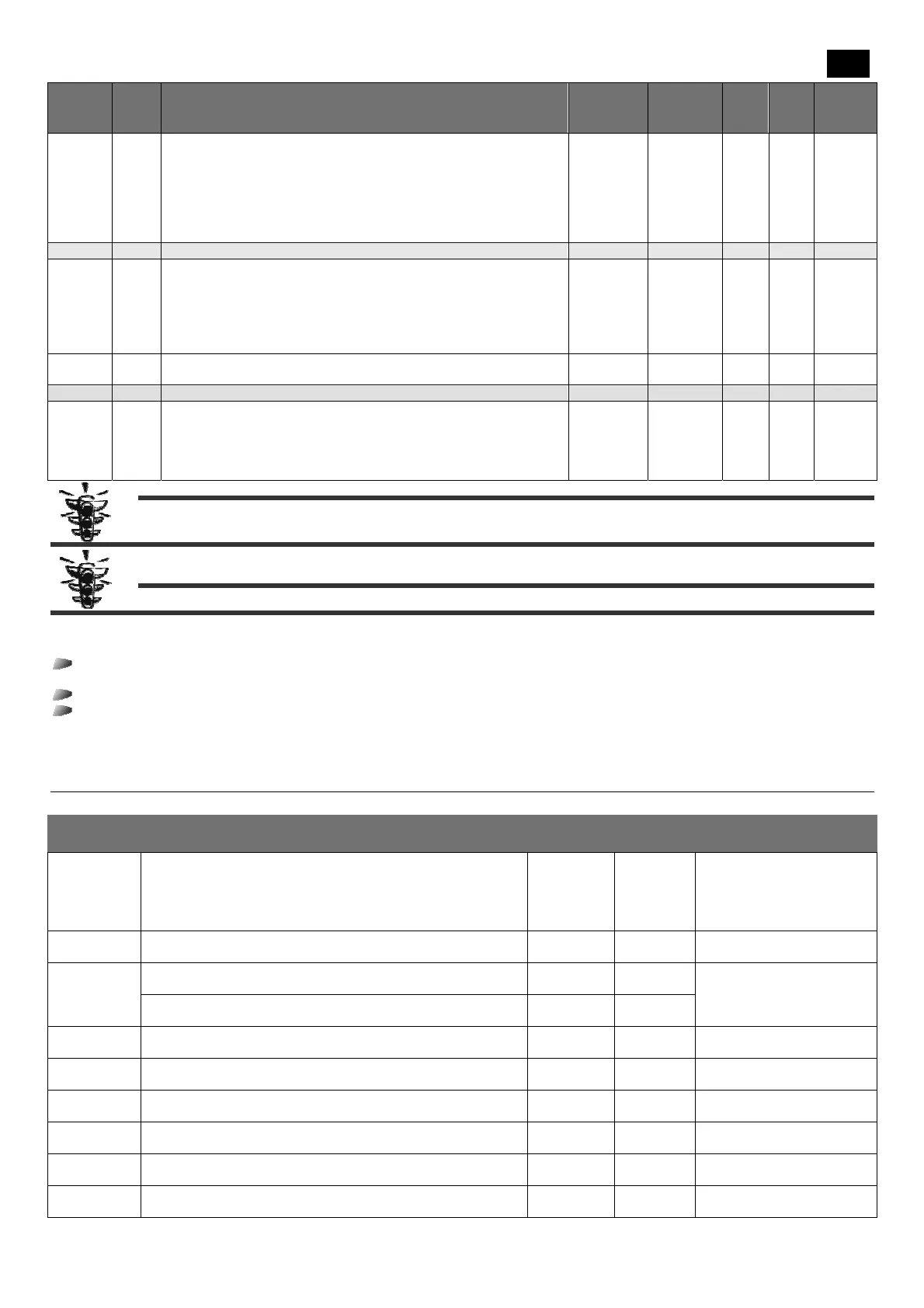
5.2. Alarm signals
In case of alarms, the board normally activates the following actions:
the relative alarm code is signalled on the display. In particular, the display control alternates the alarm code and the
temperature normally displayed;
the alarm led switches on;
the relay alarm is activated.
For certain alarms and signals, the led and/or the relay is not activated. By pressing any key, the relay deactivates (if active) and the
led flashes, while the display alarm code continues to be displayed. The led switches on and the alarm code disappears only when the
cause that generated it is found. Table 8 reports in detail the descriptions of each alarm and the actions undertaken in this respect.
Table 7 – Alarms description.
Code
displayed
Description/Control
LED
enable
Relay
enable
Reset Mode
E1
cold room probe temperature error
if a probe is used for adjustment, the compressor will be activated
cyclically and defrosting cycles will be disabled;
if a balanced network probe is enabled, adjustment will continue,
bypassing the malfunctioning probe
yes yes
automatic when the condition
ceases
E2
End defrostin probe g error
defrosting will end due to timeout
yes yes
automatic when the condition
ceases
E3
3
rd
probe error (condenser temperature)
the associated controls are disabled
blink. no
automatic when the condition
ceases
3
rd
probe error (2nd evaporator temperature)
defrosting will end due to timeout
yes yes
heat alarm (*)
adjustment is disabled
yes no
automatic when the condition
ceases
HP pressure switch alarm(*)
adjustment is disabled
yes no
automatic when the condition
ceases
LP pressure switch alarm(*)
adjustment is disabled
yes no
automatic when the condition
ceases
E4
repeated heat alarm
adjustment is disabled permanently
yes yes
at switch on
E5
repeated HP pressure switch alarm
adjustment is disabled permanently
yes yes
at switch on
E6
repeated LP pressure switch alarm
adjustment is disabled permanently
yes yes
at switch on


 To Next Page
 Loading...