Briefly press the Menu button to switch the image mode includ-
ing white hot (default), black hot,red hot, color, highlight (only for
K3).
Note: When using highlight mode, the heat source target in the
image is more prominent and brighter, and the background is
darker, making it easier to quickly identify the target.
Photo/Video (Video Button)
Video Recording
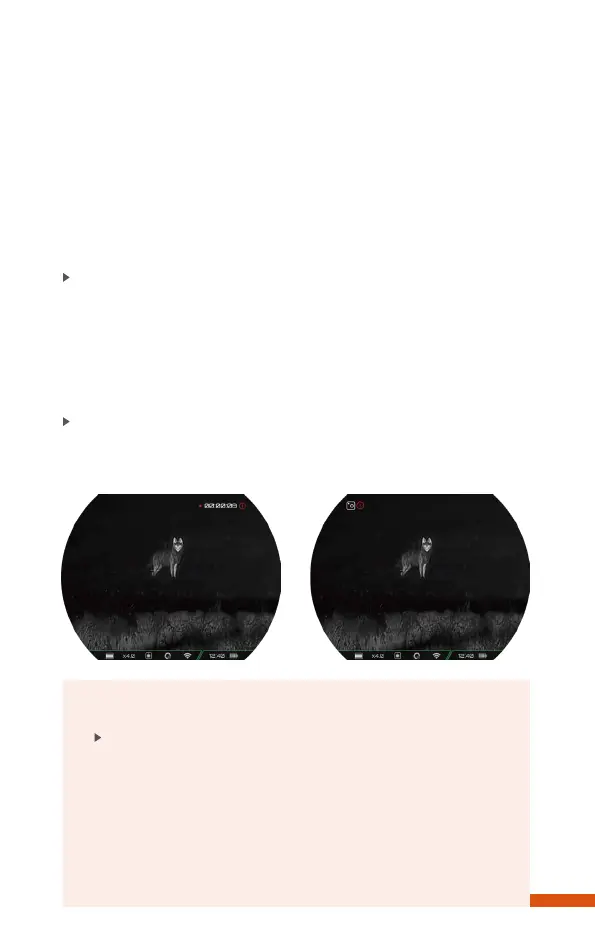
Short press the Video button to start recording. A prompt box
showing the recording time will appear in the upper right cornerof
the screen with a time format of HH:MM:SS (hour:minute:
second). Short press the Video button again to stop and save the
video recording.
Photo Taking
Long press the Video button to take a photo, and the screen will
freeze with a photo icon flashing in the upper left corner.
Briefly press the Menu button to switch the image mode includ-
ing white hot (default), black hot,red hot, color, highlight (only for
K3).
Note: When using highlight mode, the heat source target in the
image is more prominent and brighter, and the background is
darker, making it easier to quickly identify the target.
Photo/Video (Video Button)
Video Recording
Short press the Video button to start recording. A prompt box
showing the recording time will appear in the upper right cornerof
the screen with a time format of HH:MM:SS (hour:minute:
second). Short press the Video button again to stop and save the
video recording.
Photo Taking
Long press the Video button to take a photo, and the screen will
freeze with a photo icon flashing in the upper left corner.
10
Note
The photos and videos taken will be saved on the
built-in memory card respectively in the format of
PIC_HHmmss.jpg (photos) and VIDEO_HHmmss.mp4
(videos). It is recommended to synchronize the device
time and date through the app before using the pho-
to/video mode. You can find specific operation instruc-
tions in the RIX App which is available to download on our
The photos and videos taken will be saved on the
built-in memory card respectively in the format of
PIC_HHmmss.jpg (photos) and VIDEO_HHmmss.mp4
(videos). It is recommended to synchronize the device
time and date through the app before using the pho-
to/video mode. You can find specific operation instruc-
tions in the RIX App which is available to download on our


 To Next Page