01
SHORTCUT
FUNCTION
10
The shortcut functions can be directly
used through buttons on the home
screen.
Digital Zoom (Zoom Button)
On the home screen, simply press the
Zoom button to zoom in and out on the
subject.
The status bar provides a real-time
display of the magnification level as you
adjust it.
Manual Image Correction (Zoom
Button)
This function is effective for enhancing
degraded or uneven images. By balanc-
ing the background temperature of the
detector, calibration can eliminate image
defects and improve overall quality.
If you feel that the image is bad, you can
press and hold the Zoom button until
hearing a clicking sound.
Standby (Power Button)
If you are not currently using the device,
but do not want to shut it down, you can
use standby mode. This function can
reduce device power consumption and
extend battery life.
Briefly press the Power button to enter
standby mode, then press the Power
button again to exit standby mode.
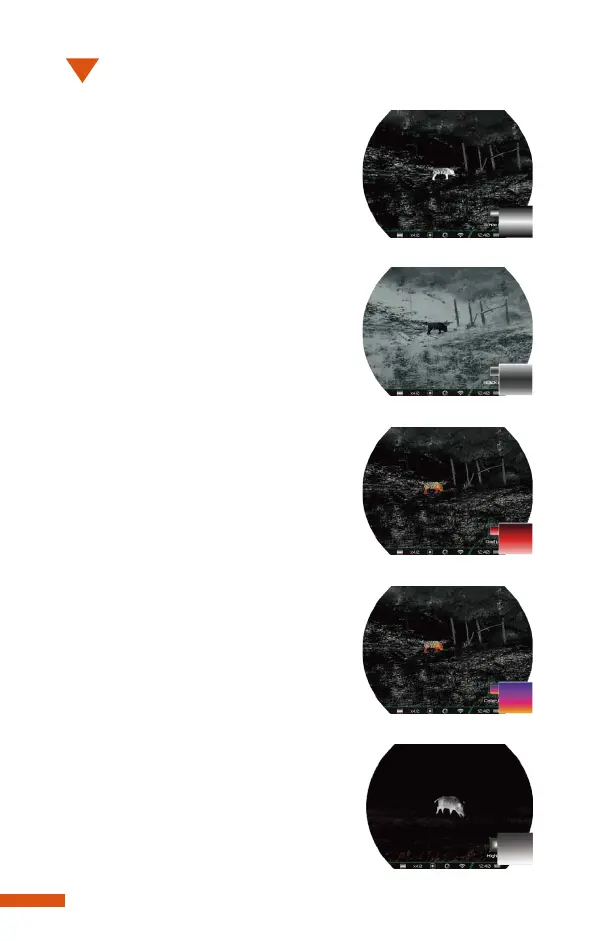
Image Mode (Menu Button)
09
White Hot (default)
Black Hot
Red Hot
Color
Highlight
The shortcut functions can be directly
used through buttons on the home
screen.
Digital Zoom (Zoom Button)
On the home screen, simply press the
Zoom button to zoom in and out on the
subject.
The status bar provides a real-time
display of the magnification level as you
adjust it.
Manual Image Correction (Zoom
Button)
This function is effective for enhancing
degraded or uneven images. By balanc-
ing the background temperature of the
detector, calibration can eliminate image
defects and improve overall quality.
If you feel that the image is bad, you can
press and hold the Zoom button until
hearing a clicking sound.
Standby (Power Button)
If you are not currently using the device,
but do not want to shut it down, you can
use standby mode. This function can
reduce device power consumption and
extend battery life.
Briefly press the Power button to enter
standby mode, then press the Power
button again to exit standby mode.
Image Mode (Menu Button)


 To Next Page